Front Fog Lamps
Switching the Front Fog Lamps On or Off
Only switch the front fog lamps on during reduced visibility.
You can switch the front fog lamps on if any of the following occur:
- You set the lighting control to the parking lamps position.
- You set the lighting control to the headlamps position.
- You set the lighting control to the autolamps position and the headlamps are on.
The front fog lamp button is on the lighting control.

Note: The brightness of the daytime running lamps may decrease when the front fog lamps are switched on.
Front Fog Lamp Indicator
| It illuminates when you switch the front fog lamps on. |
Rear Fog Lamps
Switching the Rear Fog Lamps On or Off
 WARNING: Do not use the rear fog lamps when it is raining or snowing and visibility is more than 50 m (164.0 ft). WARNING: Do not use the rear fog lamps when it is raining or snowing and visibility is more than 50 m (164.0 ft). |
You can switch the rear fog lamps on if any of the following occur:
- You switched the front fog lamps on.
- You set the lighting control to the headlamps position.
- You set the lighting control to the autolamps position and the headlamps are on.
The rear fog lamp button is on the lighting control.
 Press the button to switch the rear fog lamps on or off. Press the button to switch the rear fog lamps on or off. |
Rear Fog Lamp Indicator
| It illuminates when you switch the rear fog lamps on. |
Headlamp Leveling
To adjust the level of the headlamp beams, do the following:
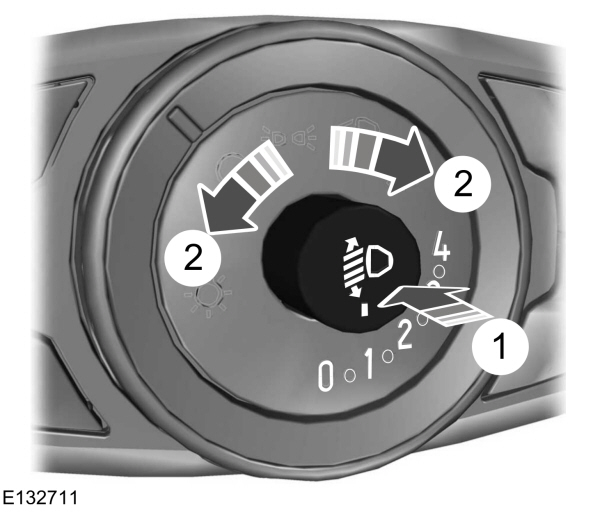
- Press to release the control.
- Rotate the control in accordance with your vehicle load to prevent you from distracting other road users when the headlamps are on.
Note: Set the control to zero when your vehicle is unloaded.
Note: Set the headlamp beams to give between 35–100 m (115–328 ft) of road surface illumination when your vehicle is partially or fully loaded.
- Press to close the control.
Download Manual