Locating the Wireless Accessory Charger

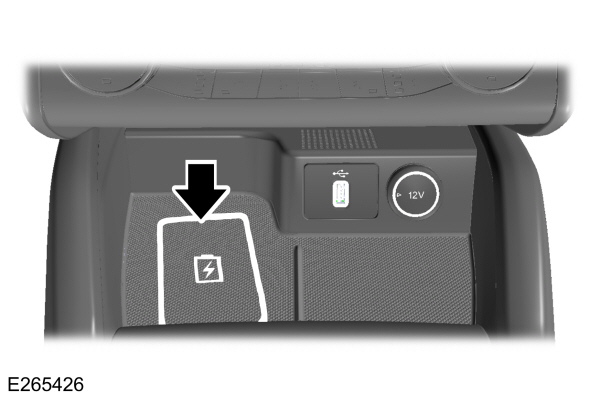
Charging a Wireless Device
 WARNING: Wireless charging devices can affect the operation of implanted medical devices, including cardiac pacemakers. If you have any implanted medical devices, we recommend that you consult with your physician. WARNING: Wireless charging devices can affect the operation of implanted medical devices, including cardiac pacemakers. If you have any implanted medical devices, we recommend that you consult with your physician. |
Place the device within the area shown and with the charging side down to begin charging. The charging stops after your device reaches a full charge.
Make sure the charging area is clean and free from obstruction before charging a device to allow the device to lay flat on the charging area.
The system supports one wireless charging compatible device on the charging area.
You can use the charger when the vehicle is in accessory mode, when the vehicle is running, or when SYNC is on.
Note: Placing the device outside the area shown could affect the charging process.
Note: Charging time and temperature are dependent on the device used. The system stops charging the device if it reaches a high temperature.
Note: Devices without built-in Qi standards for wireless charging require an additional Qi receiver or sleeve.
Note: For compatible devices with built-in Qi wireless charging capability, the charging performance may be affected if your device is in a case. It may be necessary to remove the case to wirelessly charge your device.
Note: Software and firmware updates to your device could affect the charging operation.
Do not place items with a magnetic strip, for example passports, parking tickets or credit cards near the charging area when charging a device. This could damage the magnetic strip.
Do not place metal objects, for example remote controls, coins or keys on or near the charging area when charging a device. Metal objects may heat up and degrade the charging performance.
Wireless Accessory Charger Indicators
| Displays on the SYNC status bar when a device is charging. |
WIRELESS ACCESSORY CHARGER – INFORMATION MESSAGES
| Message | Details |
|---|---|
|
Wireless Charger Active |
Displays when wireless charging has started. |
|
Charging stopped |
Displays when wireless charging has stopped. Remove objects from the charging surface and place phone on center of charging surface. |
|
Phone misaligned or object detected between phone and charger. Correct the condition to resume charging. |