Autolamps - Vehicles With: 12.3 Inch Instrument Cluster Display Screen
 WARNING: The system does not relieve you of your responsibility to drive with due care and attention. You may need to override the system if it does not turn the headlamps on in low visibility conditions, for example daytime fog. WARNING: The system does not relieve you of your responsibility to drive with due care and attention. You may need to override the system if it does not turn the headlamps on in low visibility conditions, for example daytime fog. |
Autolamps turn the headlamps on in low light situations or when the wipers operate.
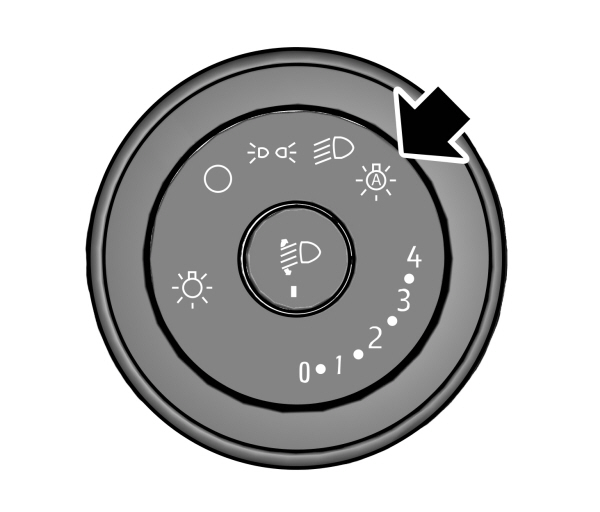
Note: When you switch the autolamps on, the headlamps turn on within 10 seconds of switching the wipers on.
Note: If you switch the autolamps and the autowipers on, the headlamps turn on when the windshield wipers continuously operate.
Note: The headlamps turn off approximately 60 seconds after you switch the wipers off.
The headlamps remain on for a period of time after you switch the ignition off. Use the information display controls to adjust the period of time that the headlamps remain on.
Adjusting the Period of Time That the Headlamps Remain On
- Press the menu button on the steering wheel to enter the information display main menu.
- Select Settings.
- Select Vehicle.
- Select Lighting.
- Select Autolamp Delay.
- Select a setting and press the OK button.
Instrument Lighting Dimmer
The instrument lighting dimmer buttons are on the lighting control.
  Repeatedly press one of the buttons to adjust the brightness. Repeatedly press one of the buttons to adjust the brightness. |
Headlamp Exit Delay
When the headlamps are off and the ignition is off, you can switch the headlamps on by pulling the turn signal lever toward you. A short tone sounds. The headlamps switch off automatically after three minutes with any door open or 30 seconds after the last door has been closed. You can cancel this feature by pulling the turn signal lever toward you again or switching the ignition on.
Download Manual