Locking and Unlocking - Vehicles With: 12.3 Inch Instrument Cluster Display Screen
Power Door Locks
The power door lock control is on the driver door.
 Press the button to unlock all doors. Press the button to unlock all doors. |
 Press the button to lock all doors. Press the button to lock all doors. |
Door Lock Indicator
An LED on the power door lock control illuminates when you lock the door. It remains on for up to five minutes after you switch the ignition off.
Door Lock Switch Inhibitor
When you electronically lock your vehicle, the power door lock switch no longer operates after 20 seconds. You must unlock your vehicle with the remote control, or switch the ignition on, to restore function to these switches.
Remote Control
You can only use the remote control when your vehicle is stationary.
Unlocking the Doors
Note: You can unlock the driver door with the key.Use the key if the remote control does not operate.
Reprogramming the Unlocking Function
You can program the unlocking function so that only the driver door unlocks.
Press and hold the unlock and lock buttons on the remote control simultaneously for at least four seconds with the ignition off. The direction indicators flash twice to confirm the change.
To return to the original unlocking function, repeat the process.
You can also change between the unlocking modes in the information display.
- Press the menu button on the steering wheel to enter the information display main menu.
- Select Settings.
- Select Vehicle.
- Select Locks.
- Select Remote Unlock.
- Select All Doors or Driver's Door.
Auto Relock
The doors automatically relock if you do not open a door within 45 seconds of unlocking the doors with the remote control. The door locks and the alarm return to their previous state.
Autounlock
Autounlock unlocks all the doors when all of the following occur:
- The ignition is on, all the doors are closed and your vehicle is moving at a speed greater than 20 km/h (12 mph).
- Your vehicle comes to a stop and you switch the ignition off or to the accessory position.
- You open the driver door within 10 minutes of switching the ignition off or to the accessory position.
Switching Autounlock On and Off
- Press the menu button on the steering wheel to enter the information display main menu.
- Select Settings.
- Select Vehicle.
- Select Locks.
- Switch Autounlock on or off.
Central Locking
Note: The locking only operates if the front doors are fully closed.
Double Locking the Doors
 WARNING: Do not use double locking when passengers or animals are inside your vehicle. The doors cannot be unlocked or opened from the inside when double locked. WARNING: Do not use double locking when passengers or animals are inside your vehicle. The doors cannot be unlocked or opened from the inside when double locked. |
Double locking is a theft protection feature that prevents someone from opening the doors from the inside. You can only double lock the doors if all the doors are closed.
| Press the button twice within three seconds.Three short flashes of the direction indicators confirms that your vehicle has double locked. |
Mislock
This warns you that your vehicle has not locked.
Vehicles with Anti-Theft Alarm
When you press the lock button once, the direction indicators do not flash if:
- Any door or the liftgate is open.
- The hood is open.
The horn sounds when you press the lock button on the remote control again within three seconds and a door is open.
Vehicles without Anti-Theft Alarm
When you press the lock button on the remote control once, the direction indicators do not flash if:
- Any door or the liftgate is open.
The horn sounds when you press the lock button on the remote control again within three seconds and a door is open.
Switching Mislock On and Off
If you switch mislock off, the horn does not sound if you press the lock button on the remote control when a door is open.
- Press the menu button on the steering wheel to enter the information display main menu.
- Select Settings.
- Select Vehicle.
- Select Locks.
- Switch Mislock Chirp on or off.
Locking and Unlocking the Doors From Inside
Use the power door lock control on the driver door to lock or unlock the doors from inside.
Locking and Unlocking the Doors with the Key Blade
Locking the Doors
Turn the top of the key toward the front of your vehicle.
Double Locking the Doors
Turn the top of the key toward the front of your vehicle twice within three seconds.
Unlocking the Driver Door
Turn the top of the key toward the rear of your vehicle.
Individually Locking and Unlocking the Doors with the Key Blade
Locking the Doors
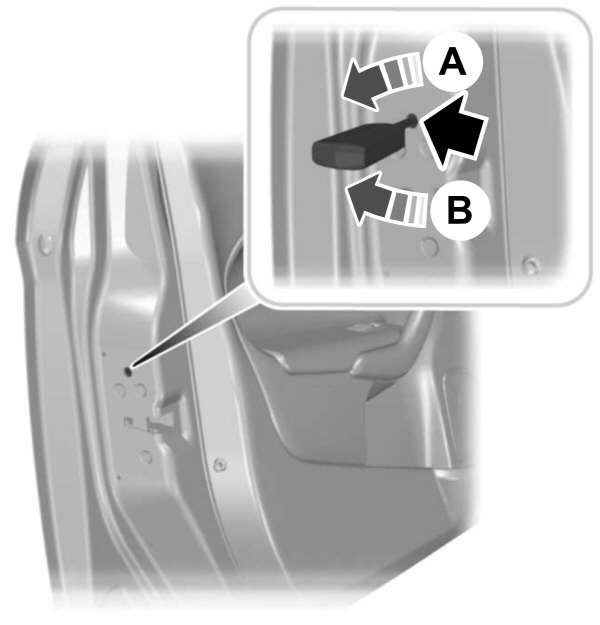
If the central locking function does not operate, individually lock the doors using the key in the position shown.
Left-Hand Side
Turn counterclockwise to lock.
Right-Hand Side
Turn clockwise to lock.
Unlocking the Doors
If the central locking function does not operate, unlock the driver door and then individually unlock all other doors by pulling the interior door handles.
Note: When the doors have been unlocked using this method, the doors must be individually locked until the central locking function has been repaired.
Note: If the child safety locks are on and you pull the interior handle, you only switch off the emergency locking, not the child safety lock.You can only open the doors using the external door handle.
Door Ajar Warning Lamp
 It illuminates when you switch the ignition on and remains on if any door or the hood is open. It illuminates when you switch the ignition on and remains on if any door or the hood is open. |
Door Ajar Audible Warning
Sounds when a door is not fully closed and your vehicle is moving.
Door Ajar Information Messages
| Message | Action |
|---|---|
|
Driver Door Ajar |
Displays if a door is open. Fully close the door. |
|
Passenger Door Ajar |
|
|
Rear Left Door Ajar |
|
|
Rear Right Door Ajar |
Download Manual