Using the Instrument Cluster Display Controls
 WARNING: Driving while distracted can result in loss of vehicle control, crash and injury. We strongly recommend that you use extreme caution when using any device that may take your focus off the road. Your primary responsibility is the safe operation of your vehicle. We recommend against the use of any hand-held device while driving and encourage the use of voice-operated systems when possible. Make sure you are aware of all applicable local laws that may affect the use of electronic devices while driving. WARNING: Driving while distracted can result in loss of vehicle control, crash and injury. We strongly recommend that you use extreme caution when using any device that may take your focus off the road. Your primary responsibility is the safe operation of your vehicle. We recommend against the use of any hand-held device while driving and encourage the use of voice-operated systems when possible. Make sure you are aware of all applicable local laws that may affect the use of electronic devices while driving. |
The controls are on the steering wheel.
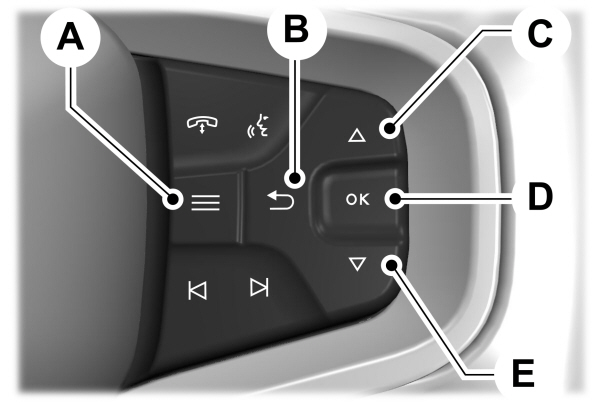
A Menu button. Menu button.B Return button.C Up button.D OK toggle button.E Down toggle button |
Return Button
Press to go back or to exit a menu.
OK Button
Press to make a selection. Press the toggle button up or down to scroll through menu items.
Menu Button
Press to display the submenus.
Toggle Buttons
Used to navigate the menus.
Status Indicator
 Menu items with a check box indicates a feature's status. A check in the box indicates the feature is on, and unchecked indicates the feature is off. Menu items with a check box indicates a feature's status. A check in the box indicates the feature is on, and unchecked indicates the feature is off. |
INSTRUMENT CLUSTER DISPLAY MAIN MENU - VEHICLES WITH: 8 INCH SCREEN, EXCLUDING: RAPTOR
Depending on your vehicle options, some menu items may appear different or not at all.
Note: For your safety, some features are speed-dependent and could be unavailable when your vehicle is above a certain speed.
| Menu Item |
|---|
|
MyView |
|
Trip/Fuel |
|
Off-Road |
|
Navigation |
|
Phone |
|
Audio |
|
Settings |
INSTRUMENT CLUSTER DISPLAY MAIN MENU - RAPTOR, VEHICLES WITH: 12 INCH SCREEN
Depending on your vehicle options, some menu items can appear different or not at all.
Note: For your safety, some features are speed-dependent and could be unavailable when your vehicle is above a certain speed.
| Menu Item |
|---|
|
MyView |
|
Trip/Fuel |
|
Raptor Information |
|
Navigation |
|
Phone |
|
Audio |
|
Settings |
Download Manual