Selecting a Four-Wheel Drive Mode - 4x4 with Part Time Engagement
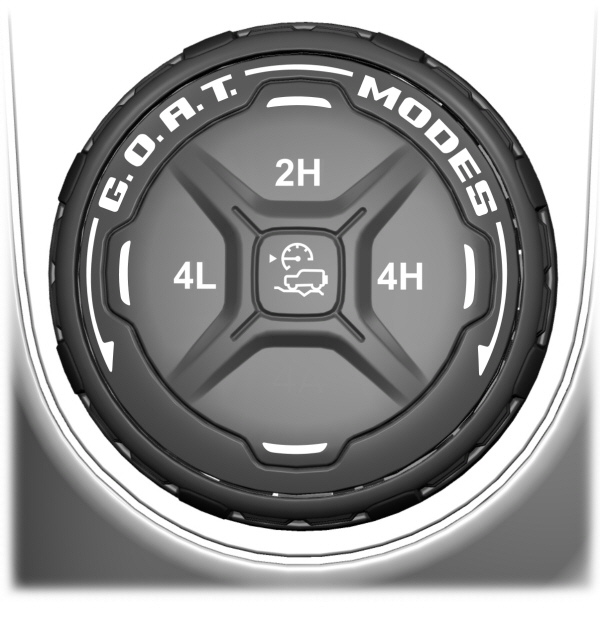
To select a four-wheel drive mode, push the button.
- 2H - Two-wheel drive high.
- 4H - Four-wheel drive high. See Four-Wheel Drive High.
- 4L - Four-wheel drive low. See Four-Wheel Drive Low.
Note: Do not perform this operation when you have cruise control or trail control selected and active. The system may not shift as expected.
Note: Do not perform this operation if the rear wheels are slipping or when applying the accelerator pedal or when driving in a tight turn.
Note: Momentarily releasing the accelerator pedal when a shift in progress message displays can improve engagement or disengagement performance.
Note: When the light is solid, the system has achieved the desired four-wheel drive mode. When a selected four-wheel drive mode light is blinking, the system is attempting to shift to that specific four-wheel drive mode.
Note: When you achieve recreational towing, all lights are off and Neutral Tow Enabled Leave Transmission in Neutral appears in the instrument cluster display.
Shifting to or from Four-Wheel Drive Low
- Bring your vehicle to a stop.
- For vehicles with an automatic transmission, place in neutral (N). For vehicles with a manual transmission, fully press the clutch pedal.
- Push 4L on the four-wheel drive mode selector.
Note: A 4x4 Shift in Progress message appears in the instrument cluster display indicating the shift is in progress.If any of the previous shift conditions are not met, the shift should not occur and the instrument cluster display can guide you through the proper shifting procedures.
Note: If Shift Delayed Drive Forward displays in the instrument cluster display, place the transmission in a forward gear, move your vehicle forward approximately 1.5 m (5 ft), and shift the transmission back to neutral (N) to allow the transfer case to complete the range shift.
SELECTING A FOUR-WHEEL DRIVE MODE - ADVANCED 4X4 WITH 4A MODE
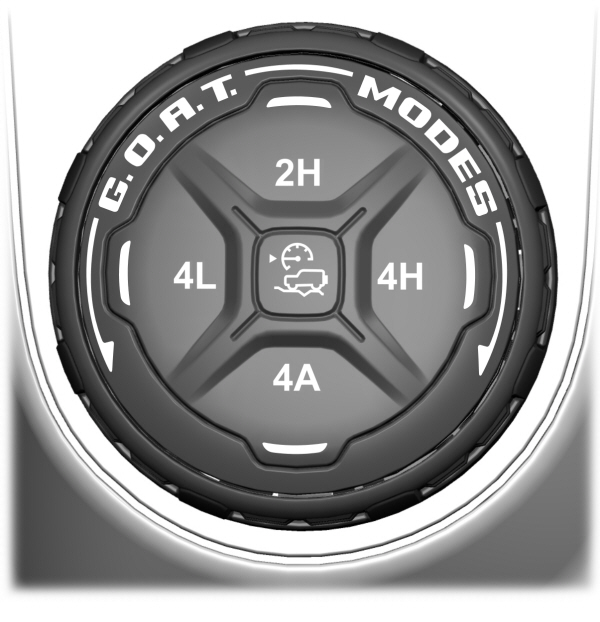
To select a four-wheel drive mode, push the button.
- 2H - Two-wheel drive high.
- 4A - Four-wheel drive Auto. See Four-Wheel Drive Auto.
- 4H - Four-wheel drive high. See Four-Wheel Drive High.
- 4L - Four-wheel drive low. See Four-Wheel Drive Low.
Note: Do not perform this operation when you have cruise control or trail control selected and active. The system may not shift as expected.
Note: Do not perform this operation if the rear wheels are slipping or when applying the accelerator pedal.
Note: When the light is solid, the system has achieved the desired four-wheel drive mode. When a selected four-wheel drive mode LED is blinking, the system is attempting to shift to that specific four-wheel drive mode.
Note: When all lights are blinking, have your vehicle serviced as soon as possible.
Note: When you achieve recreational towing, all lights are off and Neutral Tow Enabled Leave Transmission in Neutral appears in the instrument cluster display.
Shifting to or from Four-Wheel Drive Low
- Bring your vehicle to a stop.
- For vehicles with an automatic transmission, place in neutral (N). For vehicles with a manual transmission, fully press the clutch pedal.
- Push 4L on the four-wheel drive mode selector.
Note: A 4x4 Shift in Progress message appears in the instrument cluster display indicating the shift is in progress.If any of the previous shift conditions are not met, the shift should not occur and the instrument cluster display can guide you through the proper shifting procedures.
Note: If Shift Delayed Drive Forward displays in the instrument cluster display, place the transmission in a forward gear, move your vehicle forward approximately 1.5 m (5 ft), and shift the transmission back to neutral (N) to allow the transfer case to complete the range shift.
TWO-WHEEL DRIVE HIGH
Two-wheel drive high is for general on-road driving. Power is sent to the rear wheels only.
Note: Two-wheel drive high can turn on or off based on Drive Mode selection See G.O.A.T. Mode Control.
FOUR-WHEEL DRIVE AUTO (IF EQUIPPED)
Four-wheel drive auto provides electronically controlled four-wheel drive power to both the front and rear wheels, as required, for increased traction in varying on-road conditions. The four-wheel drive auto tuning varies based on selected Drive Mode. See Selecting a Four-Wheel Drive Mode - 4x4 with Part Time Engagement.
Note: Four-wheel drive auto can turn on or off automatically based on Drive Mode selection. See Selecting a Four-Wheel Drive Mode - 4x4 with Part Time Engagement.
FOUR-WHEEL DRIVE HIGH
Four-wheel drive high provides electronically or mechanically locked four-wheel drive power to both the front and rear wheels for use in off-road or winter conditions such as deep snow, sand or mud. This mode is not for use on dry pavement.
Note: Four-wheel drive high can turn on or off automatically based on Drive Mode selection.
FOUR-WHEEL DRIVE LOW
Four-wheel drive low provides electronically or mechanically locked four-wheel drive power to both the front and rear wheels for use on low traction surfaces, but does so with additional gearing for increased torque multiplication. This mode is only for off-road conditions such as deep sand, steep slopes, or pulling heavy objects.
Note: Four-wheel drive low can turn on or off automatically based on drive mode selection.
FOUR-WHEEL DRIVE INDICATORS
Two-wheel Drive High
 Illuminates briefly when two-wheel drive high is selected. Illuminates briefly when two-wheel drive high is selected. |
Four-wheel Drive Auto (If Equipped)
 Illuminates when four-wheel drive auto is selected. Illuminates when four-wheel drive auto is selected. |
Four-wheel Drive High
 Illuminates when four-wheel drive high is selected. Illuminates when four-wheel drive high is selected. |
Four-wheel Drive Low
 Illuminates when four-wheel drive low is selected. Illuminates when four-wheel drive low is selected. |
TRANSFER CASE FLUID CAPACITY AND SPECIFICATION
See Transfer Case Fluid Capacity and Specification.
FOUR-WHEEL DRIVE – WARNING LAMPS

Note: When a system fault is present, the system can typically remain in whichever mode was selected prior to the fault condition occurring. It does not default to two-wheel drive in all circumstances. When this warning displays, have your vehicle serviced by an authorized dealer.
Download Manual