Locating the Pre-Collision Assist Sensors
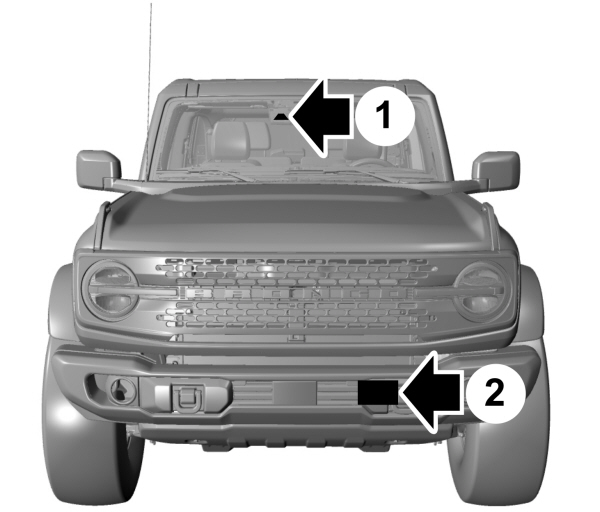
1 Camera. Camera.2 Radar sensor (if equipped). |
If a message regarding a blocked sensor or camera appears in the instrument cluster display, something is obstructing the radar signals or camera images. If your vehicle has a radar sensor, it is behind the fascia cover in the center of the lower grille. With a blocked sensor or camera, the system may not function, or performance may reduce. See Pre-Collision Assist – Information Messages.
Note: Proper system operation requires a clear view of the road by the camera. Have any windshield damage in the area of the camera's field of view repaired.
Note: If something hits the front end of your vehicle or damage occurs and your vehicle has a radar sensor, the radar sensing zone could change. This could cause missed or false vehicle detections. Have your vehicle serviced to have the radar checked for proper coverage and operation.
Note: If your vehicle detects excessive heat at the camera or a potential misalignment condition, a message could appear in the instrument cluster display indicating temporary sensor unavailability. When operational conditions are correct, the message deactivates. For example, when the ambient temperature around the sensor decreases or the sensor recalibrates successfully.
WHAT IS DISTANCE INDICATION
Distance indication displays the gap between your vehicle and the vehicle ahead of you.
Note: The graphic does not display if you switch on cruise control or adaptive cruise control.
| Vehicle Speed | System Sensitivity | Distance Indicator Color | Distance Gap | Time Gap |
|---|---|---|---|---|
| 100 km/h (62 mph). | Normal. | Gray. | Greater than 25 m (82 ft). | Greater than 0.9 seconds. |
| Yellow. | 17–25 m (56–82 ft). | 0.6-0.9 seconds. | ||
| Red. | Less than 17 m (56 ft). | Less than 0.6 seconds. |
SWITCHING DISTANCE INDICATION ON AND OFF
To switch the system on or off, use the touchscreen:
- Press Features on the touchscreen.
- Press Driver Assistance.
- Press Pre-Collision Assist.
- Switch Distance Indication on or off.
Download Manual