Locating the Blind Spot Information System
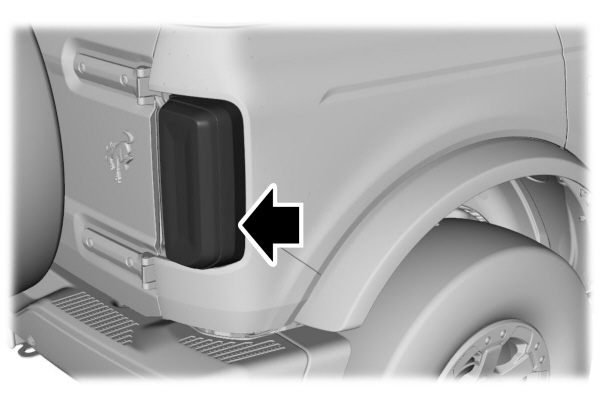
The sensors are behind the rear fascia panel.
Keep the sensors free from snow, ice and large accumulations of dirt.
Note: Do not cover the sensors with bumper stickers, repair compound or other objects.
Note: Bike and cargo racks could cause false alerts due to obstruction of the sensor. We recommend switching the feature off when using a bike or cargo rack.
Note: Blocked sensors may affect system accuracy.
Note: Blind spot information system will not function if you attach a trailer to your vehicle.
If the sensors become blocked, a message appears in the instrument cluster display. See Blind Spot Information System – Information Messages. The alert indicators illuminate but the system does not alert you.
BLIND SPOT INFORMATION SYSTEM INDICATORS
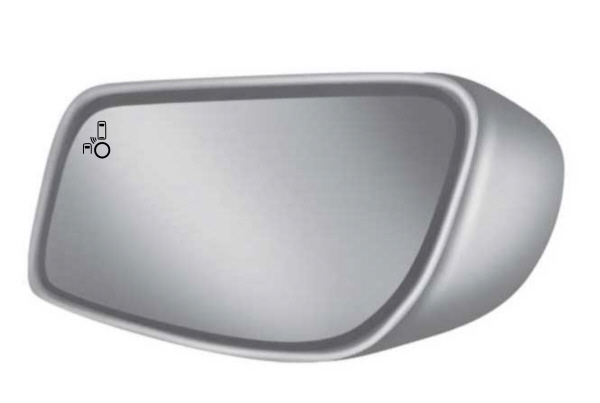
 When blind spot information system detects a vehicle, an alert indicator illuminates in the exterior mirror on the side the approaching vehicle is coming from. If you turn the turn signal on for that side of your vehicle, the alert indicator flashes. When blind spot information system detects a vehicle, an alert indicator illuminates in the exterior mirror on the side the approaching vehicle is coming from. If you turn the turn signal on for that side of your vehicle, the alert indicator flashes. |
BLIND SPOT INFORMATION SYSTEM – INFORMATION MESSAGES
| Message | Action |
|---|---|
|
Blind Spot System Fault |
A fault with the system has occurred.Have your vehicle checked as soon as possible. |
|
Blind Spot Not Available Sensor Blocked See Manual |
Something is blocking the sensors. Clean the sensors. |
|
Blind Spot Alert Deactivated Trailer Attached |
The system automatically turns off and displays this message when you connect a trailer to your vehicle under any of the following conditions: - Your vehicle does not have blind spot information system with trailer coverage. - You switch the blind spot information system off through the touchscreen. - Your trailer exceeds the limits for the system.Only appears if your vehicle has blind spot information system with trailer coverage. |
Note: When connecting a trailer, the system may detect the trailer and turn the system OFF. If the system does not automatically turn OFF, manually switch the blind spot information system OFF. If your vehicle has the blind spot information system with trailer coverage, the system prompts you to set up a trailer that allows the feature to function, if your trailer meets the requirements of the system.
Download Manual