Security alarm system
The security alarm system is for alerting the surrounding area of suspicious behaviour to prevent unlawful entry into the vehicle by operating an alarm if a door, the rear hatch or the bonnet is opened when the vehicle has not been unlocked using the keyless entry system or the keyless operation function.
Also, the alarm will be activated if any of the following occur.
► Attempt an unlawful moving of the vehicle.
(the vehicle inclination detection function) ► Detect a motion in the vehicle. (the interior intrusion detection function)
► Disconnect the battery terminal.
The security alarm system is set to “active”.
When making changes to the settings, please follow the procedure listed in the section titled “Changing the security alarm settings”.
 Caution
► Do not modify or add parts to the security alarm system.
Doing so could cause the security alarm to malfunction.
 Note
Note
► The alarm system will not be activated if the doors have been locked using a key, the inside lock knob or the central door lock switch (instead of the keyless entry system or the keyless operation function).
► If the turn-signal lamps do not blink after the locking and unlocking operation using the keyless entry system or the keyless operation function, the security alarm system may be malfunctioning.
Have the vehicle inspected at a MITSUBISHI MOTORS Authorized Service Point.
If the confirmation function (blinking of the turn-signal lamps by locking and unlocking the doors and the rear hatch) is deactivated, the turn-signal lamps do not blink after the locking and unlocking operation.
For information on the confirmation function, refer to “Keyless entry system” on pages 1-04 and 1-23 and “To operate using the keyless operation function”.
► The security alarm system could be activated in the following situations.
• Using a car wash
• Taking the vehicle on a ferry
• Parking in an automated car park
• Leaving someone or a pet in the vehicle
• Leaving a window or the sunroof open
• Leaving an unstable object such as a stuffed toy or accessory in the vehicle
• Suffering a continuous impact or vibration by hail, thunder, etc.
According to the situations, deactivate the vehicle inclination detection function and the interior intrusion detection function.
Refer to “To deactivate the vehicle inclination detection function and the interior intrusion detection function”.
► The sensitivity of the interior intrusion detection function can be adjusted. For details, please contact a MITSUBISHI MOTORS Authorized Service Point.
The security alarm has four modes
System preparation mode (approx. 20 seconds)
(The buzzer sounds intermittently and the security indicator (A) blinks.)
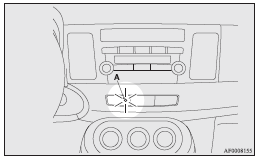
The system preparation time extends from the point at which all of the doors and rear hatch are locked by pressing the LOCK switch on the remote control switch or the keyless operation function to the point at which the system armed mode goes into effect.
During this time, it is possible to temporarily open a door or the rear hatch without using the keyless entry system or the keyless operation function and without causing the alarm to sound (for example, when you forget something inside the vehicle or realize that a window is open).
System armed mode
(The buzzer stops and the security indicator continues to blink with indicator’s reduced lit-up duration time.) Once the system preparation mode has ended, the system armed mode starts.
If an unlawful opening of any of the doors, rear hatch or bonnet is detected during the system armed mode, the alarm will be activated to warn people around the vehicle of an abnormal condition.
Also, if unlawful moving of the vehicle is attempted or a vehicle intrusion is detected, the alarm will be activated.
Alarm activation
The turn-signal lamps blink and the siren sounds for approximately 30 seconds. Refer to “Alarm activation”.
Note
► The alarm will resume if unlawful actions are taken again, even if the alarm has stopped.
System cancellation
It is possible to cancel the system activation during the system preparation mode or the system armed mode.
In addition, it is possible to cancel the alarm once it has been activated.
Refer to “Cancelling the system”, “Cancelling the alarm”.
Note
► When lending the vehicle to another person or allowing the vehicle to be driven by someone who is unfamiliar with the security alarm system, be sure to give the person a proper explanation of the security alarm system.
If a person who is unfamiliar with the security alarm system accidentally unlocked the vehicle, causing the alarm to sound, the alarm would be a nuisance to people nearby.
Changing the security alarm settings
It is possible to set the security alarm to the “active” mode or “inactive” mode.
Follow the procedure below.
1. Turn the ignition switch to the “LOCK” position.
If you started the engine with the key, remove the key from the ignition switch.
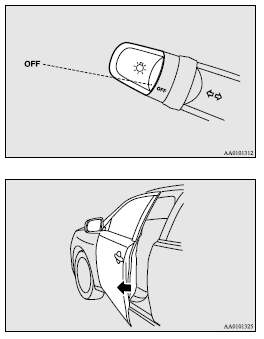
2. Place the lamp switch in the “OFF” position, and leave the driver’s door open.
3. Pull the windscreen wiper and washer switch towards you and hold it there. (Since the ignition switch is in the “LOCK” position, washer fluid will not be sprayed.)
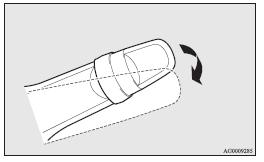
4. After approximately 10 seconds, the buzzer will make a sound. Keep the windscreen wiper and washer switch pulled towards you. (If the windscreen wiper and washer switch was released, the setting change mode would be cancelled. To start over, perform the procedure again from step 3.)
5. When the buzzer stops, with the windscreen wiper and washer switch still pulled towards you, press the UNLOCK switch (A) on the remote control switch to select the security alarm settings mode.
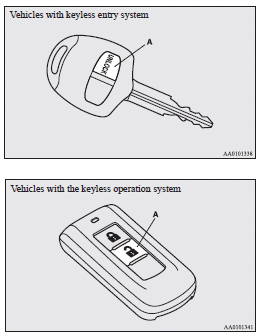
The settings mode can be toggled by pressing the UNLOCK switch. The mode can be confirmed from the number of times the buzzer sounds.
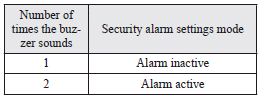
6. Any of the following operations can be used to terminate the system settings change mode.
• Releasing the windscreen wiper and washer switch.
• Closing the driver’s door.
• Inserting the key into the ignition switch.
• Placing the lamp switch in any position other than “OFF”.
• Allowing 30 seconds to pass without making any changes to the settings.
• Push the ignition switch to the “LOCK” (PUSH ON) position (Vehicles with keyless operation system).
Note
► If anything with regard to making changes to the security alarm system settings is hard to understand, please consult your MITSUBISHI MOTORS Authorized Service Point.
► Avoid leaving valuable items inside the vehicle even when the security alarm system has been set to the “active” mode.
Setting the system
Follow the procedure below to set the system to the system armed mode.
1. Turn the ignition switch to the “LOCK” position.
If you started the engine with the key, remove the key from the ignition switch.
2. Exit the vehicle and close all of the doors, rear hatch and bonnet.
3. Press the LOCK switch (A) on the remote control switch of the keyless entry system or the keyless operation system, the driver’s or front passenger’s door lock/unlock switch (B), or the rear hatch LOCK switch (C) in order to lock all the doors and rear hatch.
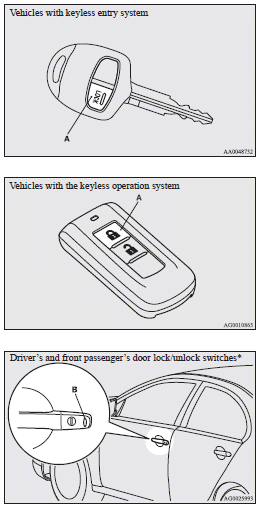
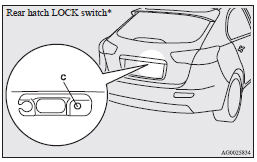
By locking the vehicle using the keyless entry system or the keyless operation function, the system preparation mode is activated.
The security indicator (D) in the audio panel blinks for confirmation.
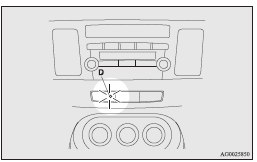
Note
► The system preparation mode is not activated when the doors and rear hatch have been locked using a method other than the keyless entry system or the keyless operation function (namely a key, the inside lock knob or the central door lock switch).
► If the bonnet is open, the security indicator illuminates, and the system does not enter the system armed mode.
When the bonnet is closed, the system enters the system preparation mode, and after approximately 20 seconds the system enters the system armed mode.
4. After approximately 20 seconds, the buzzer stops, and when the blinking of the security indicator starts to slow down, the system armed mode goes into effect.
The security indicator continues to blink during the system armed mode.
Note
► The security alarm system can be activated when people are riding inside the vehicle or when the windows are open. To prevent accidental activation of the alarm, do not set the system to the system armed mode while people are riding in the vehicle.
► Avoid leaving valuable items inside the vehicle even when the security alarm system has been set to the “active” mode.
To deactivate the vehicle inclination detection function and the interior intrusion detection function
The vehicle inclination detection function and the interior intrusion detection function can be deactivated when parking in automated car parks, when leaving pets in the vehicle or when leaving the vehicle with the windows slightly open.
1. Turn the ignition switch to the “LOCK” position.
If you started the engine with the key, remove the key from the ignition switch.
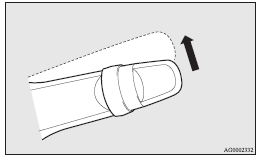
2. Raise and hold the wiper and washer switch to the “MIST” position for approximately 3 seconds. The buzzer will sound once and the function will be deactivated.
To activate the function again, raise and hold the wiper and washer switch to the “MIST” position for approximately 3 seconds.
The buzzer will sound twice and the function will be activated.
Note
► The function will be activated again if the following operation is performed.
• If the doors and rear hatch are unlocked using the keyless entry system or the keyless operation function.
• If the ignition switch is turned to the “ON” or “ACC” position.
Cancelling the system
The following methods can be used to cancel the system when it is in the system preparation mode or the system armed mode.
► Pressing the UNLOCK switch on the remote control switch.
► Turning the ignition switch to the “ON” position.
► Opening any of the doors or the rear hatch, or inserting the key into the ignition switch when the system is in the system preparation mode.
► Holding the keyless operation key and pressing the driver’s and front passenger’s door lock/unlock switch, or the rear hatch OPEN switch to unlock the doors and rear hatch (vehicles with the keyless operation system).
Note
► If the bonnet is opened during the system preparation mode, the system preparation mode is suspended.
The system returns to the system preparation mode when the bonnet is closed.
► If the battery terminals are disconnected while the system is in the system preparation mode, the memory will be erased.
► It is possible to register up to 8 remote control switches for the keyless entry system and 4 remote control switches for the keyless operation system.
As long as they are registered, any of the remote control switches, other than the one used to activate the system, can be used to cancel the system.
If you want to register additional remote control switches, please contact a MITSUBISHI MOTORS Authorized Service Point.
► The activation distance for the keyless entry system is approximately 4 m.
If it is not possible to lock or unlock the vehicle by pressing the switch at the correct distance or the security alarm system cannot be set or cancelled using the switch, the battery may need to be replaced.
Replace the battery at a MITSUBISHI MOTORS Authorized Service Point.
► If the UNLOCK switch on the remote control switch, or the driver’s or front passenger’s door lock/unlock switch is pressed and no door or the rear hatch is opened within 30 seconds, the doors or the rear hatch will automatically relock. In this case as well, the system preparation mode will go into effect.
► The time between pressing the UNLOCK switch on the remote control switch, or the driver’s or front passenger’s door lock/unlock switch and automatic locking can be adjusted.
Consult a MITSUBISHI MOTORS Authorized Service Point.
On vehicles equipped with MITSUBISHI Multi-Communication System (MMCS), screen operations can be used to make the adjustment.
Refer to the separate owner’s manual for details.
Alarm activation
When the system is in the system armed mode, the alarm will be activated as follows if the vehicle is unlocked or if any of the doors, rear hatch or bonnet is opened using a method other than the keyless entry system or the keyless operation function.
1. The alarm will be activated for approximately 30 seconds. The turn-signal lamps will blink, and the siren will sound intermittently.
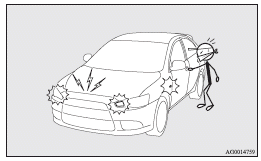
2. The alarm will resume if unlawful actions are taken again, even if the alarm has stopped.
Note
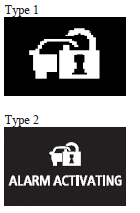
► During an alarm operation, the alarm is displayed on the information screen in the multiinformation display.
Cancelling the alarm
It is possible to halt the activation of an alarm using the following methods: ► Pressing the LOCK or UNLOCK switch on the remote control switch.
(After pressing the LOCK switch, the vehicle will lock if all the doors and rear hatch are closed, after which the system preparation mode will once again go into effect.)
► Turning the ignition switch to the “ON” position.
► Holding the keyless operation key and locking and unlocking the doors and the rear hatch using the keyless operation function (vehicles equipped with the keyless operation system).
Note
► When the ignition switch is turned to the “ON” position, the buzzer sounds 4 times.
This operation indicates that the alarm was activated while the vehicle was parked.
Please check the inside of the vehicle to confirm that nothing was stolen.
► Even if the battery is disconnected, the alarm activation memory will not be erased.
Download Manual