Manual air conditioning
The air conditioning can only be used while the engine is running.
Control panel
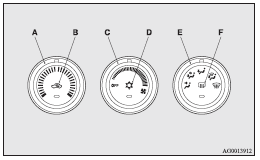
A- Temperature control dial
B- Air selection switch
C- Blower speed selection dial
D- Air conditioning switch
E- Mode selection dial
F- Rear window demister switch
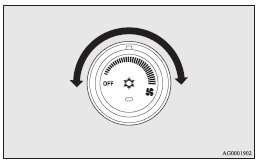
Blower speed selection dial
Select the blower speed by turning the blower speed selection dial clockwise or anticlockwise.
The blower speed will gradually increase as the dial is turned to the right.
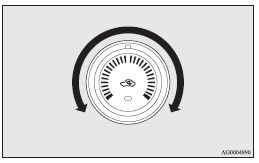
Temperature control dial
Turn the temperature control dial clockwise or anticlockwise.
 Note
Note
► While the engine coolant temperature is low, the temperature of the air from the heater will be cool/cold until the engine warms up, even if you have selected warm air with the dial.
Air selection switch
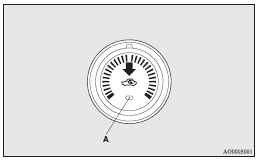
To change the air selection, simply press the air selection switch.
A sound will be made every time you push the switch.
► Outside air: Indication lamp (A) is OFF Outside air is introduced into the passenger compartment.
► Recirculated air: Indication lamp (A) is ON Air is recirculated inside the passenger compartment.
 Caution
► Normally, use the outside position to keep the windscreen and side windows clear and quickly remove fog or frost from the windscreen.
If high cooling performance is desired, or if the outside air is dusty or otherwise contaminated use the recirculation position.
Switch to the outside position periodically to increase ventilation so that the windows do not become fogged up.
► Use of the recirculation position for extended time may cause the windows to fog up.
Note
► When the air conditioning operates with the selection switch in the outside position, the system automatically determines whether to continue using outside air or to perform recirculation.
If the outside air temperature is high, the system selects recirculation to achieve rapid cooling and causes the indication lamp (A) in the switch to illuminate. Press the selection switch to return to outside air introduction.
Customizing the air selection (Changing function settings)
Functions can be changed as desired, as stated below.
► Enable automatic air control: When the air conditioning operates, the air selection switch will be automatically controlled.
► Disable automatic air control: Even when the air conditioning operates, the air selection switch will not be automatically controlled.
► Setting change method Hold down the air selection switch for about 10 seconds or more.
When the setting is changed, a sound is emitted and the indication lamp flashes.
• When the setting is changed from enable to disable 3 sounds are emitted and the indication lamp flashes 3 times.
• When the setting is changed from disable to enable 2 sounds are emitted and the indication lamp flashes 3 times.
Note
► The factory setting is “Enable automatic air control.”
► When the mode selection dial is turned to  , in order to prevent misting of the windows the ventilator automatically switches to outside air even if “Disable automatic air control” is set.
Air conditioning switch
Push the switch to turn the air conditioning on, the indication lamp (A) will come on.
A sound will be made every time you push the switch.
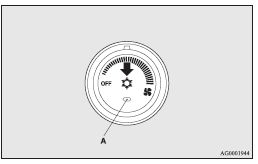
Push the switch again to switch it off.
Caution
► When using the air conditioning, the idling speed may slightly increase as the air conditioning compressor is switched on/off automatically. While the vehicle equipped with CVT is stationary, fully depress the brake pedal to prevent the vehicle from creeping.
Note
► If a problem is detected in the air conditioning system, the air conditioning operation indication lamp (A) blinks. Press the air conditioning switch once to turn it off, then once more to turn it back on. If the air conditioning operation indication lamp (A) does not blink for a while, there is nothing wrong. If it starts to blink again, we recommend you to have it checked.
► Sometimes, for example after using a highpressure car wash, the condenser can get wet, and the operation indication lamp (A) blinks temporarily. In this case there is nothing wrong. Wait a while, press the air conditioning switch once to turn the system off, then once more to turn it back on. Once the water evaporates, the blinking will stop.
Operating the air conditioning system
Heating
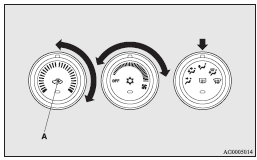
Set the mode selection dial to the position and set the air selection switch (A) to the outside position.
Turn the temperature control dial clockwise or anticlockwise to the desired temperature. Select the desired blower speed.
Note
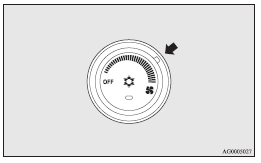
► For quick heating, set the blower speed selection dial to the position shown in the illustration.
Cooling
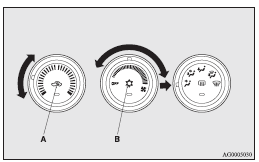
1. Set the mode selection dial to the  position.
2. Set the air selection switch (A) to the outside position.
3. Push the air conditioning switch (B).
4. Change the temperature by turning the control dial clockwise or anticlockwise.
5. Select the desired blower speed.
Caution
► If the outside air is dusty or otherwise contaminated, or if high cooling performance is desired, set air selection switch to the recirculation position and the temperature control dial all the way to the left.
Switch to the outside position periodically to increase ventilation so that the windows do not become fogged up.
Note
► When the air conditioning operates with the selection switch in the outside position, the system automatically determines whether to continue using outside air or to perform recirculation.
If the outside air temperature is high, the system selects recirculation to achieve rapid cooling and causes the indication lamp in the switch to illuminate. Press the selection switch to return to outside air introduction.
Combination of unheated air and heated air
Select the mode selection dial to the position shown in the illustration and set the air selection switch (A) to the outside position.
The air flow will be directed to the leg area and the upper part of the passenger compartment. Select the desired blower speed.
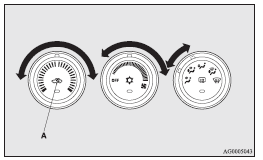
Warm air flows to the leg area and unheated or slightly warm air (depending upon temperature setting) flows to the upper part of the passenger compartment.
Demisting of the windscreen and door windows
Caution
► For safety, make sure you have a clear view through all the windows.
To remove frost or mist from the windscreen and door windows, use the mode selection dial ( or
or  ).
).
For ordinary demisting
Use this setting to keep the windscreen and door windows clear of mist, and to keep the leg area heated.
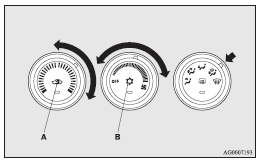
1. Set the air selection switch (A) to the outside position.
2. Set the mode selection dial to the  position.
3. Select your desired blower speed by turning the blower speed selection dial.
4. Select your desired temperature by turning the temperature control dial.
5. Push the air conditioning switch (B).
For quick demisting
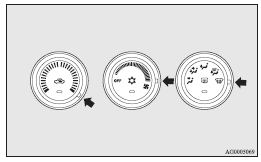
1. Set the mode selection dial to the position.
2. Set the blower to the maximum speed.
3. Set the temperature to the maximum temperature position.
Note
► While the mode selection dial is set to the position, the air conditioning will operate automatically and the outside air position will also be selected automatically.
► To demist effectively, direct the air flow from the side ventilators towards the door windows.
► Do not set the temperature control dial to the max. cool position. Cool air will blow against the window glasses and prevent demisting.
► For vehicles with the Auto Stop & Go (AS&G) system, if the mode selection dial is set to the demister position shown in the illustration, the Auto Stop & Go (AS&G) system will not operate and the engine will not stop automatically even if the vehicle is stopped.
This is to ensure that good visibility is maintained.
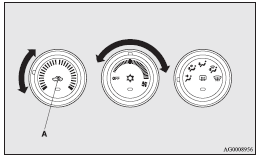
Introduction of outside air
To introduce air into the vehicle during hot weather, set the air selection switch (A) to the outside position and set the temperature control dial to the positions shown in the illustration. Be sure to set the temperature control dial all the way to the left. Select the desired blower speed.
Note
► Turn the mode selection dial clockwise and air will flow to the leg area and the windscreen.
Download Manual