Combination headlamps and dipper switch
Headlamps
 Note
Note
► Do not leave the lamps on for a long time while the engine is stationary (not running).
A rundown battery could result.
► When it rains, or when the vehicle has been washed, the inside of the lens sometimes becomes foggy, but this does not indicate a functional problem.
When the lamp is switched on, the heat will remove the fog. However, if water gathers inside the lamp, we recommend you to have it checked.
Type 1
Rotate the switch to turn on the lamps.
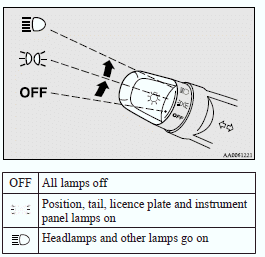
Type 2
Rotate the switch to turn on the lamps.
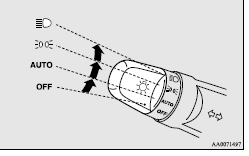
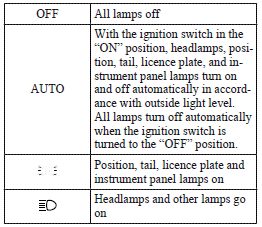
Note
► On vehicles equipped with the rain sensor, the sensitivity of the automatic on/off control can be adjusted. For further information, please contact your MITSUBISHI MOTORS Authorized Service Point.
On vehicles equipped with the MITSUBISHI Multi-Communication System (MMCS), screen operations can be used to make the adjustment.
Refer to the separate owner’s manual for details.
► When the headlamps are turned off by the automatic on/off control with the ignition switch in the “ON” position, the front fog lamps (if so equipped) and rear fog lamp also go off. When the headlamps are subsequently turned back on by the automatic on/off control, the front fog lamps also come on but the rear fog lamp stays off. If you wish to turn the rear fog lamp back on, operate the switch again.
► Do not cover the sensor (A) for the automatic on/off control by affixing a sticker or label to the windscreen.
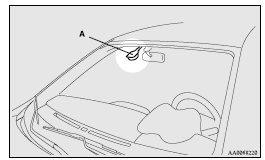
► If the lamps do not turn on or off with the switch in the “AUTO” position, manually operate the switch and we recommend you to have your vehicle checked.
Vehicles with Daytime Running Lamp
When the engine is running and the lamp switch is set to the “AUTO” or “OFF” position, the low beam of the headlamps, tail lamp etc., will illuminate.
Note
► The daytime running lamp can be deactivated.
For further information, we recommend you to consult a MITSUBISHI MOTORS Authorized Service Point.
The regulations concerning daytime running lamp may differ from country to country.
Find out and follow the laws and regulations of the area you're driving in.
Lamps (headlamps, fog lamp, etc.) auto- cutout function
► If, while the lamp switch is in the “ ” position, the ignition switch is turned to the “LOCK” position or “ACC” position, or the key is removed from the ignition switch, the lamps automatically go out when the driver’s door is opened.
[When the engine was started using the key] If the key is removed and the driver’s door is opened, a buzzer sounds at a high pitch intermittently to remind the driver to turn off the lamps.
[When the engine was started using the keyless operation function] If the ignition switch is turned to the “LOCK” position and the driver’s door is opened, a buzzer sounds at a high pitch intermittently to remind the driver to turn off the lamps.
► If the ignition switch is turned to the “LOCK” position or “ACC” position, or the key is removed from the ignition switch, while the lamp switch is in the  position, the lamps will remain on for about 3 minutes while the driver’s door is shut and will then automatically go out.
Note
► The lamp auto-cutout will not function when the lamp switch is in the  position.
► The lamp auto-cutout function can also be disabled.
For further information, we recommend you to consult a MITSUBISHI MOTORS Authorized Service Point.
On vehicles equipped with MITSUBISHI Multi-Communication System (MMCS), screen operations can be used to make the adjustment.
Refer to the separate owner’s manual for details.
When you want to keep the lamps on:
1. Turn the lamp switch in the “OFF” position while the ignition switch is in the “LOCK” or “ACC” position.
2. Turn on the lamps with the switch in the  position again, then the lamps will remain on.
Note
► When the engine was started using the key, if the driver’s door is opened and the key is removed, the lamp monitor buzzer sounds at a high pitch intermittently.
The buzzer stops when the driver’s door is closed. (The warning is also displayed on the multi-information display.) The buzzer stops in the following manner.
• Turn the lamp switch to the “OFF” position.
• Close the driver’s door.
► When the engine was started using the keyless operation function, if the driver’s door is opened and the ignition switch is in the “LOCK” position, the lamp monitor buzzer sounds at a high pitch intermittently.
The buzzer stops when the driver’s door is closed. (The warning is also displayed on the multi-information display.) The buzzer stops in the following manner.
• Turn the lamp switch to the “OFF” position.
• Close the driver’s door.
Lamp monitor buzzer
[When the engine was started using the key] If the driver’s door is opened when the key is in the “LOCK” or “ACC” position or removed from the ignition switch while the lamps are on, a buzzer will sound to remind the driver to turn off the lamps.
[When the engine was started using the keyless operation function] If, while the lamps are illuminated, the ignition switch is set to the “LOCK” or “ACC” position, or the driver’s door is opened with the ignition switch set to the “LOCK” position, a buzzer will sound to remind the driver to turn off the lamps.
In both cases, the buzzer will automatically stop if the auto-cutoff function is activated, the lamp switch is turned off, or the door is closed.
Dipper (High/Low beam change)
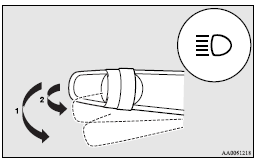
When the lamp switch is in the  position, the beam changes from high to low (or low to high) each time the lever is pulled fully (1). While the highbeam is on, the high-beam indication lamp in the instrument cluster will also illuminate.
Headlamp flasher
The high-beams flash when the lever is pulled slightly (2), and will go off when it is released.
When the high-beam is on, the high-beam indication lamp in the instrument cluster will illuminate.
Note
► The high-beams can also flash when the lamp switch is OFF.
► If you turn the lamps off with the headlamps set to high-beam, the headlamps are automatically returned to their low-beam setting when the lamp switch is next turned to the position.
Welcome light (for vehicles equipped with the keyless entry system or the keyless operation system)
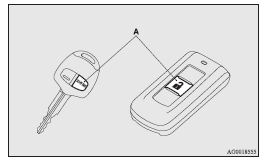
Except for vehicles for Russia, Kazakhstan and Ukraine, this function turns on the position and tail lamps for about 30 seconds after the UNLOCK switch (A) on the remote control transmitter is pressed when the combination headlamps and dipper switch is in the “OFF” or “AUTO” position (for vehicles equipped with the automatic lamp control).
On vehicles equipped with automatic lamp control, the welcome light function will operate only when it is dark outside the vehicle.
Note
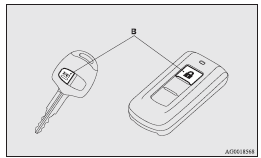
► While the welcome light function is operating, perform one of the following operations to cancel the function.
• Push the LOCK switch (B) on the remote control transmitter.
• Turn the combination headlamps and dipper switch to the  position.
• Turn the ignition switch to the “ON” position.
► It is possible to modify functions as follows:
• Except for vehicles for Russia, Kazakhstan and Ukraine, deactivating the welcome light function.
• Vehicles for Russia, Kazakhstan and Ukraine, activating the welcome light function.
• The headlamps can be set to come on in the low beam setting.
For further information, we recommend you to consult a MITSUBISHI MOTORS Authorized Service Point.
On vehicles equipped with MITSUBISHI Multi-Communication System (MMCS), screen operations can be used to make the adjustment. Refer to the separate owner’s manual for details.
Coming home light
This function turns on the headlamps in the low beam setting for about 30 seconds after the ignition switch is turned to the “LOCK” position.
1. Turn the combination headlamps and dipper switch to the “OFF” or “AUTO” position (for vehicles equipped with the automatic lamp control).
2. Turn the ignition switch to the “LOCK” position.
Also, if a key was used to start the engine, remove the key from the ignition switch.
3. Within 60 seconds of turning the ignition switch to the “LOCK” position, pull the turn signal lever towards you.
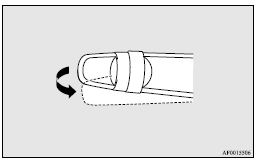
4. The headlamps will come on in the lowbeam setting for about 30 seconds. After the headlamps go off, the headlamps can be turned on again in the low beam setting for about 30 seconds by pulling the turn signal lever towards you within 60 seconds of turning the ignition switch to the “LOCK” position.
To turn on the headlamps again after 60 seconds of turning the ignition switch to the “LOCK” position, repeat the process from step 1.
Note
► While the coming home light function is operating, perform one of the following operations to cancel the function.
• Pull the lever towards you.
• Turn the combination headlamps and dipper switch to the position.
• Turn the ignition switch to the “ON” position.
► It is possible to modify functions as follows:
• The time that the headlamps remain on can be changed.
• The coming home light function can be deactivated.
For further information, we recommend you to consult a MITSUBISHI MOTORS Authorized Service Point.
On vehicles equipped with MITSUBISHI Multi-Communication System (MMCS), screen operations can be used to make the adjustment. Refer to the separate owner’s manual for details.
Download Manual