Rear-view camera
The rear-view camera is a system that shows the view behind the vehicle on a screen of the MITSUBISHI Multi Communication System (MMCS) or the inside rear-view mirror.
 Caution
► The rear-view camera is an assistance system that enables the driver to check for obstacles behind the vehicle. Its range of view is limited, so you should not overly depend on it. Please drive just as carefully as you would if the vehicle did not have the rear-view camera.
► Be sure to visually confirm safety around the vehicle with your own eyes. Do not depend entirely on the rear-view camera.
Range of view of rear-view camera
The range of view of the rear-view camera is limited to the area shown in the illustrations. It cannot show both sides and the lower part of the rear bumper, etc.
When reversing, be sure to visually confirm safety around the vehicle.
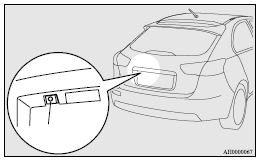
Location of rear-view camera
The rear-view camera (A) is integrated into the part near the rear hatch handle.
Range of view of rear-view camera
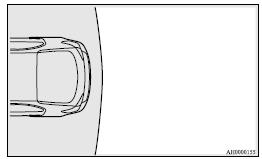
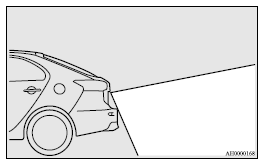
How to use the rear-view camera
When you place the gearshift lever or the selector lever in the “R” position with the ignition switch in the “ON” position, the view behind the vehicle will automatically appear on the screen of the MITSUBISHI Multi Communication System (MMCS) or the inside rear-view mirror. When you move the gearshift lever or the selector lever to any other position, the screen will return to its original indication.
Caution
► The rear-view camera has a special lens that can make objects shown on the screen appear to be closer or further away than they actually are.
 Note
Note
► Because the rear-view camera has a special lens, the lines on the ground between parking spaces may not look parallel on the screen.
► In the following situations, the screen indication may be difficult to see. There is no abnormality.
• Low light (nighttime)
• When the light of the sun or the light from a vehicle’s headlamps shines directly into the lens
► If the camera is hot and is then cooled by rain or a car wash, the lens can mist up. This phenomenon does not indicate a malfunction.
► It is not possible to fully see obstacles when the lens is dirty. If the lens becomes contaminated by water droplets, snow, mud or oil, wipe off the contamination, taking care not to scratch the lens.
► Please observe the following cautions. Ignoring them could lead to a camera malfunction.
• Do not subject the camera to physical shock.
• Do not apply wax to the camera.
• Do not splash the camera with boiling water.
• Do not disassemble the camera.
Reference lines on the screen
Reference lines and upper surface of the rear bumper (A) are displayed on the screen.
► Red line (B) indicates approximately 50 cm behind the rear bumper.
► Two Green lines (C) indicate approximately 20 cm outside of the vehicle body.
► Short transverse lines (1 to 3) indicate distance from the rear bumper.
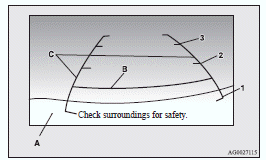
1- Approximately at the rear edge of the rear bumper
2- Approximately 100 cm
3- Approximately 200 cm
Note
► When the vehicle is tilting because of the number of people in the vehicle, the weight and positioning of luggage, and/or the condition of the road surface, the lines in the view from the rear-view camera may not be accurately positioned relative to the actual road.
The reference lines for distance and vehicle width are based on a level, flat road surface.
In the following cases, objects shown on the screen will appear to be farther off then they actually are.
• When the rear of the vehicle is weighed down with the weight of passengers and luggage in the vehicle.
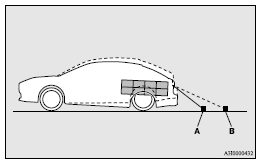
A- Actual objects
B- Objects shown on the screen
• When there is an upward slope at the back.
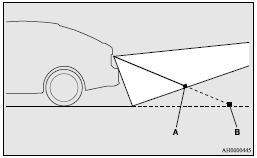
A- Actual objects
B- Objects shown on the screen
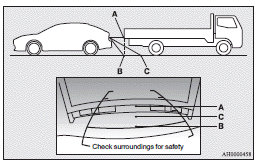
► The reference lines for distance and vehicle width are intended to indicate the distance to a flat object such as a level, flat road surface.
This may make the distance to a projecting object shown on the screen differ from the actual distance to the projecting object. Do not use them as a guide for distances to solid objects.
Example: On the screen the point B appears the nearest, then the point C and A in order of distance. The points A and B actually are the same distances from the vehicle, and the point C is farther off than the points A and B.
To change the indication on the screen of the inside rear-view mirror
It is possible to turn off the screen of the inside rearview mirror and change the language of the warning messages on the screen.
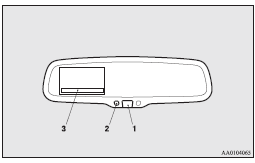
To temporarily set the non- display mode
If you press the switch (1) while the image appears on the display, it goes off temporarily.
To return to display mode, press the switch again or turn the ignition switch to the “ON” position after turning to “LOCK” or “ACC” position.
To permanently set the non- display mode
1. Turn the ignition switch to the “ON” position.
Caution
► For safety reasons, do not perform following operations with the engine running.
2. Put the gearshift lever or the selector lever in the “R” position.
3. Press and hold down the switch (1) (for about 15 seconds).
While you keep the switch pressed, the orange indicator (2) comes on. When the image goes off, the non-display mode setting is completed.
To change the language of warning text(3)
1. Turn the ignition switch to the “ON” position.
Caution
► For safety reasons, do not perform following operations with the engine running.
2. Put the gearshift lever or the selector lever in the “R” position.
3. Press and hold down the switch (1) to enter language selection mode (for 6 to 11 seconds).
In this mode, the image appears and the green indicator (2) comes on.
4. Press the switch until the desired language appears on the display.
Each time you press the switch, the language will change to the next one. When the warning text flashes, setting is completed.
Download Manual