Reversing sensor system
This system operates when you are backing the vehicle.
It uses corner and back sensors to detect an obstacle and the information screen in the multi-information display and the buzzer to inform you of the approximate distance to the obstacle.
 Caution
► The reversing sensor system assists you in determining the approximate distance between the vehicle and an obstacle located behind the vehicle. It has limitations in terms of detectable areas and objects, and may not properly detect some objects.
Therefore, do not place excessive confidence in the reversing sensor system and operate the vehicle as carefully as you would do with a vehicle not equipped with this system.
► Make sure to check the surroundings with your own eyes to ensure safety. Do not operate the vehicle by relying on the reversing sensor system alone.
Obstacle detection areas
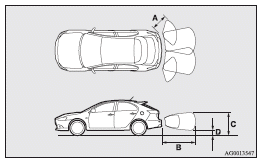
The detection areas of the corner and back sensors are limited to those shown in the illustration. Moreover, the sensors are unable to detect low or thin objects or objects near the rear bumper. Thus, make sure to check the surroundings as you operate the vehicle in a safe manner.
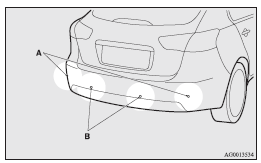
Corner and back sensor locations
There are two corner sensors (A) at the corners of the rear bumper, and two back sensors (B) in the centre of the rear bumper.
Reversing sensor system detection areas
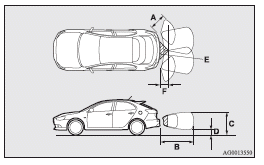
Depending on whether the vehicle is equipped with a towing bar, you can change the reversing sensor system between the standard mode and the towing bar mode. The towing bar mode changes the system to exclude the area in which the towing bar is mounted from the detection areas.
Vehicles without a towing bar
The detection areas are within approximately 60 cm (A) from the corner sensors, 150 cm (B) from the back sensors, and 60 cm (C) or less from the ground surface, excluding the area approximately 10 cm (D) from the ground surface.
Vehicles with a towing bar
The detection areas are within approximately 60 cm (A) from the corner sensors, 150 cm (B) from the back sensors, and 60 cm (C) or less from the ground surface, excluding the area approximately 10 cm (D) from the ground surface. The non-detection areas (E) are within approximately 20 cm (F) from the bumper.
 Note
Note
► If the rear bumper has been exposed to an impact, the corner or back sensors may fail and prevent the system from functioning properly.
Have the vehicle inspected at a MITSUBISHI MOTORS Authorized Service Point.
► The sensors do not detect objects located in the area directly below or near the bumper. If the height of an object is lower than the mounted position of the corner or back sensors, the sensors may not continue detecting it even if they detected it initially.
For information on how to change the detection areas, please refer to “Changing the detection areas”.
Caution
► The reversing sensor system may not operate properly under the following conditions:
• The sensors or surroundings are covered with ice, snow, or mud.
• The sensors are frozen.
• The system receives ultrasonic noise from other sources (the horns of other vehicles, motorcycle engines, brakes, radios, pouring rain, splashing water, tyre chains, etc.).
• The sensors are extremely hot or cold (while the vehicle is parked for a long period of time under a blazing sun or in cold weather).
• The vehicle tilts significantly.
• The vehicle is driven on a rough road (with a bumpy, gravel, hilly, or grassy surface).
• The vehicle is too close to an obstacle.
• The sensors or surroundings have been wiped by hand, or stickers or accessories have been attached.
► The reversing sensor system may not properly detect the following:
• Objects that are thin, such as wire nets or ropes.
• Objects that absorb sound waves, such as snow.
• Objects that are shaped with a sharp angle.
• Objects with a smooth surface, such as glass.
• Objects that are low, such as kerbstones.
Note
► The buzzer may sound lower than the normal warning sound when the reversing sensor system is receiving ultrasonic noise from other sources, but this is not a malfunction. The buzzer will stop sounding and the system will return to normal operation after the noise is no longer received.
To operate
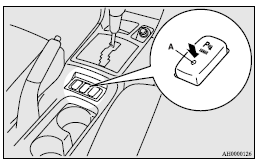
To operate the system, move the gearshift lever or selector lever to the “R” position while the ignition switch is in the “ON” position. When the reversing sensor system is operated, the reversing sensor system operation indication lamp (A) will turn on. To stop the operation, push the “SONAR” switch; the reversing sensor system operation indication lamp (A) is turned off.
Note
► Only when the gearshift lever or selector lever is in the “R” position, the reversing sensor system can be operated or be stopped by using the “SONAR” switch.
Warning for obstacles
If there is an obstacle behind the vehicle, a warning will be issued with the information screen in the multi-information display and a warning buzzer.
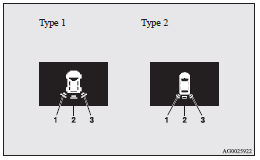
1- Corner sensor (left)
2- Back sensor
3- Corner sensor (right)
Corner sensor
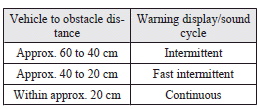
Back sensor (vehicles without a towing bar)
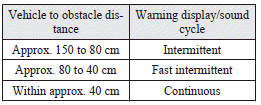
Back sensor (vehicles with a towing bar)
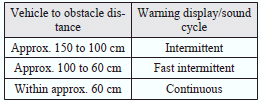
Caution
► The distances given are to be used for reference only, as errors may be caused by various factors, such as temperature, humidity, or the shape of the obstacles.
Note
► When the sensors detect different obstacles at the same time, the information screen in the multi-information display indicates the directions of the obstacles each sensor is detecting.
However, closer obstacles are given priority over other detected obstacles and the warning buzzer sounds to inform you of closer obstacles.
Changing the detection areas
The detection areas can be changed as follows:
Vehicles with a towing bar
While the operation of the system is stopped at the “SONAR” switch, push the “SONAR” switch approximately 3 seconds or more, and release it. The buzzer sounds twice to indicate that the detection area has been changed.
Vehicles without a towing bar
While the operation of the system is stopped at the “SONAR” switch, push the “SONAR” switch approximately 3 seconds or more, and release it. The buzzer sounds once to indicate that the detection area has been changed.
Note
► The detection area will not change if you keep the “SONAR” switch pushed for 10 seconds or more.
► After pushing the “SONAR” switch, reversing sensor system operation differs according to the detection area setting.
• Setting when towing bar is not equipped When the gearshift lever or selector lever is moved to the “R” position, the reversing sensor system will operate even if corner sensor operation was stopped by pushing the “SONAR” switch.
• Setting when towing bar is equipped When reversing sensor system operation was stopped by pushing the “SONAR” switch, the reversing sensor system will not operate until the engine has been stopped even if the gearshift lever or selector lever is moved to the “R” position.
To resume reversing sensor system operation, push the “SONAR” switch or stop and restart the engine, and then move the gearshift lever or selector lever to the “R” position.
Reversing sensor system warning display
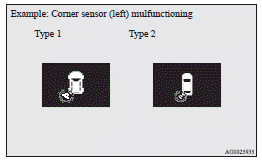
In case there is a malfunction in the reversing sensor system, the display for the malfunctioning sensor will blink and the warning buzzer will sound for approximately 5 seconds. Even after the buzzer has stopped sounding, the display will continue blinking until the system reverts to the normal state. Have the vehicle inspected at a MITSUBISHI MOTORS Authorized Service Point.
Download Manual