Keyless entry system
Press the remote control switch, and all doors and the rear hatch will be locked or unlocked as desired.
It is also possible to operate the outside rear-view mirrors.
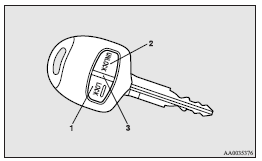
1- LOCK switch
2- UNLOCK switch
3- Indication lamp
To lock
Press the LOCK switch (1). All the doors and rear hatch will be locked. The turn-signal lamps will blink once.
 Note
Note
► With a vehicle that has a Dead Lock System, pressing the LOCK switch (1) two times in succession causes the Dead Lock System to be set. (Refer to “Setting the system”.)
To unlock
Press the UNLOCK switch (2). All the doors and the rear hatch will be unlocked. If the front room lamp switch (if so equipped) is in the “DOOR” position and the rear room lamp switch (except for vehicles equipped with the sunroof) is in the middle (•) position at this time, the room lamp will come on for approximately 15 seconds and the turn-signal lamps will blink twice.
Except for vehicles for Russia, Kazakhstan and Ukraine, the position and tail lamps can also be set to turn on for about 30 seconds.
Refer to “Instruments and controls: Welcome light”.
Note
► For vehicles equipped with the central door lock switch, the door and rear hatch unlock function can be set so that only the driver’s door unlocks when the UNLOCK switch (2) is pressed once.
If the door and rear hatch unlock function is set to work as described above, all the doors and the rear hatch unlock when the UNLOCK switch is pressed two times in succession.
Refer to “Setting of door and rear hatch unlock function”.
► The indication lamp (3) comes on each time a switch is pressed.
► For vehicles with the mirror retractor switch, the outside rear-view mirrors automatically retract or extend when all doors and the rear hatch are locked or unlocked using the remote control switches of the keyless entry system.
Refer to “Outside rear-view mirrors”.
► If the UNLOCK switch (2) is pressed and no door or rear hatch is opened within approximately 30 seconds, relocking will automatically occur.
► It is possible to modify functions as follows: For further information, please contact your MITSUBISHI MOTORS Authorized Service Point.
On vehicles equipped with MITSUBISHI Multi-Communication System (MMCS), screen operations can be used to make the adjustment.
Refer to the separate owner’s manual for details.
• The time for automatic relocking can be changed.
• Activating the operation confirmation function (blinking of the turn-signal lamps) only during locking, or only during unlocking.
• The confirmation function (this indicates locking or unlocking of the doors and rear hatch with the turn-signal lamps blinking) can be deactivated.
• The number of times the turn-signal lamps are flashed by the confirmation function can be changed.
Operation of the Dead Lock System
In a vehicle that has a Dead Lock System, it is possible to set the Dead Lock System using the remote controller. (Refer to “Dead Lock System”.)
Operation of the outside rear-view mirrors (Vehicles equipped with mirror retractor switch)
To fold
Within 30 seconds of locking the doors and rear hatch using the LOCK switch (1), press the LOCK switch twice rapidly to fold the outside rear-view mirrors.
To extend
Within 30 seconds of unlocking the doors and rear hatch using the UNLOCK switch (2), press the UNLOCK switch twice rapidly to return the outside rear-view mirrors to their extended positions.
The outside rear-view mirrors are not initially set to work as described above. If you want them to work as described above, you need to set them so that they do not retract/extend when the doors and rear hatch are locked/unlocked using the keyless entry system or keyless operation system. Refer to “Starting and driving: Outside rear-view mirrors”.
For details, please consult a MITSUBISHI MOTORS Authorized Service Point.
In a vehicle equipped with the MITSUBISHI Multi- Communication System (MMCS), it is possible to change the setting by means of screen operations.
Refer to the separate owner’s manual for details.
Note
► The keyless entry system does not operate in the following conditions: • The key is left in the ignition switch.
• The door or rear hatch is open.
► The remote control switch will operate within approximately 4 m from the vehicle. However, the operating range of the remote control switch may change if the vehicle is located near a power station, or radio/TV broadcasting station.
► If either of the following problems occurs, the battery may be exhausted.
• The remote control switch is operated at the correct distance from the vehicle, but the doors and rear hatch are not locked/unlocked in response.
• The indication lamp (3) is dim or does not come on.
For further information, please contact your MITSUBISHI MOTORS Authorized Service Point.
If you replace the battery yourself, refer to “Procedure for replacing the remote control switch battery”.
► If your remote control switch is lost or damaged, please contact your MITSUBISHI MOTORS Authorized Service Point for a replacement remote control switch.
► If you wish to add a remote control switch, please contact your MITSUBISHI MOTORS Authorized Service Point.
A maximum of 8 remote control switches are available for your vehicle.
Setting of door and rear hatch unlock function (vehicles equipped with the central door lock switch)
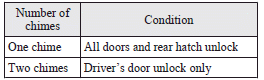
The door and rear hatch unlock function can be set to the following two conditions.
Each time the door and rear hatch unlock function is set, a chime will sound to tell you the condition of the door and rear hatch unlock function.
1. Remove the key from the ignition switch.
2. Place the combination headlamps switch and dipper switch in the “OFF” position, and leave the driver’s door open.
3. Press the LOCK switch (1) for 4 to 10 seconds and press the UNLOCK switch (2) during this time.
4. Release in sequence the LOCK and UNLOCK switches within 10 seconds of pressing the LOCK switch in step 3.
Note
► On vehicles equipped with Mitsubishi Multi- Communication System (MMCS), screen operations can be used to make the adjustment.
Refer to the separate owner’s manual for details.
Procedure for replacing the remote control switch battery
1. Before replacing the battery, remove static electricity from your body by touching a metal grounded object.
2. Remove the screw (A) from the remote control switch.
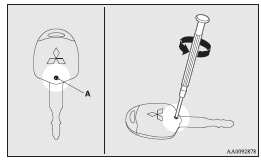
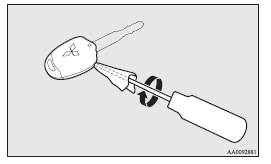
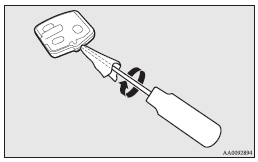
3. With the MITSUBISHI mark facing you, insert the clothcovered tip of a straight blade (or minus) screwdriver into the notch in the remote control switch case and use it to open the case.
Note
► Be sure to perform the procedure with the MITSUBISHI mark facing you. If the MITSUBISHI mark is not facing you when you open the remote control switch case, the switches may come out.
4. Remove the remote control transmitter from the remote control switch case. Then, open the remote control transmitter using the method described in step 3.
5. Remove the old battery.
6. Install a new battery with the + side (B) down.
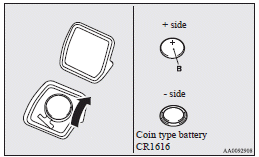
7. Close the remote control transmitter firmly.
8. Place the remote control transmitter in the remote control switch case, then securely close the remote control switch case.
9. Attach the screw (A) removed in step 2.
10. Check the keyless entry system to see that it works.
Note
► You may purchase a replacement battery at an electric appliance store.
► A MITSUBISHI MOTORS Authorized Service Point can replace the battery for you if you prefer.
 Caution
► When the remote control switch case is opened, be careful to keep water, dust, etc. out. Also, do not touch the internal components.
Download Manual