Keyless operation system
The keyless operation system allows you to lock and unlock the doors and rear hatch and start the engine simply by carrying the keyless operation key with you.
The keyless operation key can also be used as the keyless entry system remote control switch.
Refer to “Keyless operation system: Keyless entry system”.
The driver should always carry the keyless operation key. This key is necessary for locking and unlocking the doors and rear hatch, starting the engine and otherwise operating the vehicle, so before locking and leaving the vehicle, be sure to check that you have the keyless operation key.
 Warning
► People with implantable cardiac pacemakers or implantable cardiovascular-defibrillators should not go near the exterior transmitters (A) or the interior transmitters (B). The radio waves used by the keyless operation system could adversely affect implantable cardiac pacemakers or implantable cardiovascular-defibrillators.
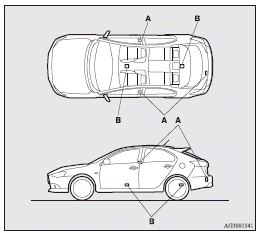
Warning
► When using electro-medical devices other than implantable cardiac pacemakers or implantable cardiovascular-defibrillators, contact the electromedical device manufacturer ahead of time to determine the affects of radio waves on the devices.
Electromedical device operations could be affected by radio waves.
You can limit the possible operations of the keyless operation system in the following ways. (The keyless operation system can be used as a keyless entry system.) Consult a MITSUBISHI MOTORS Authorized Service Point.
• You can limit operations to locking and unlocking the doors and rear hatch.
• You can limit operations to starting the engine.
• The keyless operation system can be disabled.
When keyless operation system operations are modified, the transmitters operate as follows.
• Only locking and unlocking doors or rear hatch: exterior transmitter and interior transmitter.
• Only starting the engine: interior transmitter
 Note
Note
► The keyless operation key uses an ultra-weak electromagnetic wave. In the following cases, the keyless operation system may not operate properly or may be unstable.
• When there is equipment nearby that emits strong radio waves, such as: a power station, a radio/TV broadcasting station or an airport.
• The keyless operation system is carried together with a communications device such as a cellular phone or radio set, or with an electronic device such as a personal computer.
• The keyless operation key is touching or covered by a metal object.
• A keyless entry system is being used nearby.
• When the keyless operation key battery is worn out.
• When the keyless operation key is placed in an area with strong radio waves or noise.
In such cases, use the emergency key.
Refer to “To operate without using the keyless operation function”.
► Because the keyless operation key receives signals in order to communicate with the transmitters in the vehicle, the battery continually wears down regardless of keyless operation key use. The battery life is 1 to 3 years, depending on usage conditions. When the battery wears out, have it replaced at a MITSUBISHI MOTORS Authorized Service Point.
► Because the keyless operation key continually receives signals, strong radio wave reception could affect battery wear. Do not leave the key near a TV, personal computer, or other electronic device.
Operating range of the keyless operation system
If you are carrying the keyless operation key, enter the operating range of the keyless operation system, and operate a door or rear hatch switch, the ID code for your key is verified.
You can only lock and unlock the doors and rear hatch, and start the engine if the ID codes of your keyless operation key and the vehicle match.
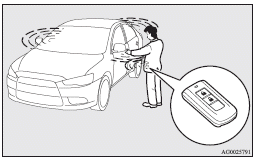
Note
► If the keyless operation key battery is wearing out or there are strong electromagnetic waves or noise present, the operating range may become smaller and operation may become unstable.
Operating range for locking and unlocking the doors and rear hatch
The operating range is about 70 cm from the handle on the driver’s door, the front passenger’s door, and rear hatch handle.
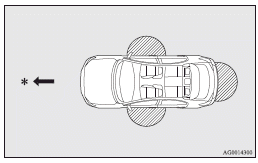
 : Forward direction
 : Operating range
Note
► Locking and unlocking are only possible when the door or rear hatch is operated while the keyless operation key is being detected.
► Operation may not be possible if you are too close to the front door, door window or rear hatch.
► Even if the keyless operation key is within 70 cm of the handle on the driver’s door, handle on the front passenger’s door or rear hatch handle, if the key is near to the ground or high up, the system may not operate.
► If the keyless operation key is within the operating range, even someone not carrying the key can lock and unlock the doors and rear hatch by pressing the driver’s or front passenger’s door lock/unlock switch, the rear hatch LOCK switch or the rear hatch OPEN switch.
Operating range for starting the engine
The operating range is the interior of the vehicle.
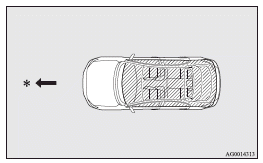
: Forward direction
: Operating range
Note
► Even if it is within the operating range, if the keyless operation key is in a small item holder such as the glove box, on top of the instrument panel, door pocket or in the luggage compartment, it may be impossible to start the engine.
► If you are too close to the door or door window, the engine may start even though the keyless operation key is outside the vehicle.
To operate using the keyless operation function
Locking the doors and rear hatch
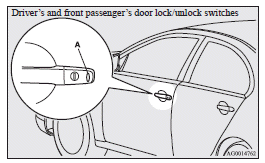
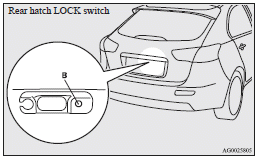
When you are carrying the keyless operation key, if you press the driver’s or front passenger’s door lock/unlock switch (A), or the rear hatch LOCK switch (B) within the operating range, the doors and the rear hatch are locked.
The turn-signal lamps will blink once.
Also refer to “Locking and unlocking: Doors, Central door locks, Rear hatch” on pages 1-26, 1-27 and 1-32.
Note
► For vehicles equipped with the mirror retractor switch, the outside rear-view mirrors automatically retract when all the doors and the rear hatch are locked using the keyless operation function.
Refer to “Starting and driving: Outside rearview mirrors”.
► With a vehicle that has a Dead Lock System, pressing the driver’s or front passenger’s door lock/unlock switch (A), or the rear hatch LOCK switch (B) two times in succession causes the Dead Lock System to be set.
(Refer to “Setting the system”.)
► The keyless operation function does not operate under the following conditions:
• The keyless operation key is inside the vehicle.
• A door or the rear hatch is open or ajar.
• The ignition switch is not in the “LOCK” position.
• The emergency key is in the ignition switch.
► When checking if the vehicle is locked, press the rear hatch OPEN switch within about 3 seconds of locking the vehicle. If you wait longer than 3 seconds and press the rear hatch OPEN switch, the doors and rear hatch will be unlocked.
► The time allowed for checking that the vehicle is locked can be adjusted. For further information, please contact a MITSUBISHI MOTORS Authorized Service Point.
On vehicles equipped with MITSUBISHI Multi-Communication System (MMCS), screen operations can be used to make the adjustment.
Refer to the separate owner’s manual for details.
Unlocking the doors and rear hatch
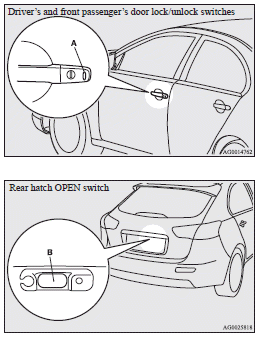
When you are carrying the keyless operation key, if you press the driver’s or front passenger’s door lock/unlock switch (A), or the rear hatch OPEN switch (B) within the operating range, all the doors and the rear hatch are unlocked. If the front room lamp switch (if so equipped) is in the “DOOR” position or the rear room lamp switch (except for vehicles equipped with the sunroof) is in the middle (•) position at this time, the room lamp will turn on for 15 seconds. The turn-signal lamps will blink twice.
If the driver’s or front passenger’s door lock/unlock switch is pressed and any of the doors or rear hatch is not opened within approximately 30 seconds, relocking will automatically occur.
Refer to “Locking and unlocking: Doors, Central door locks, Rear hatch” on pages 1-26, 1-27 and 1-32.
Note
► For vehicles equipped with the mirror retractor switch, the outside rear-view mirrors automatically extend when all the doors and rear hatch are unlocked using the keyless operation function.
Refer to “Starting and driving: Outside rearview mirrors”.
► For vehicles equipped with the central door lock switch, the keyless operation function can be set so that only the driver’s door unlocks when the driver’s door lock/unlock switch is pressed.
If the keyless operation function is set to work as described above, all the doors and the rear hatch unlock when the driver’s door lock/unlock switch is pressed two times in succession.
Refer to “Setting of door and rear hatch unlock function”.
► The keyless operation function does not operate under the following conditions: • A door or the rear hatch is open or ajar.
• The ignition switch is not in the “LOCK” position.
• The emergency key is in the ignition switch.
► In order to make it possible to check if the doors and rear hatch are locked, you cannot unlock them by using the rear hatch OPEN switch for 3 seconds after locking them.
► The time between unlocking and automatic locking can be adjusted. Consult a MITSUBISHI MOTORS Authorized Service Point.
On vehicles equipped with MITSUBISHI Multi-Communication System (MMCS), screen operations can be used to make the adjustment.
Refer to the separate owner’s manual for details.
Operation can be confirmed as shown below. However, the room lamp will only illuminate if the front room lamp switch (if so equipped) is in the “DOOR” position or the rear room lamp switch (except for vehicles equipped with the sunroof) is in the middle (•) position.
When locking: The turn-signal lamps will blink once.
When unlocking: The room lamp will illuminate for about 15 seconds, the turn-signal lamps will blink twice.
Note
► Functions can be modified as stated below.
For further information, please contact your MITSUBISHI MOTORS Authorized Service Point.
On vehicles equipped with MITSUBISHI Multi-Communication System (MMCS), screen operations can be used to make the adjustment.
Refer to the separate owner’s manual for details.
• Activating the operation confirmation function (blinking of the turn-signal lamps) only during locking, or only during unlocking.
• Disabling the operation confirmation function (blinking of the turn-signal lamps).
• Changing the number of blinks for the operation confirmation function (blinking of the turn-signal lamps).
Operation of the Dead Lock System
With a vehicle that has a Dead Lock System, it is possible to set the Dead Lock System using the driver’s or front passenger’s door lock/unlock switch, or the rear hatch LOCK switch. (Refer to “Dead Lock System”.)
Electronic immobilizer (Anti-theft starting system)
The electronic immobilizer has been designed to significantly reduce the possibility of vehicle theft.
The purpose of the system is to immobilize the vehicle if an invalid start is attempted. A valid start attempt can only be achieved (subject to certain conditions) using a keyless operation system “registered” to the immobilizer system.
All of the keys provided with your new vehicle have been programmed into the vehicle’s electronics.
Refer to “Keyless operation system: Ignition switch” on pages 1-11 and 1-18.
Note
► If you lose one of the keyless operation keys, contact a MITSUBISHI MOTORS Authorized Service Point as soon as possible.
To obtain a replacement or extra spare key, take your vehicle and all remaining keys to your MITSUBISHI MOTORS Authorized Service Point. All the keys have to be re-registered in the immobilizer computer unit.
The immobilizer can register up to 4 different keys.
Ignition switch
In order to prevent theft, the engine will not start unless a preregistered keyless operation key is used.
(Engine immobilizer function)
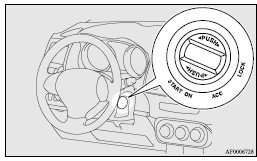
LOCK (PUSH OFF)
The position in which the steering wheel is locked.
LOCK (PUSH ON)
When the ID code verification inside the vehicle produces a match, the steering wheel lock is released and the ignition switch can be turned.
ACC
The engine is stopped, but the audio system and other electric devices can be operated.
ON
The engine is running, and all the vehicle’s electrical devices can be operated.
START
The starter motor operates. After the engine has started, release the key and it will automatically return to the “ON” position.
Note
► The keyless operation key is equipped with an electronic immobilizer.
To start the engine, the ID code which the transponder inside the key sends must match the one registered in the immobilizer computer.
Refer to “Electronic immobilizer (Antitheft starting system)”.
When turning from “LOCK” (PUSH OFF) to “ACC”
Push the ignition switch and turn it slowly.
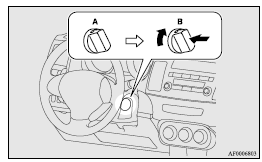
A- Steering wheel locked
B- Steering wheel released
Note
► If the ignition switch does not turn from “LOCK” (PUSH OFF) to “ACC”, press the ignition switch again, slightly move the steering wheel left and right, and then turn the ignition switch.
► The ignition switch cannot be turned if the keyless operation key is not in the vehicle. Refer to “Operating range for starting the engine”.
When turning from “ACC” to “LOCK”
[Vehicles equipped with M/T] Put the gearshift lever into the “N” (Neutral) position, and slowly turn the ignition switch to the “LOCK” position while pressing it.
[Vehicles equipped with CVT or Twin Clutch SST] First, set the selector lever (CVT) or the gearshift lever (Twin Clutch SST) to the “P” (PARK) position, and then slowly turn the ignition switch to the “LOCK” position while pressing it.
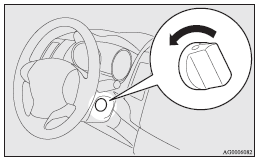
Note
► Vehicles equipped with CVT or Twin Clutch SST, the ignition switch cannot be turned to the “LOCK” position unless the selector lever (CVT) or the gearshift lever (Twin Clutch SST) is in the “P” (PARK) position.
 Caution
► Do not turn the ignition switch to the “LOCK” position while driving. The steering wheel will be locked, causing loss of control.
► If the engine is stopped while driving, the brake servomechanism will cease to function and braking efficiency will deteriorate.
Also, the power steering system will not function and it will require greater manual effort to operate the steering.
► Do not leave the ignition switch in the “ON” or “ACC” position for a long time when the engine is not running, doing so will cause the battery to be discharged.
► Do not turn the ignition switch to the “START” position when the engine is running, doing so could damage the starter motor.
Warning activation
In order to prevent vehicle theft or the accidental operation of the keyless operation system, the buzzer and the display on the information screen in the multi- information display are used to alert the driver.
If a warning is activated, always check the vehicle and the keyless operation key. The warning is also displayed if there is a fault in the keyless operation system.
If any of the following warnings are activated, please contact a MITSUBISHI MOTORS Authorized Service Point.
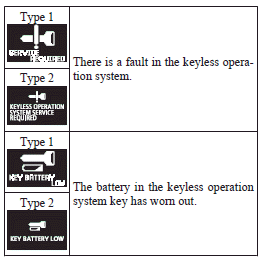
In the following cases, a warning is activated, but it can be cancelled if the correct actions are followed.
► The ID codes for the keyless operation key and vehicle do not match.
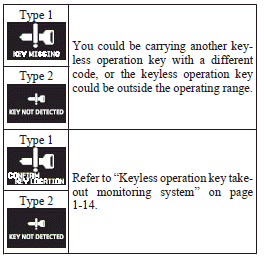
► Even though you press the driver’s or front passenger’s door lock/unlock switch, or the rear hatch LOCK switch, the doors and rear hatch are not locked.
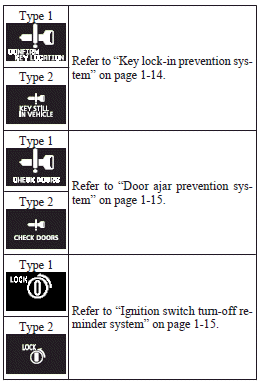
Keyless operation key take-out monitoring system
Type 1

Type 2

When the vehicle is parked with the ignition switch in any position other than “LOCK” (PUSH OFF), if you close the door after opening any of the doors and taking the keyless operation key out of the vehicle, a warning displays and the buzzer sounds 4 times.
Note
► If you take the keyless operation key out of the vehicle through a window without opening a door, the keyless operation key takeout monitoring system does not operate.
► It is possible to change the setting to make the keyless operation key take-out monitoring system operate if you take the keyless operation key out from the vehicle through a window without opening a door. For further information, please contact your MITSUBISHI MOTORS Authorized Service Point.
► Even if you have the keyless operation key within the engine start operating range, if the keyless operation key and vehicle ID codes cannot be matched, for example due to the ambient environment or electromagnetic conditions, the warning may be activated.
Key lock-in prevention system
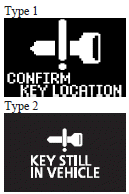
When the ignition switch is in the “LOCK” (PUSH OFF) position, if you close all the doors and the rear hatch with the keyless operation key left in the vehicle and you try to lock the doors and rear hatch by pressing the driver’s or front passenger’s door lock/unlock switch, or the rear hatch LOCK switch, a warning is issued with the warning display and the buzzer buzzing for about 3 seconds and you cannot lock the doors and rear hatch.
Note
► Make sure you have the keyless operation key with you before locking the doors and rear hatch. Even if you leave the keyless operation key inside the vehicle, it is possible that the doors and rear hatch will lock depending on the surrounding environment and wireless signal conditions.
Door ajar prevention system
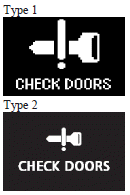
When the ignition switch is in the “LOCK” (PUSH OFF) position, if you try to lock the doors and rear hatch by pressing the driver’s or front passenger’s door lock/unlock switch, or the rear hatch LOCK switch with one of the doors or the rear hatch not completely closed, a warning is issued with the warning display and the buzzer buzzing for about 3 seconds and you cannot lock the doors and rear hatch.
Ignition switch turn-off reminder system
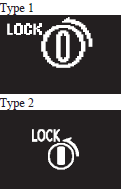
When the ignition switch is in any position other than the “LOCK” (PUSH OFF) position, if you close all the doors and the rear hatch then try to lock the doors and rear hatch by pressing the driver’s or front passenger’s door lock/unlock switch, or the rear hatch LOCK switch, a warning is issued with the warning display and the buzzer buzzing for about 3 seconds and you cannot lock the doors and rear hatch.
Steering wheel lock
To lock
Turn the steering wheel until it is locked.
To unlock
Turn the ignition switch to the “ACC” position while moving the steering wheel slightly right and left.
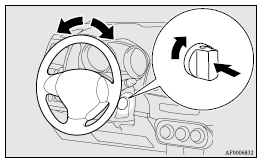
Caution
► Carry the key with you when leaving the vehicle.
If your vehicle needs to be towed, turn the ignition switch to the “ACC” position to unlock the steering wheel.
Starting
Tips for starting
► Do not operate the starter motor continuously longer than 10 seconds; doing so could run down the battery. If the engine does not start, turn the ignition switch back to “LOCK”, wait a few seconds, and then try again.
Trying repeatedly with the starter motor still turning will damage the starter mechanism.
► After starting the engine in cold weather, drive in a way that keeps the engine speed low for the first few minutes or the bar graph of the engine coolant temperature display starts to move. Otherwise the engine operation may not rev smoothly and the vehicle could jerk or surge while driving.
A longer warm up period will only consume extra fuel.
► [For vehicles equipped with Twin Clutch SST] The following may occur after the engine is started, but they do not indicate an abnormality.
• You may hear operational sounds of the Twin Clutch SST and you may feel vibration in the vehicle body.
• If you shift the gearshift lever into the “N” (NEUTRAL) position and depress the accelerator pedal, increases in the engine speed will be limited.
► [Diesel-powered vehicles] While the vehicle is stationary with the clutch pedal fully depressed, the engine revolutions do not rise to over 3,000 rpm in order to protect the engine even if the accelerator pedal is depressed.
Warning
► Never run the engine in a closed or poorly ventilated area any longer than is needed to move your vehicle in or out of the area. Carbon monoxide gases are odourless and can be fatal.
► Never attempt to start the engine by pushing or pulling the vehicle.
► Do not run the engine at high rpm or drive the vehicle at high speed until the engine has had a chance to warm up.
► Release the ignition switch as soon as the engine starts to avoid damaging the starter motor.
Starting the engine (petrol-powered vehicles)
The starting procedure is as follows: 1. Fasten the seat belt.
2. Make sure the parking brake is applied.
3. Depress and hold the brake pedal.
4. Fully depress the clutch pedal. (M/T)
Note
► On vehicles with the Auto Stop & Go (AS&G) system, the starter will not operate unless the clutch pedal is fully depressed (Clutch interlock).
5. On vehicles equipped with M/T, place the gearshift lever in the “N” (Neutral) position.
On vehicles equipped with CVT or Twin Clutch SST, make sure the selector lever (CVT) or the gearshift lever (Twin Clutch SST) is in the “P” (PARK) position.
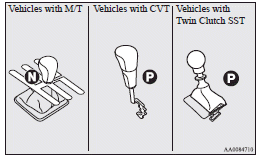
Note
► On vehicles with CVT, the starter will not operate unless the selector lever is in the “P” (PARK) or “N” (NEUTRAL) position.
On vehicles with Twin Clutch SST, the starter will not operate unless the gearshift lever is in the “P” (PARK) position or the gearshift lever is in the “N” (NEUTRAL) position with the brake pedal depressed.
For safety reasons, start the engine in the “P” (PARK) position so that the wheels are locked.
6. After turning the ignition switch to the “ON” position, make certain that all warning lamps are functioning properly before starting the engine.
7. Turn the ignition switch to the “START” position without depressing the accelerator pedal, and release it when the engine starts.
Note
► Minor noises may be heard on engine startup.
These will disappear as the engine warms up.
Starting the engine (diesel-powered vehicles)
1. Fasten the seat belt.
2. Make sure the parking brake is applied.
3. Depress and hold the brake pedal.
4. Fully depress the clutch pedal.
Note
► On vehicles with the Auto Stop & Go (AS&G) system, the starter will not operate unless the clutch pedal is fully depressed (Clutch interlock).
5. Place the gearshift lever in the “N” (Neutral) position.
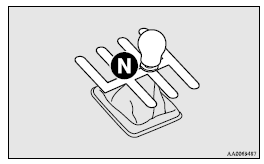
6. Turn the ignition switch to the “ON” position.
The diesel preheat indication lamp will first illuminate, and then after a short time go out, indicating that preheating is completed.
Note
► If the engine is cold, the diesel preheat indication lamp is on for a longer time.
► When the engine has not been started within about 5 seconds after the diesel preheat indication lamp went out, return the ignition switch to the “LOCK” position. Then, turn the ignition switch to the “ON” position to preheat the engine again.
► When the engine is warm, the diesel preheat indication lamp does not come on even if the ignition switch is placed in the “ON” position.
Start the engine by turning the ignition switch right to the “START” position.
7. Turn the ignition switch to the “START” position, and release it when the engine starts.
Note
► Minor noises may be heard on engine startup.
These will disappear as the engine warms up.
Using the MIVEC engine
The MIVEC engine automatically controls valve timing in accordance with driving conditions for maximum engine performance.
Note
► To protect the engine, the high-speed mode may not be selected while the engine coolant temperature is low.
To operate without using the keyless operation function
Emergency key
The emergency key is built into the keyless operation key. If the keyless operation function cannot be used, for example because the keyless operation key battery has worn out or the vehicle battery is flat, you can lock and unlock the doors and start the engine with the emergency key. To use the emergency key (1), unlock the lock knob (2) and remove it from the keyless operation key (3).
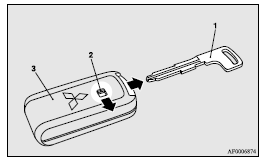
Note
► Only use the emergency key for emergencies.
If the keyless operation key battery wears out, replace it as quickly as possible so that you can use the keyless operation key.
► After using the emergency key, always return it into the keyless operation key.
Locking and unlocking the door
Turning the emergency key in the forward direction locks the door, and turning it in the rear direction unlocks the door. Also refer to “Locking and unlocking: Doors”.
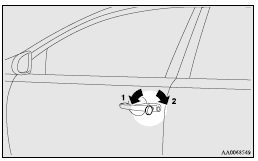
1- Lock
2- Unlock
Electronic immobilizer (Anti-theft starting system)
The electronic immobilizer has been designed to significantly reduce the possibility of vehicle theft.
The purpose of the system is to immobilize the vehicle if an invalid start is attempted. A valid start attempt can only be achieved (subject to certain conditions) using a keyless operation system “registered” to the immobilizer system.
All of the keys provided with your new vehicle have been programmed into the vehicle’s electronics.
Refer to “Keyless operation system: Ignition switch” on pages 1-11 and 1-18.
Note
► If you lose one of the keyless operation keys, contact a MITSUBISHI MOTORS Authorized Service Point as soon as possible.
To obtain a replacement or extra spare key, take your vehicle and all remaining keys to your MITSUBISHI MOTORS Authorized Service Point. All the keys have to be re-registered in the immobilizer computer unit.
The immobilizer can register up to 4 different keys.
Ignition switch
To prevent vehicle theft, only the emergency key with the preregistered keyless operation key inserted can start the engine. (Electronic immobilizer function) Also refer to “Starting and driving: Starting the engine” on pages 4-15, 4-16.
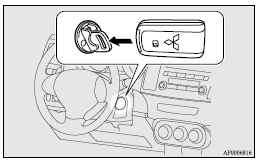
LOCK
The engine is stopped and the steering wheel locked. The emergency key can be inserted and removed in this position.
ACC
The engine is stopped, but the audio system and other electric devices can be operated.
ON
The engine is running, and all the vehicle’s electrical devices can be operated.
START
The starter motor operates. After the engine has started, release the emergency key and it will automatically return to the “ON” position.
Note
► The keyless operation key is equipped with an electronic immobilizer. To start the engine, the ID code which the transponder inside the key sends must match the one registered in the immobilizer computer. Refer to “Electronic immobilizer (Anti-theft starting system)”.
When turning from “LOCK” to “ACC”
1. Take the emergency key out of the keyless operation key. Refer to “Emergency key”.
2. Remove the ignition switch cover while pressing the lock release button (A).
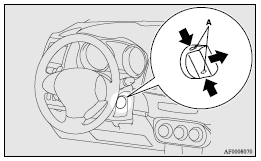
3. Insert the emergency key into the ignition switch and turn slowly while pushing.
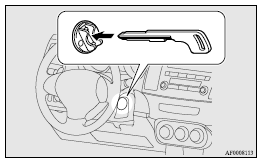
Note
► If the ignition switch will not turn from the “LOCK” to the “ACC” position, lightly turn the steering wheel right and left while turning the ignition switch.
To turn from “ACC” to “LOCK”
1. [Vehicles equipped with M/T]
Push the emergency key in at the “ACC” position and keep it depressed until it is turned to the “LOCK” position, and remove it.
[Vehicles equipped with CVT or Twin Clutch SST]
First, set the selector lever (CVT) or the gearshift lever (Twin Clutch SST) to the “P” (PARK) position, and then push the emergency key in at the “ACC” position and keep it depressed until it is turned to the “LOCK” position, and remove.
2. Install the cover of the ignition switch.
3. Reinsert the emergency key into the keyless operation key.
Note
► Vehicles equipped with CVT or Twin Clutch SST, the emergency key cannot be removed unless the selector lever (CVT) or the gearshift lever (Twin Clutch SST) is set to the “P” (PARK) position.
► When not using the emergency key, always install the ignition switch cover. Otherwise, there is a danger of dirt or dust getting into the keyhole of the ignition switch and causing a malfunction.
Caution
► Do not remove the emergency key from the ignition switch while driving. The steering wheel will be locked, causing loss of control.
► If the engine is stopped while driving, the brake servomechanism will cease to function and braking efficiency will deteriorate.
Also, the power steering system will not function and it will require greater manual effort to operate the steering.
► Do not leave the ignition switch in the “ON” or “ACC” position for a long time when the engine is not running, doing so will cause the battery to be discharged.
► Do not turn the ignition switch to the “START” position when the engine is running, doing so could damage the starter motor.
Steering wheel lock
To lock
Turn the emergency key to the “LOCK” position.
Turn the steering wheel until it is locked.
To unlock
Turn the emergency key to the “ACC” position while moving the steering wheel slightly right and left.
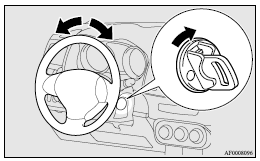
Caution
► Remove the emergency key when leaving the vehicle.
In some countries, it is prohibited to leave the key in the vehicle when parked.
Starting
Tips for starting
► Do not operate the starter motor continuously longer than 10 seconds; doing so could run down the battery. If the engine does not start, turn the ignition switch back to “LOCK”, wait a few seconds, and then try again.
Trying repeatedly with the starter motor still turning will damage the starter mechanism.
► After starting the engine in cold weather, drive in a way that keeps the engine speed low for the first few minutes or the bar graph of the engine coolant temperature display starts to move. Otherwise the engine operation may not rev smoothly and the vehicle could jerk or surge while driving.
A longer warm up period will only consume extra fuel.
► [For vehicles equipped with Twin Clutch SST] The following may occur after the engine is started, but they do not indicate an abnormality.
• You may hear operational sounds of the Twin Clutch SST and you may feel vibration in the vehicle body.
• If you shift the gearshift lever into the “N” (NEUTRAL) position and depress the accelerator pedal, increases in the engine speed will be limited.
► [Diesel-powered vehicles] While the vehicle is stationary with the clutch pedal fully depressed, the engine revolutions do not rise to over 3,000 rpm in order to protect the engine even if the accelerator pedal is depressed.
Warning
► Never run the engine in a closed or poorly ventilated area any longer than is needed to move your vehicle in or out of the area. Carbon monoxide gases are odourless and can be fatal.
Caution
► Never attempt to start the engine by pushing or pulling the vehicle.
► Do not run the engine at high rpm or drive the vehicle at high speed until the engine has had a chance to warm up.
► Release the emergency key as soon as the engine starts to avoid damaging the starter motor.
Starting the engine (petrol-powered vehicles)
The starting procedure is as follows: 1. Fasten the seat belt.
2. Make sure the parking brake is applied.
3. Depress and hold the brake pedal.
4. Fully depress the clutch pedal. (M/T)
Note
► On vehicles with the Auto Stop & Go (AS&G) system, the starter will not operate unless the clutch pedal is fully depressed (Clutch interlock).
5. On vehicles equipped with M/T, place the gearshift lever in the “N” (Neutral) position.
On vehicles equipped with CVT or Twin Clutch SST, make sure the selector lever (CVT) or the gearshift lever (Twin Clutch SST) is in the “P” (PARK) position.
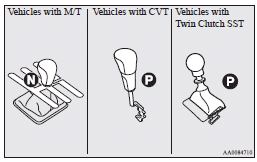
Note
► On vehicles with CVT, the starter will not operate unless the selector lever is in the “P” (PARK) or “N” (NEUTRAL) position.
On vehicles with Twin Clutch SST, the starter will not operate unless the gearshift lever is in the “P” (PARK) position or the gearshift lever is in the “N” (NEUTRAL) position with the brake pedal depressed.
For safety reasons, start the engine in the “P” (PARK) position so that the wheels are locked.
6. While pushing the lock release button (A), remove the cover of the ignition switch.
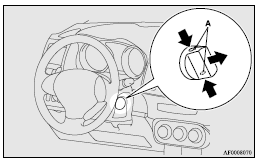
7. Insert the emergency key into the ignition switch.
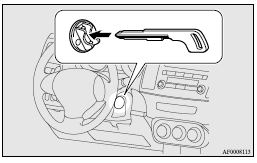
8. Insert the keyless operation key into the emergency key.
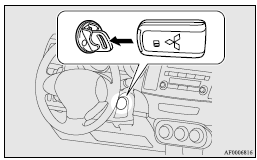
9. After turning the emergency key with the keyless operation key to the “ON” position, make sure that all warning lamps are functioning properly before starting the engine.
10. Turn the emergency key with the keyless operation key to the “START” position without depressing the accelerator pedal, and release it when the engine starts.
Note
► Minor noises may be heard on engine startup.
These will disappear as the engine warms up.
11. Remove the keyless operation key from the emergency key.
Warning
► Make sure to remove the keyless operation key from the emergency key after the engine is started.
If not removed, the keyless operation key could fall to the floor, which could disturb the pedal operation. Furthermore, the keyless operation key could prevent the driver’s knee airbag (if so equipped) from inflating normally or could be propelled to cause serious injury if the airbag inflates.
Note
► If the emergency key is attached to a key holder, it may become impossible to insert the keyless operation key into the emergency key, and it may prevent the engine from being started.
When using the emergency key to start the engine, first remove the key from the key ring.
Starting the engine (diesel-powered vehicles)
1. Fasten the seat belt.
2. Make sure the parking brake is applied.
3. Depress and hold the brake pedal.
4. Fully depress the clutch pedal.
Note
► On vehicles with the Auto Stop & Go (AS&G) system, the starter will not operate unless the clutch pedal is fully depressed (Clutch interlock).
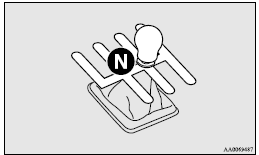
5. Place the gearshift lever in the “N” (Neutral) position.
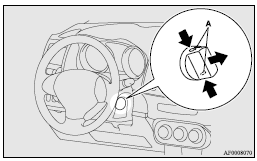
6. While pushing the lock release button (A), remove the cover of the ignition switch.
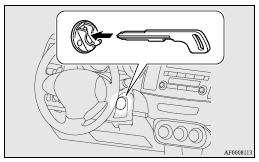
7. Insert the emergency key into the ignition switch.
8. Insert the keyless operation key into the emergency key.
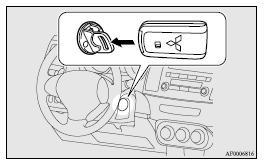
9. Turn the emergency key with keyless operation key to the “ON” position. The diesel preheat indication lamp will first illuminate, and then after a short time go out, indicating that preheating is completed.
Note
► If the engine is cold, the diesel preheat indication lamp is on for a longer time.
► When the engine has not been started within about 5 seconds after the diesel preheat indication lamp went out, return the ignition key to the “LOCK” position. Then, turn the emergency key to the “ON” position to preheat the engine again.
► When the engine is warm, the diesel preheat indication lamp does not come on even if the emergency key is placed in the “ON” position.
Start the engine by turning the emergency key right to the “START” position.
10. Turn the emergency key with the keyless operation key to the “START” position without depressing the accelerator pedal, and release it when the engine starts.
Note
► Minor noises may be heard on engine startup.
These will disappear as the engine warms up.
Using the MIVEC engine
Note
► To protect the engine, the high-speed mode may not be selected while the engine coolant temperature is low.
11. Remove the keyless operation key from the emergency key.
Warning
► Make sure to remove the keyless operation key from the emergency key after the engine is started.
If not removed, the keyless operation key could fall to the floor, which could disturb the pedal operation. Furthermore, the keyless operation key could prevent the driver’s knee airbag from inflating normally or could be propelled to cause serious injury if the airbag inflates.
Note
► If the emergency key is attached to a key holder, it may become impossible to insert the keyless operation key into the emergency key, and it may prevent the engine from being started.
When using the emergency key to start the engine, first remove the key from the key ring.
Keyless entry system
Press the remote control switch, and all doors and the rear hatch will be locked or unlocked as desired.
It is also possible to operate the door outside rear-view mirrors.
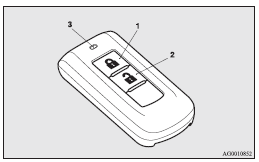
1- LOCK  switch
2- UNLOCK  switch
3- Indication lamp
To lock
Press the LOCK switch (1). All the doors and rear hatch will be locked. The turn-signal lamps will blink once.
Note
► With a vehicle that has a Dead Lock System, pressing the LOCK switch (1) two times in succession causes the Dead Lock System to be set. (Refer to “Setting the system”.)
To unlock
Press the UNLOCK switch (2). All the doors and the rear hatch will be unlocked. If the front room lamp switch (if so equipped) is in the “DOOR” position or the rear room lamp switch (except for vehicles equipped with the sunroof) is in the middle (•) position at this time, the room lamp will come on for approximately 15 seconds and the turn-signal lamps will blink twice.
Except for vehicles for Russia, Kazakhstan and Ukraine, the position and tail lamps can also be set to turn on for about 30 seconds.
Refer to “Instruments and controls: Welcome light”.
Note
► For vehicles equipped with the central door lock switch, the door and rear hatch unlock function can be set so that only the driver’s door unlocks when the UNLOCK switch (2) is pressed once.
If the door and rear hatch unlock function is set to work as described above, all the doors and the rear hatch unlock when the UNLOCK switch is pressed two times in succession.
Refer to “Setting of door and rear hatch unlock function”.
Operation of the Dead Lock System
In a vehicle that has a Dead Lock System, it is possible to set the Dead Lock System using the remote controller. (Refer to “Dead Lock System”.)
Operation of the outside rear-view mirrors (Vehicles equipped with mirror retractor switch)
To fold
Within 30 seconds of locking the doors and rear hatch using the LOCK switch (1), press the LOCK switch twice rapidly to fold the outside rear-view mirrors.
To extend
Within 30 seconds of unlocking the doors and rear hatch using the UNLOCK switch (2), press the UNLOCK switch twice rapidly to return the outside rear-view mirrors to their extended positions.
The outside rear-view mirrors are not initially set to work as described above. If you want them to work as described above, you need to set them so that they do not retract/extend when the doors and rear hatch are locked/unlocked using the keyless entry system or keyless operation system. Refer to “Starting and driving: Outside rear-view mirrors”.
For details, please consult a MITSUBISHI MOTORS Authorized Service Point.
In a vehicle equipped with the MITSUBISHI Multi- Communication System (MMCS), it is possible to change the setting by means of screen operations.
Refer to the separate owner’s manual for details.
Note
► The indication lamp (3) comes on each time a switch is pressed.
► For vehicles with the mirror retractor switch, the outside rear-view mirrors automatically retract or extend when all doors and the rear hatch are locked or unlocked using the remote control switches of the keyless entry system.
Refer to “Starting and driving: Outside rear-view mirrors”.
► If the UNLOCK switch (2) is pressed and no door or rear hatch is opened within approximately 30 seconds, relocking will automatically occur.
► It is possible to modify functions as follows: For further information, please contact your MITSUBISHI MOTORS Authorized Service Point.
On vehicles equipped with MITSUBISHI Multi-Communication System (MMCS), screen operations can be used to make the adjustment.
Refer to the separate owner’s manual for details.
• The time for automatic relocking can be changed.
• Activating the operation confirmation function (blinking of the turn-signal lamps) only during locking, or only during unlocking.
• The confirmation function (this indicates locking or unlocking of the doors and rear hatch with the turn-signal lamps blinking) can be deactivated.
• The number of times the turn-signal lamps are flashed by the confirmation function can be changed.
► The keyless entry system does not operate in the following conditions: • The key is left in the ignition switch.
• The door or rear hatch is open.
► The remote control switch will operate within approximately 4 m from the vehicle. However, the operating range of the remote control switch may change if the vehicle is located near a power station, or radio/TV broadcasting station.
► If either of the following problems occurs, the battery may be exhausted.
• The remote control switch is operated at the correct distance from the vehicle, but the doors and rear hatch are not locked/unlocked in response.
• The indication lamp (3) is dim or does not come on.
For further information, please contact your MITSUBISHI MOTORS Authorized Service Point.
If you replace the battery yourself, refer to “Procedure for replacing the remote control switch battery”.
► If your remote control switch is lost or damaged, please contact your MITSUBISHI MOTORS Authorized Service Point for a replacement remote control switch.
► If you wish to add a remote control switch, please contact your MITSUBISHI MOTORS Authorized Service Point.
A maximum of 4 remote control switches are available for your vehicle.
Setting of door and rear hatch unlock function (vehicles equipped with the central door lock switch)
The door and rear hatch unlock function can be set to the following two conditions.
Each time the door and rear hatch unlock function is set, a chime will sound to tell you the condition of the door unlock function.
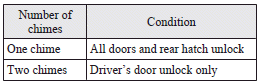
1. Turn the ignition switch to the “LOCK” position. If you started the engine with the key, remove the key from the ignition switch.
2. Place the combination headlamps switch and dipper switch in the “OFF” position, and leave the driver’s door open.
3. Press the LOCK switch (1) for 4 to 10 seconds and press the UNLOCK switch (2) during this time.
4. Release in sequence the LOCK and UNLOCK switches within 10 seconds of pressing the LOCK switch in step 3.
Note
► On vehicles equipped with Mitsubishi Multi- Communication System (MMCS), screen operations can be used to make the adjustment.
Refer to the separate owner’s manual for details.
Procedure for replacing the remote control switch battery
1. Before replacing the battery, remove static electricity from your body by touching a metal grounded object.
2. With the MITSUBISHI mark facing you, insert the cloth-covered tip of a straight blade (or minus) screwdriver into the notch in the case and use it to open the case.
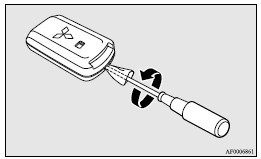
Note
► Be sure to perform the procedure with the MITSUBISHI mark facing you. If the MITSUBISHI mark is not facing you when you open the case, the transmitter may come out.
3. Remove the old battery.
4. Install a new battery with the + side (A) up.
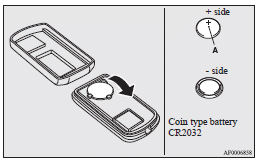
5. Close the case firmly.
6. Check the keyless operation function to see that it works.
Note
► You may purchase a replacement battery at an electric appliance store.
► A MITSUBISHI MOTORS Authorized Service Point can replace the battery for you if you prefer.
Caution
► When the remote control switch case is opened, be careful to keep water, dust, etc. out. Also, do not touch the internal components.
Download Manual