Battery
The condition of the battery is very important for quick starting of the engine and proper functioning of the vehicle’s electrical system. Regular inspection and care are especially important in cold weather.
 Warning
► An SRS airbag sensor is located in the front of the engine compartment near the battery.
When checking or replacing the battery, or when working around this area, do not strike or damage this sensor.
Removing and installing the battery upper cover (Petrol-powered vehicles equipped with turbocharger)
Warning
► Turn the ignition key to the “LOCK” position on the vehicle. Make sure that your clothes cannot be caught by the fan or drive belt. Personal injury could result.
To remove
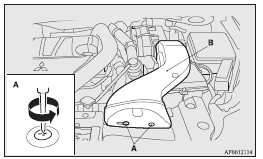
1. Remove the clips (A), and then remove the air duct (B).
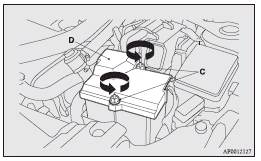
2. Turn the plastic nuts (C) anticlockwise, and then remove the battery upper cover (D).
 Note
Note
► Be careful not to lose the removed plastic nuts.
To install
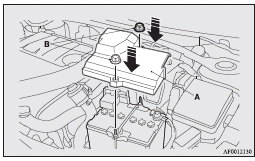
1. Install the battery upper cover (A) onto the battery, and then push the plastic nuts (B) in the direction shown by the arrows to secure the cover.
Note
► Be sure to install the plastic nuts in the correct direction.
► Make sure that the battery upper cover is installed securely.
2. To install the air duct, perform the removal steps in reverse.
 Caution
► Be sure to install the battery upper cover.
Otherwise, the battery electrolyte may spill and cause a malfunction.
► When installing the battery upper cover, plastic nuts, and air duct, do not touch the cooling fan or other moving parts in the engine compartment. Be especially careful that the cables, your clothing or hair, etc., do not get caught in the cooling fan or other moving parts.
Checking battery electrolyte level
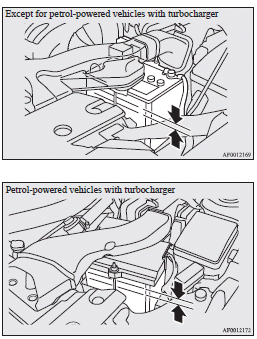
The electrolyte level must be between the specified limit on the outside of the battery. Replenish with distilled water as necessary.
The inside of the battery is divided into several compartments; remove the cap from each compartment and fill to the upper mark. Do not top up beyond the upper mark because spillage during driving could cause damage.
Check the electrolyte level at least once every 4 weeks, depending on the operating conditions.
If the battery is not used, it will discharge by itself with time.
Check it once every 4 weeks and charge with low current as necessary.
Note
► For petrol-powered vehicles with turbocharger, the battery upper cover does not need to be removed to check the battery electrolyte level.
During cold weather
The capacity of the battery is reduced at low temperatures.
This is an inevitable result of its chemical and physical properties.
This is why a very cold battery, particularly one that is not fully charged, will only deliver a fraction of the starter current which is normally available.
We recommend you to have the battery checked before the start of cold weather and, if necessary, have it charged or replaced.
This does not only ensure reliable starting, but a battery which is kept fully charged also has a longer life.
Disconnection and connection
To disconnect the battery cable, stop the engine, first disconnect the negative (-) terminal and then the positive (+) terminal.
When connecting the battery, first connect the positive (+) terminal and then the negative (-) terminal.
Note
► For petrol-powered vehicles with turbocharger, remove the battery upper cover before disconnecting the terminal of battery. Refer to “Removing and installing the battery upper cover”.
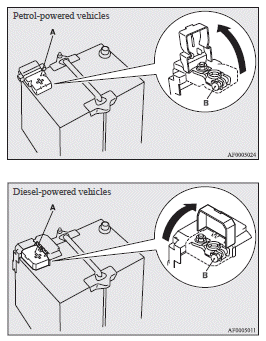
► Open the terminal cover (A) before disconnecting or connecting the positive (+) terminal of the battery.
► Loosen the nut (B), and then disconnect the battery cable from the positive (+) terminal.
Warning
► Keep sparks, cigarettes, and flames away from the battery because the battery could explode.
► The battery electrolyte is extremely caustic.
Do not allow it to come in contact with your eyes, skin, clothing, or the painted surfaces of the vehicle.
Spilt electrolyte should be flushed immediately with ample amounts of water.
Irritation to eyes or skin from contact with electrolyte requires immediate medical attention.
► Ventilate when charging or using the battery in an enclosed space.
Caution
► Keep it out of reach of children.
► Never disconnect the battery when the ignition switch is in the “ON” position. Doing so could damage electric components.
► Never short-circuit the battery. This could cause it to overheat and be damaged.
► If the battery is to be quick-charged, first disconnect the battery cables.
► In order to prevent a short circuit, be sure to disconnect the negative (-) terminal first.
► Always wear protective eye goggles when working near the battery.
► Do not bring the nearby parts, the plastic parts and so on into contact with sulphuric acid (battery electrolyte) which may crack, stain or discolour them.
If they are in contact, wipe off with soft cloth, chamois or the like and an aqueous solution of neutral detergent then immediately rinse the affected parts with plenty of water.
Note
► Keep the terminals clean. After the battery is connected, apply terminal protection grease.
To clean the terminals, use lukewarm water.
► Check to see if the battery is securely installed and cannot be moved during travel. Also check each terminal for tightness.
► When the vehicle is to be left unused for a long period of time, remove the battery and store it in a place where the battery fluid will not freeze. The battery should be stored only in a fully charged condition.
Download Manual