Ignition switch
[For vehicles equipped with keyless operation system]
For information on operations for vehicles equipped with the keyless operation system, refer to “Keyless operation system: Ignition switch” on pages 1-11 and 1-18.
[Except for vehicles equipped with keyless operation system]
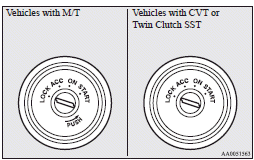
LOCK
The engine is stopped and the steering wheel locked. The key can only be inserted and removed in this position.
ACC
The engine is stopped, but the audio system and other electric devices can be operated.
ON
The engine is running, and all the vehicle’s electrical devices can be operated.
START
The starter motor operates. After the engine has started, release the key and it will automatically return to the “ON” position.
 Note
Note
► Your vehicle is equipped with an electronic immobilizer.
To start the engine, the ID code transmitted by the transponder inside the key must match the code registered in the immobilizer computer.
Refer to “Electronic immobilizer (Antitheft starting system)”.
ACC power auto-cutout function
After about 30 minutes has elapsed with the ignition switch in the “ACC” position, the function automatically cuts out the power for the audio system and other electric devices that can be operated with that position.
When the ignition switch is turned from the “ACC” position, the power is supplied again to those devices.
Note
► It is possible to modify functions as follows:
• The time until the power cuts out can be changed to approximately 60 minutes.
• The ACC power auto-cutout function can be deactivated.
For details, we recommend you to consult a MITSUBISHI MOTORS Authorized Service Point.
On vehicles equipped with MITSUBISHI Multi-Communication System (MMCS), screen operations can be used to make the adjustment.
Refer to the separate owner’s manual for details.
To remove the key
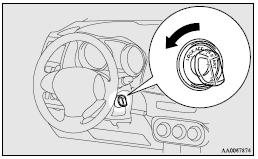
For vehicles equipped with a M/T, when removing the key, push the key in at the “ACC” position and keep it depressed until it is turned to the “LOCK” position, and remove it.
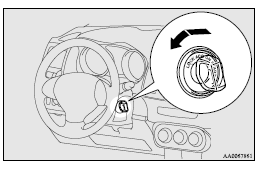
For vehicles with CVT or Twin Clutch SST, when removing the key, first set the selector lever (CVT) or gearshift lever (Twin Clutch SST) to the “P” (PARK) position, and then turn the key to the “LOCK” position and remove it.
 Caution
► Do not remove the ignition key from the ignition switch while driving. The steering wheel will be locked, causing loss of control.
► If the engine is stopped while driving, the brake servomechanism will cease to function and braking efficiency will deteriorate.
Also, the power steering system will not function and it will require greater manual effort to operate the steering.
► Do not leave the key in the “ON” position for a long time when the engine is not running, doing so will cause the battery to be discharged.
► Do not turn the key to the “START” position when the engine is running, doing so could damage the starter motor.
Download Manual