Central door locks
Type 1 (Vehicles equipped with the central door lock switch)
 Note
Note
► Each of the doors can be locked or unlocked independently by using the inside lock knob.
► When locking or unlocking with the key on the driver’s door, only the driver’s door will lock or unlock.
► Repeated continuous operation between lock and unlock could activate the central door locking systems built-in protection circuit and prevent the system from operating. If this occurs, wait approximately 1 minute before operating the central door lock switch.
► When the driver’s door is open, neither the key nor the central door lock switch can be used to lock it.
Using the central door lock switch
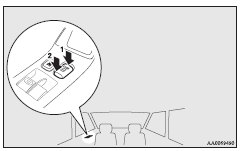
1- Lock
2- Unlock
All doors can be locked or unlocked by pressing the central door lock switch on the driver’s door.
Type 2 (Except for vehicles equipped with the central door lock switch)
Note
► Each of the doors can be locked or unlocked independently by using the inside lock knob (except for the driver’s door).
► Repeated continuous operation between lock and unlock could activate the central door locking systems built-in protection circuit and prevent the system from operating. If this occurs, wait about 1 minute before operating the inside lock knob or the key.
Using the key on the driver’s door
Using the key on the driver’s door locks or unlocks all doors and rear hatch.
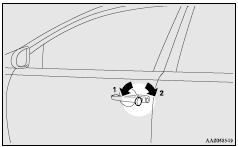
1- Lock
2- Unlock
Using the inside lock knob on the driver’s door
Using the inside lock knob on the driver’s door locks or unlocks all doors and rear hatch.
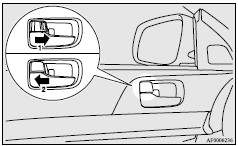
1- Lock
2- Unlock
To unlock the doors and rear hatch
You can select the function to unlock the doors and rear hatch either using the ignition switch position or using the selector lever position (CVT) or the gearshift lever position (Twin Clutch SST).
These functions are not activated when the vehicle is shipped from the factory. To activate or deactivate these functions, please contact a MITSUBISHI MOTORS Authorized Service Point.
Using the ignition switch position
All doors and rear hatch will unlock whenever the ignition switch is turned to the “LOCK” position.
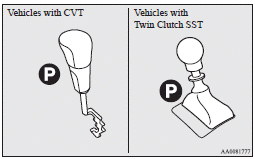
Using the selector lever position (CVT) or the gearshift lever (Twin Clutch SST) position
All doors and rear hatch will unlock whenever the selector lever (CVT) or the gearshift lever (Twin Clutch SST) is moved to the “P” (PARK) position with the ignition switch in the “ON” position.
Note
► On vehicles equipped with MITSUBISHI Multi-Communication System (MMCS), screen operations can be used to make the adjustment.
Refer to the separate owner’s manual for details.
Download Manual