Multi-information display
Except for vehicles equipped with Twin Clutch SST
Always stop the vehicle in a safe place before operating.
The following information is included on the multi-information display: warnings, odometer, tripmeter, service reminder, engine coolant temperature, fuel remaining, outside temperature, selector lever position, average and momentary fuel consumption, driving range, average speed and meter illumination.
It is also possible to change elements such as the language and units used on the multi-information display.
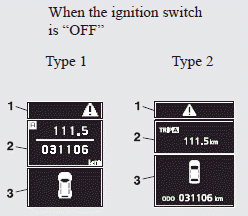
1-mark display screen (when the ignition switch is “OFF”) ®
2- Information screen (when the ignition switch is “OFF“) ®
Interrupt display screen (when the ignition switch is “OFF”) ®
3- Door ajar warning display screen (when the ignition switch is “OFF”) ®
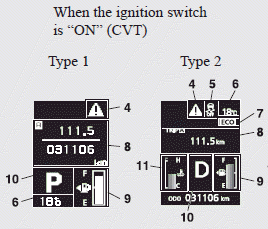
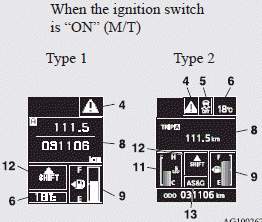
4- ACD (Active centre differential system) control mode display screen ®
5. Outside temperature display screen ®
6- mark display screen (when the ignition switch is “ON”) ®
7- Information screen (when the ignition switch is “ON”) ®
Interrupt display screen (when the ignition switch is “ON”) ®
8. Fuel remaining display screen ®
9- Twin Clutch SST control mode display screen ®
10- Engine coolant temperature display ®
11- Gearshift lever position display screen ®
12- Active Stability Control (ASC) OFF display screen ®
13. ECO mode indicator (except for vehicles for Russia, Kazakhstan and Ukraine) ®
Instruments and controls
 Note
Note
► The fuel units, temperature units, display language, and other settings can be changed.
Refer to “Changing the function settings (when the ignition switch is “ON”)”.
► The display screen is different depending on whether the ignition switch is “OFF” or “ON”.
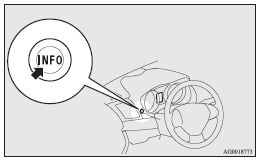
Multi-information meter switch
Each time the multi-information meter switch is operated, a sound is emitted and the multi-information display changes between information such as warnings, odometer, tripmeter, service reminder, engine coolant temperature (Type 1), average and momentary fuel consumption, driving range, average speed, and ACD (Active centre differential system) operation display.
It is also possible to change elements such as the language and units used on the multi-information display by operating the multi-information meter switch.
Mark display screen (when the ignition switch is “OFF”)

If you press the multi-information meter switch and return from the warning display screen to the previous screen, the mark is displayed.
Refer to “To return to the screen displayed before the warning” on page.
This mark is also displayed if there is another warning other than the one displayed.
When the cause of the warning display is eliminated, the mark goes out automatically.
Note
► When the mark is displayed, the warning display screen can be redisplayed on the information screen.
Refer to “Information screen (when the ignition switch is “OFF“)”.
Refer to “Information screen (when the ignition switch is “ON”)”.
Information screen (when the ignition switch is “OFF“)
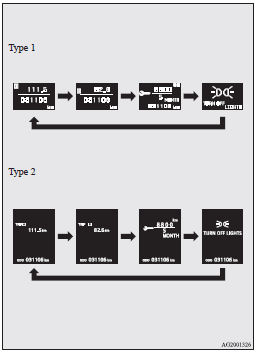
Each time you lightly press the multi-information meter switch, the display screen switches in the following order.
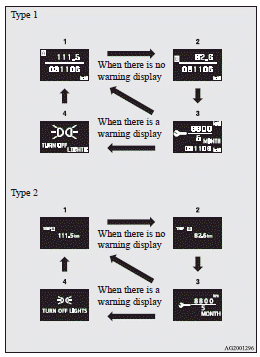
1- Odometer (Type 1)/Tripmeter 
2- Odometer (Type 1)/Tripmeter 
3- Service reminder
4- Redisplay of a warning display screen
Odometer/Tripmeter
Each time you lightly press the multi-information meter switch, the display screen switches.
Odometer/Tripmeter → Odometer/Tripmeter → Service reminder → Redisplay of a warning display screen → Odometer/Tripmeter
Odometer
The odometer indicates the distance travelled.
Tripmeter
The tripmeter indicates the distance travelled between two points.
Example usage of tripmeter and tripmeter It is possible to measure two currently travelled distances, from home using tripmeter and from a particular point on the way using tripmeter .
To reset the tripmeter
To return the display to 0, hold down the multi-information meter switch for about 2 seconds or more. Only the currently displayed value will be reset.
Example
If tripmeter is displayed, only tripmeter will be reset.
Note
► If there is no warning display, the switching sequence is: Odometer/Tripmeter → Odometer/ Tripmeter → Service reminder → Odometer/Tripmeter .
► Both tripmeters and can count up to 9999.9 km (9999.9 miles).
When a tripmeter goes past 9999.9 km (9999.9 miles), it returns to 0.0 km (0.0 miles).
► When disconnecting the battery terminal, the memories of tripmeter display and display are erased, and their displays return to 0.0 km (0.0 miles).
Service reminder
This displays the distance and number of months until the next periodic inspection.
Refer to “Service reminder”.
Interrupt display screen (when the ignition switch is “OFF”)
When there is information to be announced, such as lamp reminders, the buzzer sounds and the multiinformation display switches to the warning display screen. Refer to the appropriate page and take the necessary measures.
When the cause of the warning display is eliminated, the warning display goes out automatically.
Refer to “Warning display list (when the ignition switch is “OFF”)”.
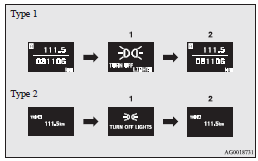
1- Information generated
2- Cause eliminated
To return to the screen displayed before the warning display
Even if the cause of the warning display is not eliminated, you can return to the screen that was displayed before the warning display.
If you press the multi-information meter switch, the display screen switches to the screen that was displayed before the warning display and the  mark (A) is displayed.
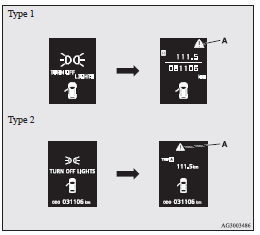
Note
► Warning display screens with a  or
or  mark displayed in the upper right of the screen can be switched. If you want to switch the display, press the multi-information meter switch as follows.
: Press lightly.
: Press for about 2 seconds or more.
Redisplay of a warning display screen
When the mark  is displayed, if you lightly press the multi-information meter switch a few times, the warning display screen you switched from is displayed again. Refer to “Information screen (when the ignition switch is “OFF“)”.
Door ajar warning display screen (when the ignition switch is “OFF”)
If any of the doors or the rear hatch is not completely closed, this displays the open door or rear hatch.
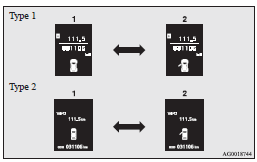
1- Doors and rear hatch are closed
2- Doors or rear hatch is open
Information screen (when the ignition switch is turned from “OFF” to “ON”)
When the ignition switch is turned to the “ON” position, the display screen switches in the following order.
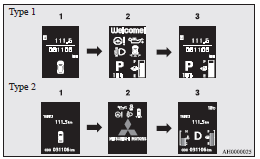
1- Screen when the ignition switch is “OFF”
2- System check screen
3- Screen when the ignition switch is “ON”
System check screen
When the ignition switch is turned to the “ON” position, the system check screen is displayed for about 4 seconds. If there is no fault, information screen (when the ignition switch is “ON” ) is displayed.
If there is a fault, the screen changes to warning display.
Refer to “Warning display list (when the ignition switch is “ON”)”.
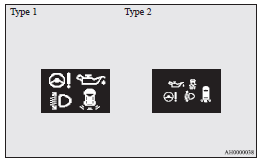
Note
► The system check screen display varies depending on the customer’s equipment.
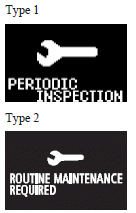
Service reminder
When the time for periodic inspection arrives, the warning display is displayed for a few seconds after the ignition switch “ON”. Refer to “Service reminder”.
ACD (Active centre differential system) control mode display screen

The ACD operation status is displayed.
Refer to “ACD control mode switch”.
Mark display screen (when the ignition switch is “ON”)

This is displayed when you press the multi- information meter switch and switch the warning display screen.
This mark is also displayed if there is another warning other than the one displayed.
When the cause of the warning display is eliminated, the  mark goes out automatically.
Note
► When the mark is displayed, the warning display screen can be redisplayed on the information screen.
Refer to “Information screen (when the ignition switch is “OFF“)”.
Refer to “Information screen (when the ignition switch is “ON”)”.
Active Stability Control (ASC) OFF display screen

This is displayed when the Active Stability Control (ASC) is turned off with the ASC OFF switch.
If there is a fault with the ASC, the ASC OFF display is shown.
Refer to ““ASC OFF” switch”.
Information screen (when the ignition switch is “ON”)
Each time you lightly press the multi-information meter switch, the display screen switches in the following order.
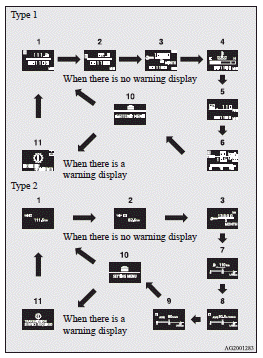
1- Odometer (Type 1)/Tripmeter
2- Odometer (Type 1)/Tripmeter
3- Service reminder
4- Engine coolant temperature display (Type 1)
5- Driving range display (Type 1)
6- Average speed display, average fuel consumption display, momentary fuel consumption display (Type 1)
7- Driving range display, momentary fuel consumption display (Type 2)
8- Average fuel consumption display, momentary fuel consumption display (Type 2)
9- Average speed display, momentary fuel consumption display (Type 2)
10- Function setting screen
11- Redisplay of a warning display screen
Note
► While driving, even if you operate the multiinformation meter switch, the function setting screen is not displayed. Always stop the vehicle in a safe place before operating.
Refer to “Changing the function settings (when the ignition switch is “ON”)”.
► When there is information to be announced, such as a system fault, the buzzer sounds and the screen display is switched.
Refer to “Interrupt display screen (when the ignition switch is “ON”)”.
Odometer/Tripmeter
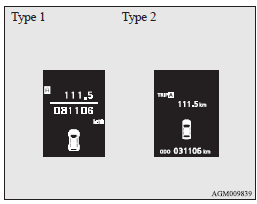
The operation method is the same as when the ignition switch is “OFF”.
Refer to “Odometer/Tripmeter” for further details.
Service reminder
This displays the distance and number of months until the next periodic inspection.
Refer to “Service reminder”.
Engine coolant temperature display
This indicates the engine coolant temperature.
If the coolant becomes hot,  will blink.
Pay careful attention to the engine coolant temperature display while you are driving.
 Caution
► If the engine is overheating, will blink. In this case, the bar graph is on the red zone.
lmmediately park the vehicle in a safe place and take the required measures. Refer to “Engine overheating”
Driving range display
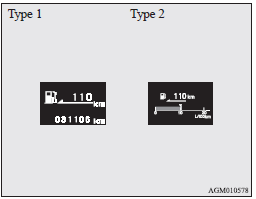
This displays the approximate driving range (how many more kilometres or miles you can drive).
When the driving range falls below approximately 50 km (30 miles), “---” is displayed. Refuel as soon as possible.
Note
► The driving range is determined based on the fuel consumption data. This may vary depending on the driving conditions and habits.
Treat the distance displayed as just a rough guideline.
► When you refuel, the driving range display is updated.
However, if you only add a small amount of fuel, the correct value will not be displayed.
Fill with a full tank whenever possible.
► On rare occasions, the value displayed for the driving range may change if you are parked on an extremely steep incline. This is due to the movement of fuel in the tank and does not indicate a malfunction.
► The display setting can be changed to the preferred units (km or miles).
Refer to “Changing the function settings (when the ignition switch is “ON”)”.
Average speed display
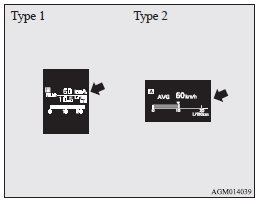
This displays the average speed from the last reset to the present time.
There are the following 2 mode settings.
For the method for changing the average speed display setting, refer to “Changing the function settings (when the ignition switch is “ON”)”.
Manual reset mode
► When the average speed is being displayed, if you hold down the multi-information meter switch, the average speed displayed at that time is reset.
► When the ignition switch is switched from “ACC” or “LOCK” to “ON”, the mode setting is automatically switched from manual to auto.
Switching to auto occurs automatically. If switching to manual mode is done, however, the data from the last reset is displayed.
Auto reset mode
► When the average speed is being displayed, if you hold down the multi-information meter switch, the average speed displayed at that time is reset.
► If the ignition switch is at “ACC” or “LOCK” for about 4 hours or longer, the average speed display is automatically reset.
Note
► The average speed display and the average fuel consumption display can be reset individually for the auto reset mode and manual reset mode.
► “---” is displayed when the average speed cannot be measured.
► The initial (default) setting is “Auto reset mode”.
► The display setting can be changed to the preferred units (km/h or mph).
Refer to “Changing the function settings (when the ignition switch is “ON”)”.
► The memory of the auto reset mode or manual reset mode for the average speed display is erased if the battery is disconnected.
Average fuel consumption display
This displays the average fuel consumption from the last reset to the present time.
There are the following 2 mode settings.
For information on how to change the average fuel consumption display setting, refer to “Changing the function settings (when the ignition switch is “ON”)”.
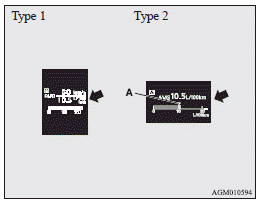
The  mark (A) in the momentary fuel gauge shows the average fuel consumption.
Manual reset mode
► When the average fuel consumption is being displayed, if you hold down the multi-information meter switch, the average fuel consumption displayed at that time is reset.
Instruments and controls
► When the ignition switch is switched from “ACC” or “LOCK” to “ON”, the mode setting is automatically switched from manual to auto.
Switching to auto occurs automatically. If switching to manual mode is done, however, the data from the last reset is displayed.
Auto reset mode
► When the average fuel consumption is being displayed, if you hold down the multi-information meter switch, the average fuel consumption displayed at that time is reset.
► If the ignition switch is at “ACC” or “LOCK” for about 4 hours or longer, the average fuel consumption display is automatically reset.
Note
► The average speed display and the average fuel consumption display can be reset individually for the auto reset mode and manual reset mode.
► “---” is displayed when the average fuel consumption cannot be measured.
► The initial (default) setting is “Auto reset mode”.
► The average fuel consumption depends on the driving condition (road condition, driving behavior, etc.). The displayed fuel consumption may vary from the actual fuel consumption.
Treat the fuel consumption displayed as just a rough guideline.
► The memory of the auto reset mode or manual reset mode for the average fuel consumption display is erased if the battery is disconnected.
► The display setting can be changed to the preferred units {km/L, mpg (US), mpg (UK) or L/100 km}.
Refer to “Changing the function settings (when the ignition switch is “ON”)”.
Momentary fuel consumption display
While driving, this displays the momentary fuel consumption, using a bar graph.
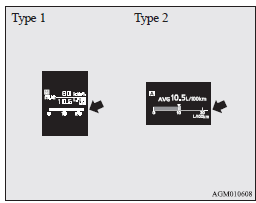
When the momentary fuel consumption surpasses the average fuel consumption, the momentary fuel consumption is displayed with a green bar graph.
(Type 2) Be conscious of maintaining the momentary fuel consumption above the average fuel consumption, it can help you drive with the better fuel consumption.
Note
► When the momentary fuel consumption cannot be measured, the bar graph is not displayed.
► The display setting can be changed to the preferred units {km/L, mpg (US), mpg (UK) or L/100 km}.
Refer to “Changing the function settings (when the ignition switch is “ON”)”.
► It is posible to cancel the green bar graph.
Refer to “Changing the function settings (when the ignition switch is “ON”)”.
Function setting screen

The “Display language”, “Temperature unit”, “Fuel consumption unit”, and “Average fuel consumption and speed reset method” etc. settings can be modified as desired.
Refer to “Changing the function settings (when the ignition switch is “ON”)” for further details.
Interrupt display screen (when the ignition switch is “ON”)
Warning display
When there is information to be announced, such as a system fault, a sound is emitted and the information screen switches to the warning display screen.
Refer to the warning list and take the necessary measures.
Refer to “Warning display list (when the ignition switch is “ON”)”.
When the cause of the warning display is eliminated, the warning display goes out automatically.
To return to the screen displayed before the warning display
Even if the cause of the warning display is not eliminated, you can return to the screen that was displayed before the warning display.
If you press the multi-information meter switch, the display screen switches to the screen that was displayed before the warning display and the mark (A) is displayed.
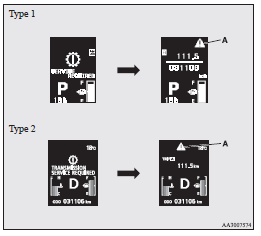
Note
► Warning display screens with a  or
or  mark displayed in the upper right of the screen can be switched. If you want to switch the display, press the multi-information meter switch as follows.
 : Press lightly.
 : Press for about 2 seconds or more.
Redisplay of a warning display screen
When the mark is displayed, if you lightly press the multi-information meter switch a few times, the warning display screen you switched from is displayed again.
Other interrupt displays
The operation status of each system is displayed on the information screen.
Refer to the appropriate page in the warning display list for further details.
Refer to “Other interrupt displays (when the ignition switch is “ON”)”.
Selector lever position display screen (vehicles with CVT)/ Gearshift lever position display screen (vehicles with Twin Clutch SST)

Shows the position of the selector lever or gearshift lever.
Refer to “Selector lever operation”.
Refer to “Gearshift lever position display”.
Outside temperature display screen

This shows the temperature outside the vehicle.
Note
► The display setting can be changed to the preferred units (°C or °F).
Refer to “Changing the function settings (when the ignition switch is “ON”)”.
► Depending on factors such as the driving conditions, the displayed temperature may vary from the actual outside temperature.
Twin Clutch SST control mode display screen (vehicles equipped with Twin Clutch SST)

The operation status of the Twin Clutch SST control mode is displayed.
Refer to “Twin Clutch SST control mode”.
Fuel remaining display screen
Caution
► Do not run out of fuel, or the catalytic converter may be adversely affected. If the warning display appears, refuel as soon as possible.
Note
► It may take several seconds to stabilise the display after refilling the tank.
► If fuel is added with the ignition switch in the “ON” position, the fuel gauge may incorrectly indicate the fuel level.
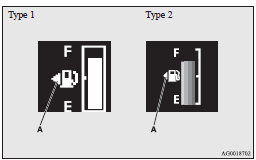
Fuel lid mark
The arrow (A) indicates that the fuel tank filler is located on the left side of the body.
Fuel remaining warning display
When the fuel is reduced to about 8 litres, the information screen switches to the interrupt display of the fuel remaining warning display, and the  mark (B) on the fuel remaining display flashes slowly (about once per second). After a few seconds, the information screen returns from the fuel remaining warning display to the previous screen.
When the fuel is reduced further to about 5 litres, the information screen switches to the fuel remaining warning display and the  mark (B) on the fuel remaining display flashes quickly (about twice per second).
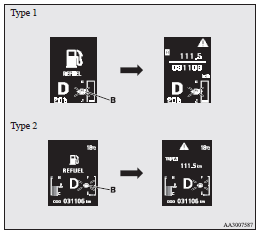
Note
► On inclines or curves, the display may be incorrect due to the movement of fuel in the tank.
ECO mode indicator (for vehicles equipped with CVT or Twin clutch SST)

Except for vehicles for Russia, Kazakhstan and Ukraine, this indicator will be displayed when fuel-efficient driving is achieved.
Service reminder
Displays the approximate time until the next periodic inspection that MITSUBISHI MOTORS recommends.
“---” is displayed when the inspection time has arrived.
Note
► Depending on the vehicle specifications, the displayed time until the next periodic inspection may differ from that recommended by MITSUBISHI MOTORS.
In addition, the display settings for the next periodic inspection time can be modified.
To modify the display settings, have it adjusted at a MITSUBISHI MOTORS Authorized Service Point.
For more details, consult a MITSUBISHI MOTORS Authorized Service Point.
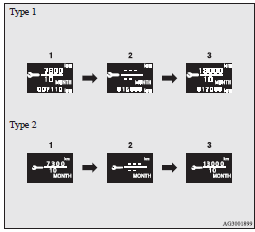
1. Displays the time until the next periodic inspection.
Note
► The distance is shown in units of 100 km (100 miles). The time is shown in units of months.
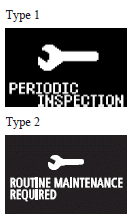
2. This informs you that a periodic inspection is due. We recommend you to consult a MITSUBISHI MOTORS Authorized Service Point.
At that time, when the ignition switch is switched from “OFF” to “ON”, the warning display is displayed for a few seconds on the information screen.
3. After your vehicle is inspected at a MITSUBISHI MOTORS Authorized Service Point, it displays the time until the next periodic inspection.
To reset
The “---” display can be reset while the ignition switch is “OFF”. When the display is reset, the time until the next periodic inspection is displayed and the warning display is no longer displayed when the ignition switch is switched from “OFF” to “ON”.
1. When you lightly press the multi-information meter switch a few times, the information screen switches to the service reminder display screen.
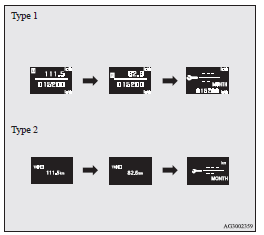
2. Press and hold the multi-information meter switch for about 2 seconds or more to display  and make it flash. (If there is no operation for about 10 seconds with flashing, the display returns to the previous screen.)
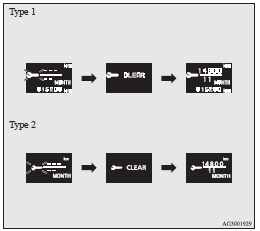
3. Lightly press the multi-information meter switch while the icon is flashing to change the display from “---” to “CLEAR”. After this, the time until the next periodic inspection will be displayed.
Caution
► The customer is responsible for making sure that periodic inspection and maintenance are performed. Inspections and maintenance must be performed to prevent accidents and malfunctions.
Note
► “---” display cannot be reset when the ignition switch is “ON”.
► When “---” is displayed, after a certain distance and a certain period of time, the display is reset and the time until the next periodic inspection is displayed.
► If you accidentally reset the display, we recommend you to consult a MITSUBISHI MOTORS Authorized Service Point.
Door ajar warning display screen (when the ignition switch is “ON”)
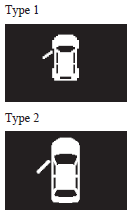
If any of the doors or the rear hatch is not completely closed, this displays the open door or rear hatch.
If the vehicle speed exceeds approximately 8 km/h (5 mph) while a door is ajar, a buzzer sounds 4 times. This notifies the driver that a door is ajar.
Caution
► Before moving your vehicle, check that the warning lamp is OFF.
Note
► In order to prevent the battery from running down, the lamp goes out automatically if you leave the door open for a long time.
Refer to “Lamps (room lamps, etc.) auto-cutout function”.
Changing the function settings (when the ignition switch is “ON”)
1. Stop the vehicle in a safe place.
Firmly apply the parking brake and put the gearshift lever into the “N” (Neutral) position (M/T), the selector lever into the “P” (PARK) position (CVT) or the gearshift lever into the “P” (PARK) position (Twin Clutch SST).
2. Lightly press the multi-information meter switch a few times to switch the information screen to the function setting screen. Refer to “Information display (when the ignition switch is “ON”)”.
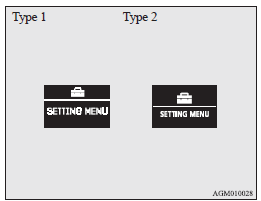
Caution
► For safety, stop the vehicle before operating.
While driving, even if you operate the multi- information meter switch, the function setting screen is not displayed.
3. Press and hold the multi-information meter switch for about 2 seconds or more to switch from the setting mode screen to the menu screen.
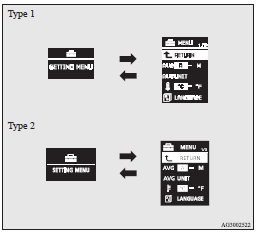
Note
► To return the menu screen to the function setting screen, press and hold the multi-information meter switch for about 2 seconds or more.
► If no operations are made within about 15 seconds of the menu screen being displayed, the display returns to the function setting screen.
4. Select the item to change on the menu screen and change to the desired setting. Refer to the following items for further details on the operation methods.
Changing the reset mode for average fuel consumption and average speed
The mode conditions for the average fuel consumption and average speed display can be switched between “Auto reset” and “Manual reset”.
1. Press and hold the multi-information meter switch for about 2 seconds or more to switch from the setting mode screen to the menu screen.
Refer to “Changing the function settings (when the ignition switch is “ON”)”.
2. Lightly press the multi-information meter switch to select “AVG (average fuel consumption and average speed setting)”.
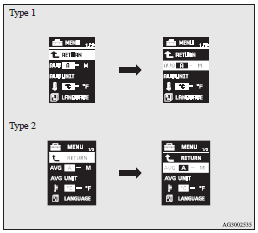
3. Press and hold the multi-information meter switch for about 2 seconds or more to switch in sequence from A or 1 (Auto reset mode) → M, 2 or P (Manual reset mode) → A or 1 (Auto reset mode).
The setting is changed to the selected mode condition.
Manual reset mode
► When the average fuel consumption and average speed are being displayed, if you hold down the multi-information meter switch, the average fuel consumption and average speed displayed at that time are reset.
► When the ignition switch is switched from “ACC” or “LOCK” to “ON”, the mode setting is automatically switched from manual to auto.
Switching to auto occurs automatically. If switching to manual mode is done, however, the data from the last reset is displayed.
Auto reset mode
► When the average fuel consumption and average speed are being displayed, if you hold down the multi-information meter switch, the average fuel consumption and average speed displayed at that time are reset.
► If the ignition switch is at “ACC” or “LOCK” for about 4 hours or longer, the average fuel consumption display and average speed display are automatically reset.
Note
► The memory of the auto reset mode or manual reset mode for the average speed display is erased if the battery is disconnected.
► The initial (default) setting is “Auto reset mode”.
Changing the fuel consumption display unit
The display unit for fuel consumption can be switched.
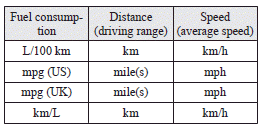
The distance, speed, and amount units are also switched to match the selected fuel consumption unit.
1. Press and hold the multi-information meter switch for about 2 seconds or more to switch from the setting mode screen to the menu screen.
Refer to “Changing the function settings (when the ignition switch is “ON”)”.
2. Lightly press the multi-information meter switch to select “AVG UNIT (fuel consumption display setting)”.
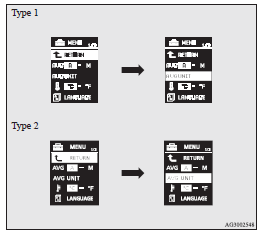
3. Press and hold the multi-information meter switch for about 2 seconds or more to display “AVG UNIT” (fuel consumption display unit setting).
4. Lightly press the multi-information meter switch to switch in sequence from km/L → L/100 km → mpg (US) → mpg (UK) → RETURN → km/L.
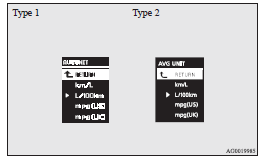
5. Press and hold the multi-information meter switch for about 2 seconds or more to change the setting to the selected unit.
Note
► The display units for the driving range, the average fuel consumption, the average speed and the momentary fuel consumption are switched, but the units for the indicating needle (speedometer), the odometer and the tripmeter will remain unchanged.
► The memory of the unit setting is erased if the battery is disconnected, and it returns automatically to L/100 km.
The distance and speed units are also switched in the following combinations to match the selected fuel consumption unit.
Changing the temperature unit
The display unit for temperature can be switched.
1. Press and hold the multi-information meter switch for about 2 seconds or more to switch from the setting mode screen to the menu screen. Refer to “Changing the function settings (when the ignition switch is “ON”)”.
2. Lightly press the multi-information meter switch to select  (temperature unit setting).
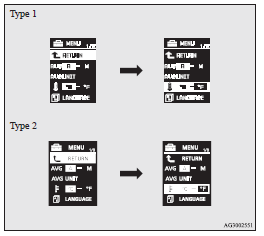
3. Press and hold the multi-information meter switch for about 2 seconds or more to switch in sequence from °C → °F → °C.
The setting is changed to the selected temperature unit.
Note
► If the battery is disconnected, the unit setting is erased from memory and is automatically set to °C.
Changing the display language
The language of the multi-information display can be switched.
1. Press and hold the multi-information meter switch for about 2 seconds or more to switch from the setting mode screen to the menu screen.
Refer to “Changing the function settings (when the ignition switch is “ON”)”.
2. Lightly press the multi-information meter switch to select “LANGUAGE” (language setting).
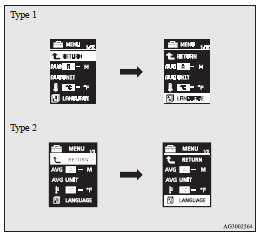
3. Press and hold the multi-information meter switch for about 2 seconds or more to display “LANGUAGE” (language setting).
4. Lightly press the multi-information meter switch to select the desired language.
5. If you hold down the multi-information meter switch for about 2 seconds or more, the setting is changed to the selected language.
Note
► The memory of the language setting is erased if the battery is disconnected, and it returns automatically to ENGLISH or RUSSIAN.
► If “---” is selected in the language setting, a warning message is not displayed when there is a warning display or interrupt display.
Changing the language cooperative control
The language used in MITSUBISHI Multi-Communication System (MMCS) (if so equipped) or the Bluetooth® 2.0 interface (if so equipped) can be changed automatically to the same language as that shown in the multi-information display.
1. Press and hold the multi-information meter switch for about 2 seconds or more to switch from the setting mode screen to the menu screen.
Refer to “Changing the function settings (when the ignition switch is “ON”)”.
2. Lightly press the multi-information meter switch to select  (language cooperative control).
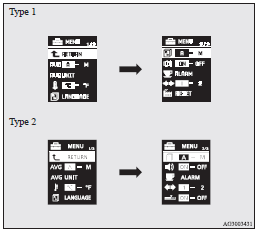
3. Press and hold the multi-information meter switch to switch in sequence from A or 1 (language cooperation enabled) → M, 2 or P (language cooperation disabled) → A or 1 (language cooperation enabled).
The setting is changed to the selected condition.
Note
► The memory of the language cooperative control is erased if the battery is disconnected, and it returns automatically to A or 1 (language cooperation enabled).
► The language display modified with the language setting can be switched in the following manner.
• When A or 1 (language cooperation enabled) has been selected with the language cooperative control, the language for MITSUBISHI Multi-Communication System (MMCS) (if so equipped) or the Bluetooth® 2.0 interface (if so equipped) is automatically changed to the language selected for the multi-information display.
• When M, 2 or P (language cooperation disabled) has been selected with the language cooperative control, the language for MITSUBISHI Multi-Communication System (MMCS) (if so equipped) or the Bluetooth® 2.0 interface (if so equipped) is not automatically changed to the language selected for the multi-information display.
Operation sound setting
You can turn off the operation sounds of the multiinformation meter switch and daytime dipper button.
1. Press and hold the multi-information meter switch for about 2 seconds or more to switch from the setting mode screen to the menu screen.
Refer to “Changing the function settings (when the ignition switch is “ON”)”.
2. Lightly press the multi-information meter switch to select  (operation sound setting).
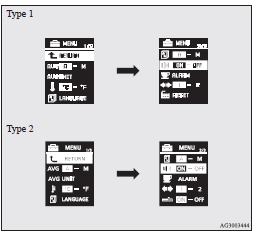
3. Press and hold the multi-information meter switch for about 2 seconds or more to switch in sequence from ON (operation sound on) → OFF (operation sound off) → ON (operation sound on).
The setting is changed to the selected condition.
Note
► The memory of the operation sound setting is erased if the battery is disconnected, and it returns automatically to ON (operation sound on).
► The operation sound setting only deactivates the operation sound of the multi-information meter switch and daytime dipper button. The warning display and other sounds cannot be deactivated.
Changing the time until “REST REMINDER” is displayed
The time until the display appears can be changed.
1. Press and hold the multi-information meter switch for about 2 seconds or more to switch from the setting mode screen to the menu screen.
Refer to “Changing the function settings (when the ignition switch is “ON”)”.
2. Lightly press the multi-information meter switch to select “ALARM” (rest time setting).
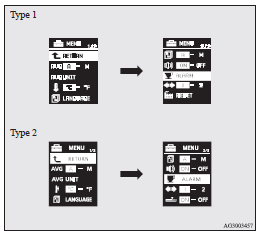
3. Press and hold the multi-information meter switch for about 2 seconds or more to display “ALARM” (rest time setting).
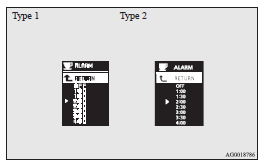
4. Lightly press the multi-information meter switch to select the time until the display.
5. Press and hold the multi-information meter switch for about 2 seconds or more, the setting is changed to the selected time.
Note
► If the battery is disconnected, the unit setting is erased from memory and is automatically set to OFF.
► The drive time is reset when the ignition switch is turned off.
Changing the turn-signal sound
It is possible to change the turn-signal sound.
1. Press and hold the multi-information meter switch for about 2 seconds or more to switch from the setting mode screen to the menu screen.
Refer to “Changing the function settings (when the ignition switch is “ON”)”.
2. Lightly press the multi-information meter switch to select  (changing the turn-signal sound).
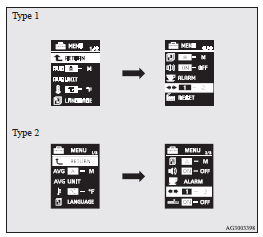
3. Press and hold the multi-information meter switch for about 2 seconds or more to switch in sequence from 1 (turn-signal sound 1) → 2 (turn-signal sound 2) → 1 (turn-signal sound 1).
The setting changes to the selected turn-signal sound.
Changing the momentary fuel consumption display (Type 2)
It is possible to change the bar graph setting of the momentary fuel consumption display.
1. Press and hold the multi-information meter switch for about 2 seconds or more to switch from the setting mode screen to the menu screen.
Refer to “Changing the function settings (when the ignition switch is “ON”)”.
2. Lightly press the multi-information meter switch to select  (changing the momentary fuel consumption display)
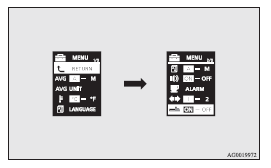
3. Press and hold the multi-information meter switch for about 2 seconds or more to switch in sequence from ON (with the green bar graph) → OFF (without the green bar graph) → ON (with the green bar graph).
The setting changes to the selected bar graph setting.
Returning to the factory settings
All of the function settings can be returned to their factory settings.
1. Press and hold the multi-information meter switch for about 2 seconds or more to switch from the setting mode screen to the menu screen.
Refer to “Changing the function settings (when the ignition switch is “ON”)”.
2. Lightly press the multi-information meter switch to select “RESET” (returning to the factory settings).
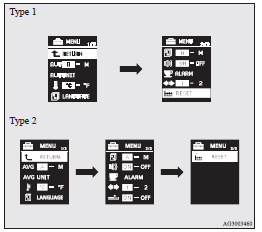
3. When you press and hold the multi-information meter switch for about 5 seconds or more, the buzzer sounds and all of the function settings are returned to the factory settings.
Note
► The factory settings are as follows.
• Average fuel consumption and average speed reset mode: A (Auto reset)
• Fuel consumption display unit: L/100 km
• Temperature unit: °C (Celsius)
• Display language: ENGLISH or RUSSIAN
• Cooperative language setting: A
• Operation sounds: ON (Operation sounds on)
• “REST REMINDER” display: OFF
• Turn-signal sound: Turn-signal sound 1
• Momentary fuel consumption with the green bar graph (Type 2): ON
Download Manual