Instruments
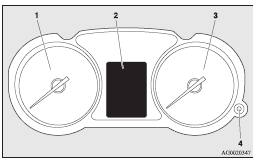
1- Tachometer ®
2- Multi-information display ®
Information screen display list ®
3- Speedometer (km or mph + km/h)
4- Daytime dipper button (meter illumination control) ®
Tachometer
The tachometer indicates the engine speed (r/min).
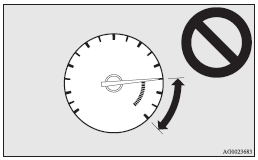
The tachometer helps you to obtain more economical driving and also warns you of excessive engine speeds (Red zone).
 Caution
► When driving, watch the tachometer to make sure that the engine speed indication does not rise into the red zone (excessive engine rpm)
Daytime dipper button (meter illumination control)
Each time you press this button, there is a sound and the brightness of the instruments changes.
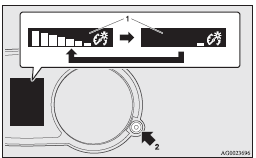
1- Brightness display
2- Rheostat illumination button
 Note
Note
► You can adjust to 8 different levels for when the tail lamps are illuminated and 8 for when they are not.
► If the vehicle is equipped with the automatic lamp control, when the lamp switch is in a position other than the “OFF” position, the meter illumination switches automatically to the adjusted brightness, depending on the brightness outside the vehicle.
► The brightness level of the instruments is stored when the ignition switch is turned off.
► If you press and hold the button for longer than about 1 second when the position lamps are illuminated, the brightness level changes to the maximum level. Pressing and holding the button for longer than about 1 second again returns the brightness level to the previous level.
Download Manual