Dead Lock System
The Dead Lock System helps to prevent theft.
When the keyless entry system or the keyless operation function has been used to lock all of the doors and rear hatch, the Dead Lock System makes it impossible to unlock the doors using the inside lock knobs.
 Caution
► Do not set the Dead Lock System when someone is inside the vehicle. With the Dead Lock System set, it is not possible to unlock the doors using the inside lock knobs. If you erroneously set the Dead Lock System, unlock the doors using the UNLOCK switch on the remote control switch or using the keyless operation function.
Setting the system
1. Turn the ignition switch to the “LOCK” position.
Also, if a key was used to start the engine, remove the key from the ignition switch.
2. Get out of the vehicle. Close all doors and rear hatch.
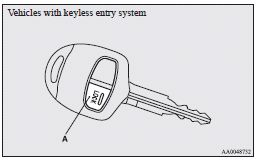
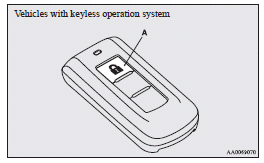
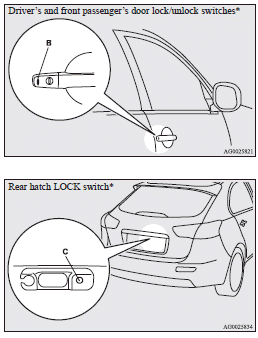
3. Press the LOCK switch (A) on the remote control switch, the driver’s or front passenger’s door lock/unlock switch (B), or the rear hatch LOCK switch (C) to lock all of the doors and rear hatch. The turn-signal lamps will blink once.
4. Press the switch again within 2 seconds.
The turn-signal lamps will blink three times to show that the Dead Lock System has been set.
 Note
Note
► Pressing the LOCK switch (A) on the remote control switch once while the Dead Lock System is set causes the turn-signal lamps to blink three times, so it is possible to confirm that the Dead Lock System is set.
Cancelling the system
When the following operation is performed, the doors and rear hatch will unlock and the Dead Lock System will be simultaneously cancelled.
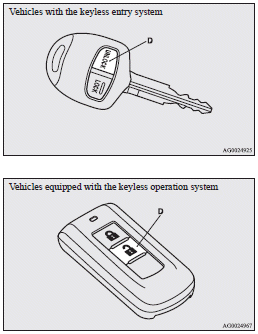
► The UNLOCK switch (D) on the remote control switch is pressed.
► The driver’s or front passenger’s door lock/ unlock switch (B) is pressed while you are carrying the keyless operation key.
► The rear hatch OPEN switch (E) is pressed.
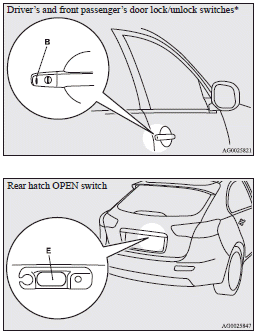
Note
► If neither a door nor rear hatch is opened within 30 seconds of unlocking (except for using the rear hatch OPEN switch), the doors and rear hatch are automatically relocked and the Dead Lock System is simultaneously set again.
► Even when it is not possible to use the keyless entry system or the keyless operation function to unlock the doors, it is possible to use the key to unlock the driver’s door.
When the key is used to unlock the driver’s door, the Dead Lock System is cancelled for only the driver’s door. If you wish to subsequently unlock all other doors, turn the ignition switch to the “ON” or “ACC” position.
► It is possible to adjust the time between pressing the UNLOCK switch (D) on the remote control switch or the driver’s or front passenger’s door lock/unlock switch (B) and automatic locking. For details, please contact a MITSUBISHI MOTORS Authorized Service Point.
On vehicles equipped with MITSUBISHI Multi-Communication System (MMCS), screen operations can be used to make the adjustment.
Refer to the separate owner’s manual for details.
► It is possible to lock the doors and rear hatch and set the Dead Lock System at the same time with a single push of the LOCK switch (A) on the remote control switch, the driver’s or front passenger’s door lock/unlock switch (B), or the rear hatch LOCK switch (C). For details, please contact a MITSUBISHI MOTORS Authorized Service Point.
Testing the system
Open all of the door windows, then set the Dead Lock System. (Refer to “Setting the system”.) After setting the Dead Lock System, reach into the vehicle through a window and confirm that you cannot unlock the doors using the lock knobs.
Note
► If you need advice on how to set the Dead Lock System, please contact a MITSUBISHI MOTORS Authorized Service Point.
Download Manual