What Is Blind Spot Information System
Blind spot information system detects vehicles that may have entered the blind spot zone.
HOW DOES BLIND SPOT INFORMATION SYSTEM WORK
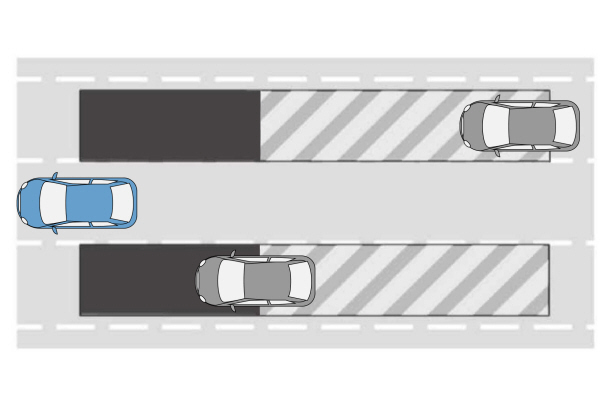
Blind spot information system uses sensors on both sides of your vehicle, detecting rearward from the exterior mirrors to approximately 13 ft (4 m) beyond the rear bumper. The detection area extends to approximately 59 ft (18 m) beyond the rear bumper when the vehicle speed is greater than 30 mph (48 km/h) to alert you of faster approaching vehicles.
BLIND SPOT INFORMATION SYSTEM PRECAUTIONS
 WARNING: Do not use the blind spot information system as a replacement for using the interior and exterior mirrors or looking over your shoulder before changing lanes. The blind spot information system is not a replacement for careful driving. WARNING: The system may not operate properly during severe weather conditions, for example snow, ice, heavy rain and spray. Always drive with due care and attention. Failure to take care may result in a crash. WARNING: Do not use the blind spot information system as a replacement for using the interior and exterior mirrors or looking over your shoulder before changing lanes. The blind spot information system is not a replacement for careful driving. WARNING: The system may not operate properly during severe weather conditions, for example snow, ice, heavy rain and spray. Always drive with due care and attention. Failure to take care may result in a crash. |
Note: Blind spot information system does not prevent contact with other vehicles. It does not detect parked vehicles, pedestrians, animals or other infrastructure.
BLIND SPOT INFORMATION SYSTEM LIMITATIONS
Blind spot information system does not operate in park (P) or reverse (R).
The system may not alert you if a vehicle quickly passes through the detection zone while overtaking.
Note: For vehicles without the trailer coverage feature, we recommend that you switch the blind spot information system off when you attach a trailer.
BLIND SPOT INFORMATION SYSTEM REQUIREMENTS
Blind spot information system turns on when all the following occur:
- You start your vehicle.
- You shift into drive (D).
- The vehicle speed is greater than 6 mph (10 km/h).
SWITCHING BLIND SPOT INFORMATION SYSTEM ON AND OFF - VEHICLES WITH: 12 INCH SCREEN
To switch blind spot information system on or off, use the touchscreen:
- Press Features on the touchscreen.
- Press Driver Assistance.
- Press Blind Spot Information System.
- Switch the feature on or off.
When you switch blind spot information system off, a warning lamp illuminates. When you switch the system on or off, the alert indicators flash twice.
Note: The system remembers the last setting when you start your vehicle.
SWITCHING BLIND SPOT INFORMATION SYSTEM ON AND OFF - VEHICLES WITH: 15 INCH SCREEN
To switch blind spot information system on or off, use the touchscreen:
- Access the vehicle drawer.
- Press SETTINGS.
- Press Driver Assistance.
- Switch Blind Spot Information System on or off.
When you switch blind spot information system off, a warning lamp illuminates. When you switch the system on or off, the alert indicators flash twice.
Note: The system remembers the last setting when you start your vehicle.
Download Manual