Programming the Remote Control - Vehicles With: Push Buttoun start
General Information
You must have two previously programmed remote controls inside your vehicle and the new unprogrammed remote controls readily accessible. Contact an authorized dealer to have the spare remote control programmed if two previously programmed remotes are not available.Make sure that your vehicle is off before beginning this procedure. Make sure that you close all the doors before beginning and that they remain closed throughout the procedure.Perform all steps within 30 seconds of starting the sequence.Stop and wait for at least one minute before starting again if you perform any steps out of sequence.
Read and understand the entire procedure before you begin.
Note: You can program a maximum of four remote controls to your vehicle.
Note: If your programmed remote controls are lost or stolen and you do not have an extra coded remote, you need to have your vehicle towed to an authorized dealer. Store an extra programmed remote away from your vehicle in a safe place to help prevent any inconvenience. Contact an authorized dealer to purchase additional spare or replacement remotes.
Steps for Programming Your Spare Remote Control
Programming Backup Location
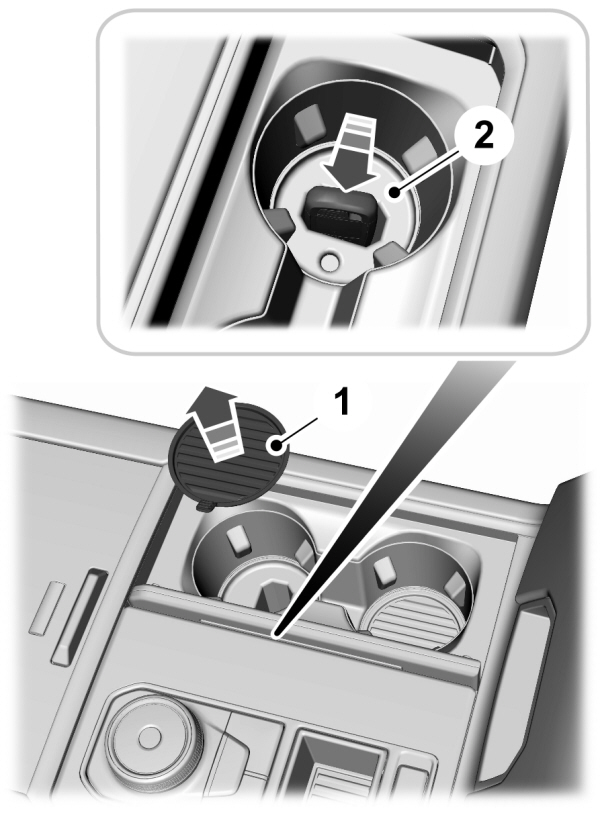
- Access the backup slot.
- Place the first programmed remote in the backup slot with your foot off the brake pedal, press and release the push button ignition switch.
- Wait five seconds and then press and release the push button ignition switch again.
- Remove the remote control.
- Within 10 seconds, place a second programmed remote control in the backup slot.Press and release the push button ignition switch.
- Wait five seconds and then press and release the push button ignition switch again.Keep the ignition on for at least three seconds, but no more than 10 seconds.
- Remove the remote control.
- Place the unprogrammed remote control in the backup slot and press and release the push button ignition switch.
Programming is now complete.With your foot on the brake pedal, press the push button ignition switch to verify the remote control functions operate and your vehicle starts with the new remote control.
If programming was not successful, wait 10 seconds and repeat Steps 1 through 8. If you are still unsuccessful, take your vehicle to an authorized dealer.
Keys and Remote Controls Audible Warnings
Key In Reminder
Sounds when the following conditions are met:
- Vehicle is out of park (P).
- You switch the vehicle off.
- You open the driver's door.
- You have left the key inside the vehicle.
Keys and Remote Controls – Information message
| Message | Action |
|---|---|
|
Key Battery Low Replace Soon |
Replace remote control battery. |
Download Manual