Distance Indication (If Equipped)
WHAT IS DISTANCE INDICATION - VEHICLES WITH: 8 INCH SCREEN
Distance indication displays the gap between your vehicle and the vehicle ahead of you.
Note: The graphic does not display if you switch on cruise control or adaptive cruise control.
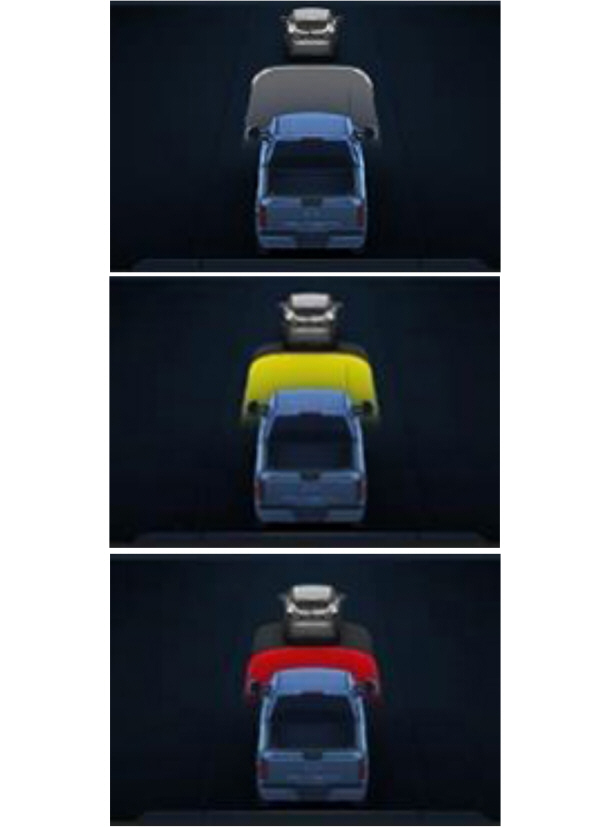
| Vehicle Speed | System Sensitivity | Distance Indicator Color | Distance Gap | Time Gap |
|---|---|---|---|---|
| 62 mph (100 km/h). | Normal. | Gray. | Greater than 82 ft (25 m). | Greater than 0.9 seconds. |
| Yellow. | 56–82 ft (17–25 m). | 0.6-0.9 seconds. | ||
| Red. | Less than 56 ft (17 m). | Less than 0.6 seconds. |
WHAT IS DISTANCE INDICATION - VEHICLES WITH: 12 INCH SCREEN
Distance indication displays the gap between your vehicle and the vehicle ahead of you.
Note: The graphic does not display if you switch on cruise control or adaptive cruise control.
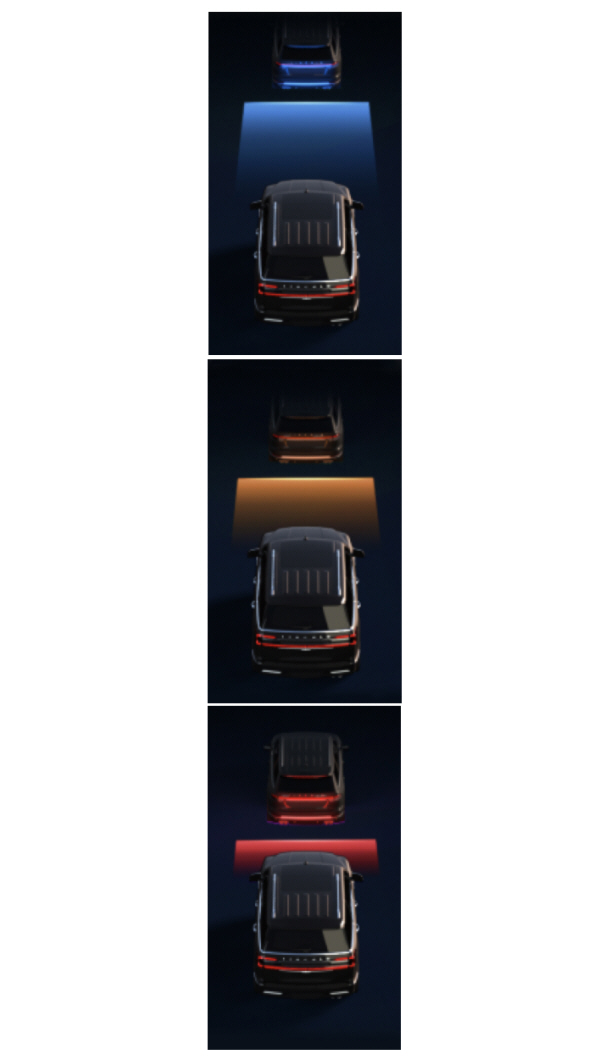
| Vehicle Speed | System Sensitivity | Distance Indicator Color | Distance Gap | Time Gap |
|---|---|---|---|---|
| 62 mph (100 km/h). | Normal. | Blue. | Greater than 82 ft (25 m). | Greater than 0.9 seconds. |
| Yellow. | 56–82 ft (17–25 m). | 0.6-0.9 seconds. | ||
| Red. | Less than 56 ft (17 m). | Less than 0.6 seconds. |
SWITCHING DISTANCE INDICATION ON AND OFF - VEHICLES WITH: 12 INCH SCREEN
To switch the system on or off, use the touchscreen:
- Press Features on the touchscreen.
- Press Driver Assistance.
- Press Pre-Collision Assist.
- Switch Distance Indication on or off.
SWITCHING DISTANCE INDICATION ON AND OFF - VEHICLES WITH: 15 INCH SCREEN
To switch the system on or off:
Press the button on the touchscreen.
- Press Driver Assistance.
- Press Pre-Collision Assist.
- Switch Distance Indication on or off.
DISTANCE INDICATION INDICATOR - VEHICLES WITH: 8 INCH SCREEN
The indicator displays the time gap between your vehicle and vehicles traveling in the same direction ahead of you. The area in front your vehicle changes shape and color as the vehicle in front of you gets closer or farther away.
DISTANCE INDICATION INDICATOR - VEHICLES WITH: 12 INCH SCREEN
The indicator displays the time gap between your vehicle and vehicles traveling in the same direction ahead of you. The area in front your vehicle changes shape and color as the vehicle in front of you gets closer or farther away.
WHAT IS DISTANCE ALERT
The system alerts you with a warning lamp if the distance to the vehicle ahead is small.
Note: The warning lamp does not illuminate if cruise control or adaptive cruise control is active.
ADJUSTING THE SENSITIVITY OF DISTANCE ALERT - VEHICLES WITH: 12 INCH SCREEN
To adjust the sensitivity of the system, use the touchscreen:
- Press Features on the touchscreen.
- Press Driver Assistance.
- Press Pre-Collision Assist.
- Press Alert Sensitivity.
- Select a setting.
ADJUSTING THE SENSITIVITY OF DISTANCE ALERT - VEHICLES WITH: 15 INCH SCREEN
To adjust the sensitivity of the system:
- Press Driver Assistance.
- Press Pre-Collision Assist.
- Press Alert Sensitivity.
- Select a setting.
WHAT IS AUTOMATIC EMERGENCY BRAKING
Automatic emergency braking may activate if the system determines that a collision is imminent. The system may help to reduce impact damage or completely avoid the crash.
SWITCHING AUTOMATIC EMERGENCY BRAKING ON AND OFF - VEHICLES WITH: 12 INCH SCREEN
To switch the system on or off, use the touchscreen:
- Press Features on the touchscreen.
- Press Driver Assistance.
- Press Pre-Collision Assist.
- Press Auto Emergency Braking.
- Switch the feature on or off.
SWITCHING AUTOMATIC EMERGENCY BRAKING ON AND OFF - VEHICLES WITH: 15 INCH SCREEN
To switch the system on or off:
- Press Driver Assistance.
- Press Pre-Collision Assist.
- Press Automatic Emergency Braking.
- Switch the feature on or off.
WHAT IS EVASIVE STEERING ASSIST
If your vehicle is rapidly approaching a road user, evasive steering assist helps you steer around the road user.
After you turn the steering wheel in an attempt to avoid a crash with the road user, the system applies additional steering torque to help you steer around the road user. After you pass the road user, the system applies steering torque when you turn the steering wheel to steer back into the lane. The system deactivates after you fully pass the road user.
Note: Road users are defined as pedestrians or bicyclists in your vehicle's path or another stationary vehicle in the same lane or a vehicle traveling in the same lane in the same direction as you. See Pre-Collision Assist Precautions.
EVASIVE STEERING ASSIST LIMITATIONS
Evasive steering assist only activates when all the following occur:
- Automatic emergency braking and evasive steering assist are on.
- The system detects a road user ahead and starts to apply the brakes.
- You significantly turn the steering wheel to steer around a road user.
Note: Evasive steering assist does not automatically steer around a road user. If you do not turn the steering wheel, evasive steering assist does not activate.
Note: Evasive steering assist does not activate if the distance to the road user ahead is too small and the system cannot avoid a crash.
SWITCHING EVASIVE STEERING ASSIST ON AND OFF - VEHICLES WITH: 12 INCH SCREEN
To switch the system on or off, use the touchscreen:
- Press Features on the touchscreen.
- Press Driver Assistance.
- Press Pre-Collision Assist.
- Switch Evasive Steering on or off.
Note: If you switch automatic emergency braking off, evasive steering assist turns off.
Note: Automatic emergency braking and evasive steering assist turn on every time you start your vehicle.
SWITCHING EVASIVE STEERING ASSIST ON AND OFF - VEHICLES WITH: 15 INCH SCREEN
To switch the system on or off:
- Press Driver Assistance.
- Press Pre-Collision Assist.
- Switch Evasive Steering on or off.
Note: If you switch automatic emergency braking off, evasive steering assist turns off.
Note: Automatic emergency braking and evasive steering assist turn on every time you start your vehicle.
PRE-COLLISION ASSIST – WARNING LAMPS

Note: If the telltale illuminates without a corresponding information message, make sure the setting for automatic emergency braking is switched on. See Switching Automatic Emergency Braking On and Off - Vehicles With: 12 Inch Screen. No action is needed unless an information message appears.
See Pre-Collision Assist Precautions.
PRE-COLLISION ASSIST – INFORMATION MESSAGES
| Message | Action |
|---|---|
|
Pre-Collision Assist Not Available Sensor Blocked |
You have a blocked sensor due to bad weather, ice, mud or water in front of the radar sensor. You can typically clean the sensor to resolve. |
|
Pre-Collision Assist Not Available |
A fault with the system has occurred. Have your vehicle checked as soon as possible. |
PRE-COLLISION ASSIST – FREQUENTLY ASKED QUESTIONS
What should I do if the windshield in front of the camera is dirty or obstructed?
- Clean the outside of the windshield in front of the camera.
What if the windshield in front of the camera is clean, but the message remains in the instrument cluster display?
- Wait a short time. It could take several minutes for the camera to detect that there is no obstruction.
What should I do if the surface of the radar in the grille is dirty or obstructed?
- Clean the grille surface in front of the radar or remove the object causing the obstruction.
What if the surface of the radar in the grille is clean, but the message remains in the instrument cluster display?
- Wait a short time. It could take several minutes for the radar to detect that there is no obstruction.
Can weather or road conditions interfere with the radar signals?
- Yes, weather such as heavy rain, spray or fog as well as water, snow or ice on the surface of the road can interfere with the radar signals. In these situations, the system temporarily disables this feature. Pre-collision assist reactivates a short time after the weather conditions improve.
What if the radar is out of alignment due to a front end impact?
- Have your vehicle serviced to have the radar checked for proper coverage and operation.
Download Manual