Shifting Using the Buttons on the Selector Lever
The instrument cluster displays the current gear. The current gear flashes when your vehicle cannot shift into the requested gear. Your vehicle will not shift if the requested gear raises or lowers the engine speed beyond the limit.
Your vehicle could shift when you fully press the accelerator or brake pedal.
Note: Prolonged driving with high engine speed could cause vehicle damage not covered by vehicle warranty.
Note: Drive modes could affect when the vehicle shifts into the requested gear.
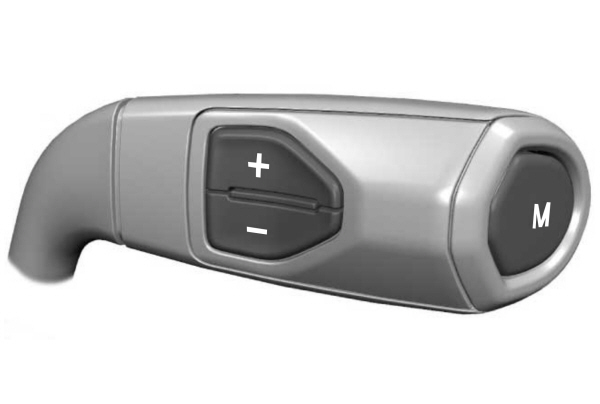
Manually Shifting Gears in Drive (D) (If Equipped)
Use this feature to temporarily change gear.
Note: We recommend using this feature for engine braking or driving on hilly or mountainous roads.
- Press any button to switch the feature on.
- Press the upper (+) button to upshift.
- Press the lower (-) button to downshift.
- Hold the (+) button for a few seconds to switch the feature off.
Note: The feature switches off after a short period of time if neither button is pressed.
Progressive Range Selection in Drive (D)
Use this feature to prevent your vehicle from automatically shifting to high gears. The instrument cluster displays the current gear and the highest gear available.
Note: Your vehicle automatically shifts within the gear range you select.
Note: We recommend using this feature for engine braking, driving on hilly or mountainous roads, or when towing a trailer. See Towing a Trailer.
- Press the lower (-) button to switch the feature on.
- Press the lower (-) button to disable the next highest gear.
- Hold the upper (+) button for a few seconds to switch the feature off.
Manually Shifting Gears in Manual (M)
Use this feature to select a specific gear.
Note: We recommend using this feature for engine braking, driving on hilly or mountainous roads, or when towing a trailer. See Towing a Trailer.
- Press any button to switch the feature on.
- Press the upper (+) button to upshift.
- Press the lower (-) button to downshift.
- Shift to drive (D) to switch the feature off.
Download Manual