Intelligent Adaptive Cruise Control
HOW DOES INTELLIGENT ADAPTIVE CRUISE CONTROL WORK
Intelligent adaptive cruise control combines speed sign recognition and navigation map data with adaptive cruise control to adjust the cruise set speed to the speed limit detected by the speed sign recognition system. As the system detects new speed signs, the set speed updates.
There are limitations that affect the accuracy of the speed sign recognition system and its ability to determine the current speed limit. The intelligent adaptive cruise control system and its ability to determine the current speed limit shares these limitations. See Speed Sign Recognition.
Note: The adaptive cruise control gap setting operates normally when the feature is enabled.
INTELLIGENT ADAPTIVE CRUISE CONTROL PRECAUTIONS
 WARNING: You are responsible for controlling your vehicle at all times. The system is designed to be an aid and does not relieve you of your responsibility to drive with due care and attention. Failure to follow this instruction could result in the loss of control of your vehicle, personal injury or death. WARNING: You are responsible for controlling your vehicle at all times. The system is designed to be an aid and does not relieve you of your responsibility to drive with due care and attention. Failure to follow this instruction could result in the loss of control of your vehicle, personal injury or death. |
INTELLIGENT ADAPTIVE CRUISE CONTROL REQUIREMENTS
Traffic sign recognition must be enabled for intelligent adaptive cruise control to be active.
INTELLIGENT ADAPTIVE CRUISE CONTROL LIMITATIONS
The speed limit information provided by the navigation map data could be inaccurate or out of date.
The system may not detect and read speed limit signs with conditional information, for example, when a sign is flashing, during specific time ranges, or when children are present.
Note: The system does not set the vehicle speed to speed limits shown with a supplementary traffic sign.
Under certain conditions, the system may not adjust the vehicle speed until after your vehicle passes the speed limit.
SWITCHING INTELLIGENT MODE ON AND OFF - VEHICLES WITH: 12 INCH SCREEN
- Press Features on the touchscreen.
- Press Driver Assistance.
- Press Cruise Control.
- Press Adaptive Cruise Control.
- Press Speed Sign Recognition.
SWITCHING INTELLIGENT MODE ON AND OFF - VEHICLES WITH: 15 INCH SCREEN
- Access the vehicle drawer on the touchscreen.
- Press SETTINGS.
- Press Driver Assistance.
- Press Cruise Control.
- Press Adaptive Cruise Control.
- Press Speed Sign Recognition.
ADJUSTING THE SET SPEED TOLERANCE - VEHICLES WITH: 12 INCH SCREEN
- Press Features on the touchscreen.
- Press Driver Assistance.
- Press Cruise Control.
- Press Adaptive Cruise Control.
- Press Speed Sign Recognition.
- Press Tolerance.
- Use + and - to set the tolerance.
Note: You cannot set the tolerance more than 20 mph (30 km/h) above or below the recognized speed.
ADJUSTING THE SET SPEED TOLERANCE - VEHICLES WITH: 15 INCH SCREEN
- Access the vehicle drawer on the touchscreen.
- Press SETTINGS.
- Press Driver Assistance.
- Press Cruise Control.
- Press Adaptive Cruise Control.
- Press Speed Sign Recognition.
- Press Tolerance.
- Use the slider bar to adjust the allowable tolerance for the system.
Note: You cannot set the tolerance more than 20 mph (30 km/h) above or below the recognized speed.
INTELLIGENT ADAPTIVE CRUISE CONTROL ALERTS
If you increase the set speed beyond the speed limit or speed limit plus a positive tolerance value, the set speed indicator flashes.
The warning does not occur if:
- You override the set speed using the accelerator pedal.
- The vehicle speed exceeds the set speed due to being on a downhill slope.
INTELLIGENT ADAPTIVE CRUISE CONTROL INDICATORS - VEHICLES WITH: 8 INCH SCREEN
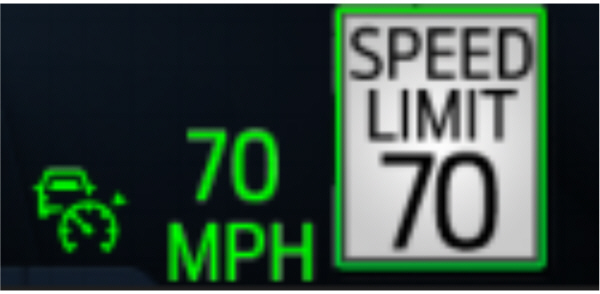
The set speed limit displays next to the detected speed limit in the instrument cluster.
INTELLIGENT ADAPTIVE CRUISE CONTROL INDICATORS - VEHICLES WITH: 12 INCH SCREEN
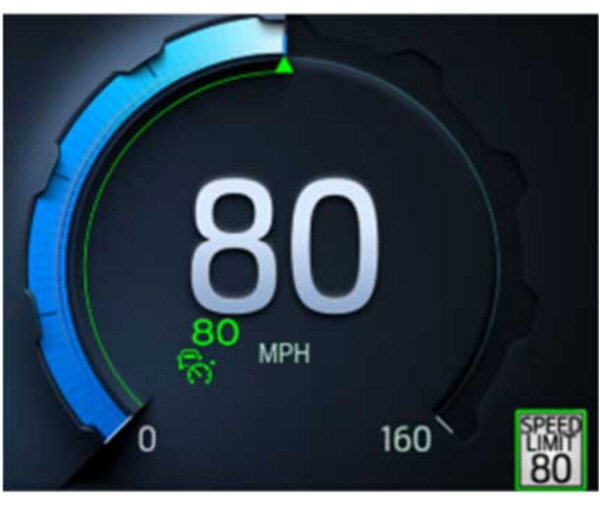
The set speed limit displays in the speedometer and the detected speed limit displays outside and below the speedometer in the instrument cluster.
Download Manual