Selecting a Four-Wheel Drive Mode
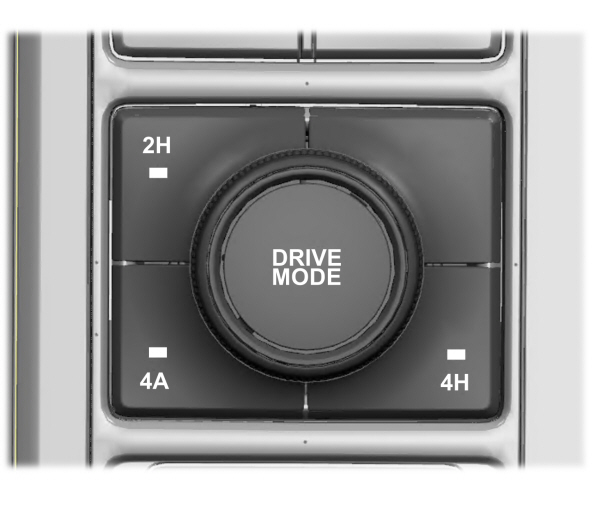
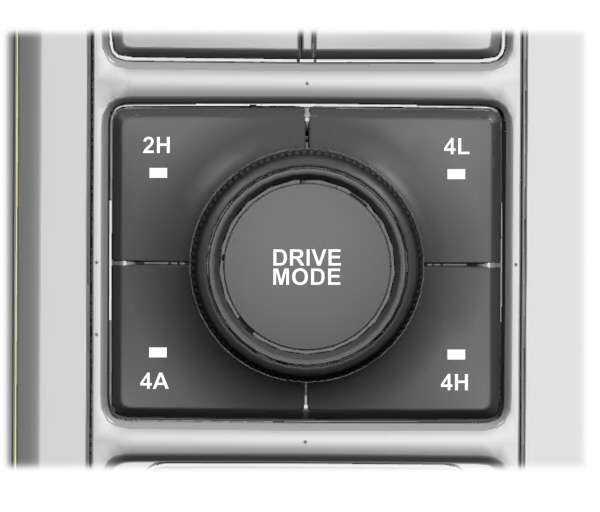
Depending on the variant, the four-wheel drive mode control is either in the instrument panel or the center console.
To select a four-wheel drive mode, press the four-wheel drive mode control button of the desired mode. You can select two-wheel drive high (2H), four-wheel drive auto (4A) or four-wheel drive high (4H) at a stop or while driving. Once the shift is complete, the information display shows the selected four-wheel drive mode. While shifts are in progress, the lights on the four-wheel drive control switch flashes until your vehicle achieves the desired shift.
Note: When shifting to and from four-wheel drive, the information display shows the shifting in progress message indicating that the system is in the process of making a shift.
Note: Do not perform this operation if the rear wheels are slipping or while applying the accelerator pedal.
If the system detects a fault, a warning message appears in the information display. See Four-Wheel Drive – Information Messages.
Shifting to or from Four-Wheel Drive Low (4L) (If Equipped)
To select or exit four-wheel drive low (4L):
- Bring your vehicle to a speed of 3 mph (5 km/h) or less.
- Place the transmission in neutral (N)
- Press the desired four-wheel drive button on the four-wheel drive mode control switch.
The information display shows a message indicating a four-wheel drive shift is in progress. If any of the above shift conditions are not present, the shift does not occur and the information display shows information guiding the driver through the proper shifting procedures. If there is a transfer case tooth blockage, a message displays in the information display. To alleviate this condition, place the transmission in a forward gear, move your vehicle forward approximately 5 ft (1.5 m), and shift the transmission back to neutral (N) to allow the transfer case to complete the range shift.
Note: You could hear some noise as the system shifts or engages which is normal.
If the system detects a fault, a warning message appears in the information display. See Four-Wheel Drive – Information Messages.
Two-Wheel Drive High
Two-wheel drive high is for general on-road driving. Power is sent to the rear wheels only.
Note: Two-wheel drive high can turn on or off based on Drive Mode selection See Drive Mode Control.
Four-Wheel Drive Auto
Four-wheel drive auto provides electronically controlled four-wheel drive power to both the front and rear wheels, as required, for increased traction in varying on-road conditions. The four-wheel drive auto tuning varies based on selected Drive Mode. See Selecting a Drive Mode.
Note: Four-wheel drive auto can turn on or off automatically based on Drive Mode selection. See Selecting a Drive Mode.
Four-Wheel Drive High (If Equipped)
Four-wheel drive high provides electronically locked four-wheel drive power to both the front and rear wheels for use in off-road or winter conditions such as deep snow, sand or mud. This mode is not for use on dry pavement.
Note: Four-wheel drive high can turn on or off automatically based on Drive Mode selection. See Selecting a Drive Mode.
Four-Wheel Drive Low (If Equipped)
Four-wheel drive low provides electronically locked four-wheel drive power to both the front and rear wheels for use on low traction surfaces, but does so with additional gearing for increased torque multiplication. This mode is only for off-road conditions such as deep sand, steep slopes, or pulling heavy objects.
Note: Four-wheel drive low can turn on or off automatically based on drive mode selection. See Selecting a Drive Mode.
Download Manual