Vehicle key
Vehicle key functions
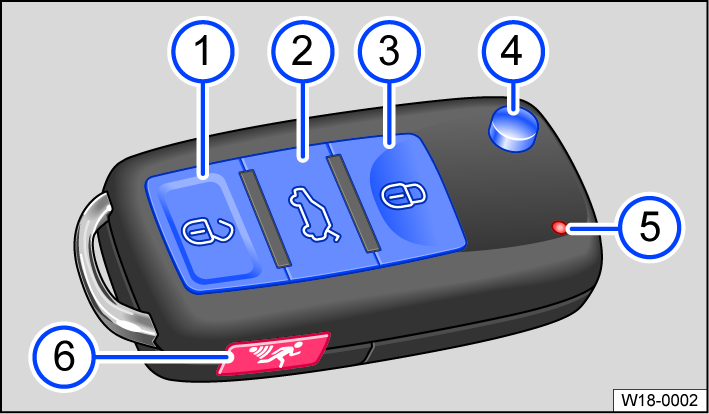
Fig. 40 Vehicle key.
 Unlock the vehicle. All turn signals will flash twice.
 Unlock the trunk lid separately. All turn signals flash twice
 Lock the vehicle. All turn signals will flash once.
 Fold the key bit out and in.
 Indicator light: flashes when a button is pressed.
 Panic button (depending on vehicle equipment).
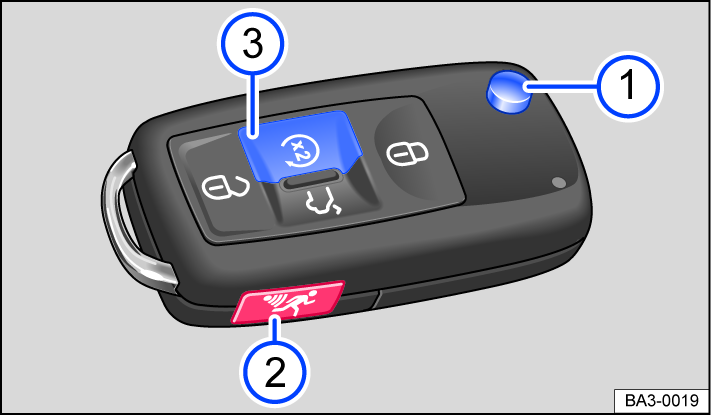
Fig. 41 Vehicle key with remote start relay function.
- Fold the key bit out and in.
- Panic button (depending on vehicle equipment).
- Remote start relay function ⇒ Remote start function.
Panic button (depending on vehicle equipment)
Only use the panic button in case of an emergency. When you press the panic button, the horn will sound and the vehicle lights will flash. Pressing the panic button again switches off the alarm.
 WARNING
Careless or unintended use of the vehicle key can cause crashes and serious injuries.
-
Always take all vehicle keys with you when leaving the vehicle. Children or unauthorized people could lock the doors and/or the trunk lid, start the engine, or switch on the ignition and activate electrical equipment, such as the power windows.
-
Never leave children or people requiring assistance alone in the vehicle. In an emergency, they will not be able to leave the vehicle unassisted or care for themselves. For example, depending on the season, the temperature inside the vehicle could become very high or low, which can lead to serious injuries, illness or death, especially for very young children.
 NOTICE
Protect the vehicle key from moisture and strong impacts.
 Regular use of comfort systems and other usage patterns shorten the service life of the button cell in the vehicle key.
Replacing the button cell battery (vehicle keys with key bit)

Fig. 42 Vehicle key: Replacing the button cell battery (general example).
- Cover
- Button cell battery
Volkswagen recommends having the button cell changed by suitably qualified professionals ⇒  . Volkswagen recommends contacting an authorized Volkswagen dealer or authorized Volkswagen Service Facility.
-
Fold the key bit out.
-
Lever off the cover fig. 42
⇒ . -
Lift the button cell battery out of the battery compartment fig. 42
. -
Press the new button cell battery into the battery compartment ⇒
. -
Press the cover onto the housing fig. 42
. -
Dispose of drained battery in a way that will not harm the environment.
 DANGER
If button cell batteries are swallowed or enter the air ducts, serious or fatal injuries could occur within a very short time due to choking or internal burns.
-
Seek medical assistance immediately if you suspect that a button cell battery has been swallowed.
-
If the battery cover cannot be closed, do not use the remote control.
-
Always keep the remote control and key fob with button cell batteries out of the reach of children.
NOTICE
-
If the button cell battery is replaced incorrectly, it can damage the vehicle key.
-
Using incorrect batteries can damage the vehicle key. Only replace drained batteries with new batteries in the same voltage, size, and specification.
-
Make sure the battery is facing in the right direction when inserting it.

The type of batteries used in the remote control of your vehicle key can contain perchlorate. This requires special handling. Observe all legal requirements regarding the handling and disposal of these batteries ⇒ Disposal of old batteries and electronic devices. We recommend having this service carried out by suitably qualified professionals. Volkswagen recommends contacting an authorized Volkswagen dealer or authorized Volkswagen Service Facility.
Synchronizing a vehicle key
If the vehicle cannot be unlocked or locked using the vehicle key, synchronize the vehicle key or replace the button cell battery ⇒ Replacing the button cell battery (vehicle keys with key bit).
Synchronizing a vehicle key
-
Fold out the key bit and remove the spare key.
-
If necessary, remove the cap from the driver's door handle ⇒ Locking the front passenger door and rear doors in an emergency.
-
Press the
 button on the vehicle key.
 -
Unlock the vehicle using the key bit.
-
Open the driver door.
If the vehicle is equipped with an anti-theft alarm system, the alarm will be triggered immediately ⇒ Anti-theft alarm system.
-
Switch the ignition on.
This completes the synchronization.
Troubleshooting
Vehicle cannot be locked or unlocked
Remote control is disrupted by objects, poor weather conditions or transmitters on the same frequency band close to the vehicle (e.g. cell phones), as well as by a drained button cell.
Or: The central locking switches off briefly to protect it from overloading.
-
Close the driver door.
Or: Synchronize the vehicle key ⇒ Synchronizing a vehicle key.
Or: Change the battery cell in the vehicle key ⇒ Replacing the button cell battery (vehicle keys with key bit).
The indicator light is not blinking
If the indicator light in the vehicle key does not blink when you press one of the buttons, then the button cell battery in the vehicle key must be replaced ⇒ Replacing the button cell battery (vehicle keys with key bit).
You can get an additional or replacement vehicle key from an authorized Volkswagen dealer or authorized Volkswagen Service Facility.
Download Manual