Cruise control system
 Introduction
The cruise control system helps to maintain a set speed.
Speed range
The CCS is available at speeds above 15 mph (20 km/h).
Driving with cruise control system
You can override the stored speed at any time, for example, to pass another vehicle. Cruise control is paused while the vehicle accelerates and then resumes the stored speed.
Displays
If the CCS is switched on, the instrument cluster display indicates the stored speed and the status of the CCS:
 CCS active.
 CCS active (alternative display).
 Small or gray: CCS is not regulating the speed.Large or white: CCS is regulating the speed.
If no speed is stored, the instrument cluster display shows  instead of the speed.
Driving downhill
The vehicle cannot maintain the saved speed in all driving situations. Always be ready to apply the brakes.
-
Downshift before traveling downhill for extended periods.
This will enable you to utilize the engine braking effect and reduce the load on the brakes.
 WARNING
If it is not possible to drive safely with enough distance and a constant speed, using the CCS may cause accidents and serious injuries.
-
Never use the CCS when visibility is poor, when there is not enough distance, or when roads are steep, winding, flooded, or slippery, for example from snow, ice, moisture, or gravel.
-
Never use the CCS when driving off-road or on unpaved roads.
-
Always adapt your speed and remain a safe distance to vehicles driving ahead according to the visual, weather, road, and traffic conditions.
-
To reduce the risk of activating the CCS unintentionally, always turn off the cruise control system after using it.
-
It is dangerous to resume the stored speed if that speed is too fast for the current road, traffic, or weather conditions.
Operating the cruise control system
Please read the introductory information and heed the Warnings and Notice ⇒  Introduction.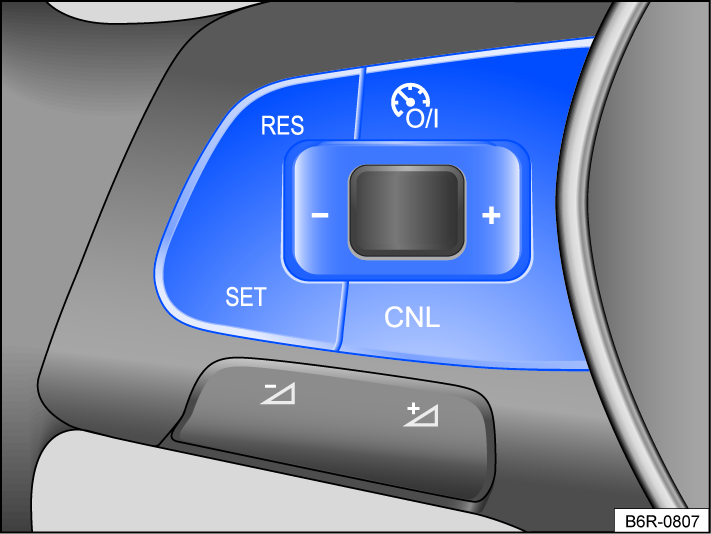
Fig. 95 Left side of the multi-function steering wheel.
Switching on
-
Press the
 button.
No speed is saved. At this stage, the limiter will not yet start regulating your speed.
Starting the Cruise Control System
-
Press the
 button while driving.
The CCS stores and controls the current speed.
Setting the speed
You can adjust the stored speed while the CCS is regulating the speed:
- + 1 mph (1 km/h):
- Press the
 button.
 - - 1 mph (1 km/h):
- Press the
 button.
To change the stored speed continuously, press and hold the respective button.
The vehicle adjusts to the current speed by accelerating or decelerating. The vehicle does not brake actively.
Canceling Adaptive Cruise Control
-
Press the
 or button briefly.
Or: Press the brake pedal.
The vehicle speed remains stored in the system.
Resuming the Cruise Control System
-
Press the
 button.
The CCS resumes and maintains the stored speed.
Switching off
-
Press and hold the
button.The CCS is switched off and the stored speed is deleted.
Troubleshooting
Please read the introductory information and heed the Warnings and Notice ⇒ Introduction.
 Cruise control system is malfunctioning
Malfunction. The white indicator light comes on. In addition, the yellow central warning light  lights up.
-
Switch off CCS and seek assistance from suitably qualified professionals. Volkswagen recommends contacting your Volkswagen dealership.
Control is canceled automatically
-
The vehicle has exceeded the stored speed for an extended period.
-
The selector lever is not in the D or S selector lever position.
-
Brake assistance systems, for example ASR or ESC, are active.
-
The vehicle has been braked by Front Assist.
-
If the problem persists, switch off CCS and seek assistance from suitably qualified professionals. Volkswagen recommends contacting your Volkswagen dealership.
Download Manual