Analog instrument cluster
Overview of the analog instrument cluster
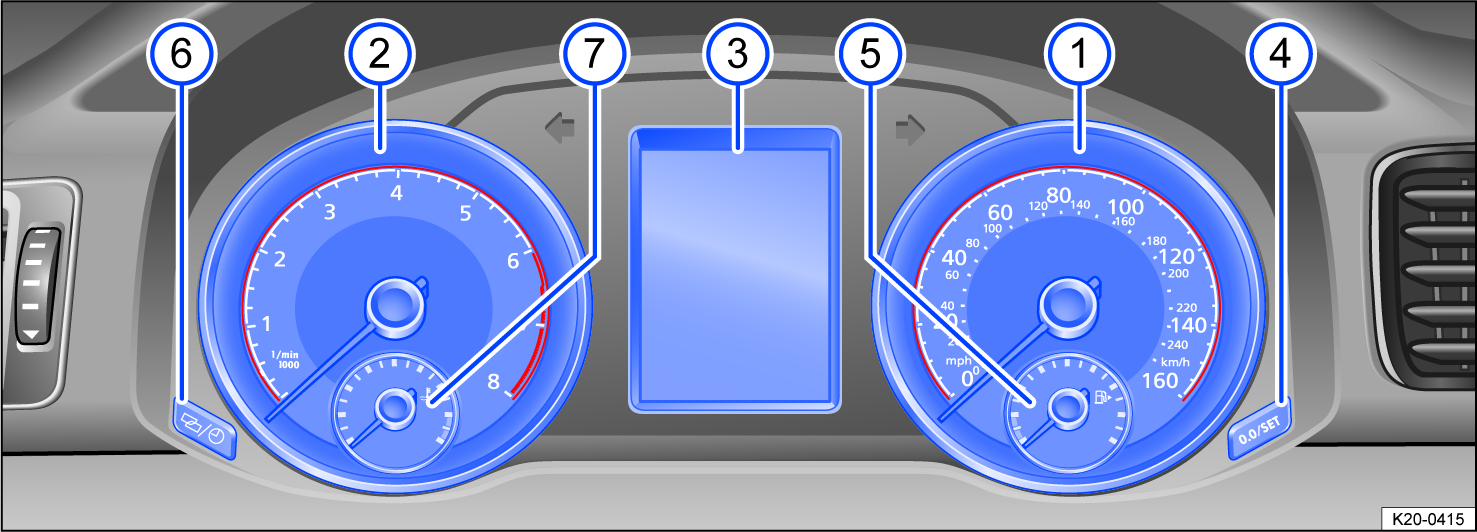
Fig. 10 General example: Analog instrument cluster in the instrument panel.
 Speedometer.
 Tachometer (RPM of the running engine) ⇒ Tachometer.
 Displays.
 Reset, set, and display button.
 Fuel gauge ⇒ Fuel gauge.
 Reset, set, and display button.
 Coolant temperature gauge ⇒ Engine coolant temperature gauge.
Operating the analog instrument cluster
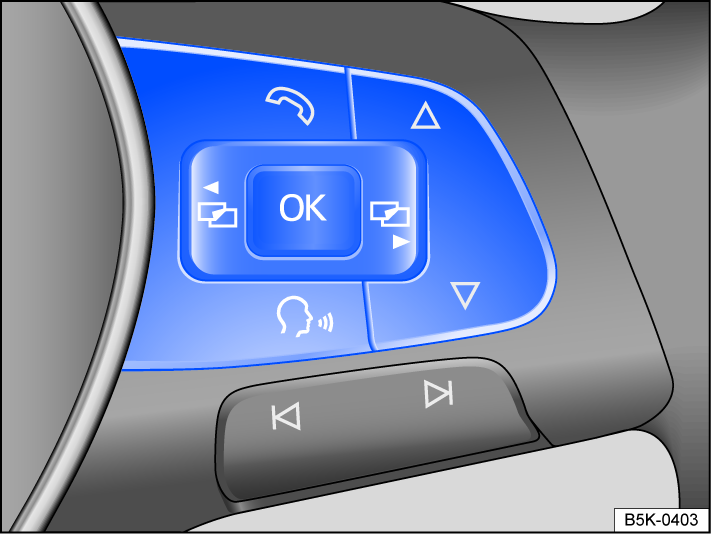
Fig. 11 Right side of the multi-function steering wheel: buttons for operating the menus and information displays in the instrument cluster
 Vehicles with multi-function steering wheel: Menus cannot be accessed when a priority 1 warning message is displayed ⇒ Warning and information texts. You can confirm and hide some messages using the
  button on the multi-function steering wheel fig. 11.
Opening the main menu
Vehicles with multi-function steering wheel:
-
Switch the ignition on.
-
If a message or vehicle icon is displayed, press the
fig. 11 button on the multi-function steering wheel, repeatedly if necessary. -
To scroll through the individual main menu items, press the
 or
or  button several times.
Opening the sub-menu
Vehicles with multi-function steering wheel:
-
Press the
 and
and  arrow buttons on the multi-function steering wheel fig. 11 until your preferred submenu item is highlighted.
 -
To open the submenu item, press the
button on the multi-function steering wheel.
If no options have been chosen in the sub-menu after a few seconds, you are switched back to the previous menu.
Adjusting menu-dependent settings
Vehicles with multi-function steering wheel:
-
Make your preferred changes using the arrow buttons on the multi-function steering wheel. Press and hold for a more rapid increase or decrease in values.
-
Highlight and confirm your selection using the
button on the multi-function steering wheel.
Returning to menu selection
Vehicles with multi-function steering wheel:
-
Select the Back menu item.
If warning messages about malfunctions appear when the ignition is switched on, settings or information displays may not appear as described. If this is the case, have malfunctions corrected by suitably qualified professionals. Volkswagen recommends contacting your Volkswagen dealership.
 WARNING
Driver distraction can cause accidents and injuries.
-
Do not allow operating the analog instrument cluster to distract you from the traffic around you.
-
Always drive attentively and responsibly.
Download Manual