Park Distance Control (PDC)
 Introduction
The Park Distance Control system (PDC) assists the driver when parking and maneuvering.
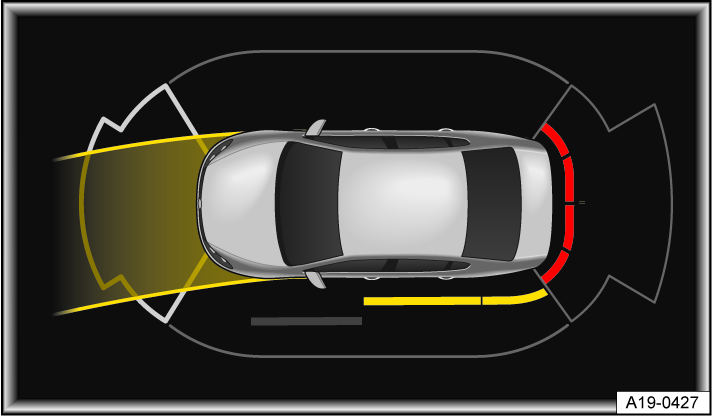
Fig. 106 Infotainment system: Park Distance Control with obstacle detection and steering lock (general example).
System function
The Park Distance Control system (PDC) detects the distance to an obstacle using sensors in the front and rear areas of the vehicle ⇒ Front view, ⇒ Rear view.
 WARNING
The intelligent technology of the Park Distance Control (PDC) cannot overcome the natural laws of physics and it can only operate within the limits of the system. Not paying attention can result in accidents, serious injuries and vehicle damage.
-
The PDC cannot replace the driver's attention.
The Park Distance Control warns you of an obstacle via colored segments on the screen of the Infotainment system and via warning chimes fig. 106 , ⇒  .
.
 NOTICE
Do not continue driving! The collision area has been reached when the next to last segment is displayed.
NOTICE
Depending on the vehicle equipment, distances to obstacles in the side areas are also displayed. In order to fully scan and display the side areas, you must move the vehicle a few yards forward or back. Any obstacles that enter these areas from the outside are not displayed.
If the driver does not respond to an approaching obstacle, automatic braking support may kick in ⇒ Automatic braking intervention.
Park Distance Control settings
Depending on vehicle equipment, it may be possible to adjust PDC settings in the instrument cluster ⇒ Settings menu.
Switching Park Distance Control (PDC) on and off
Please read the introductory information and heed the Warnings and Notice ⇒  andSafety instructions.
Fig. 107 In the center console: button for switching the PDC on or off (general example).
Switching on
-
Select the reverse gear.
Or: Press the
 button fig. 107.
Or: The vehicle will roll backward.
Switching off
-
Press the
button fig. 107.Or: engage the P selector lever position.
Or: The vehicle is driving forward at more than 6–9 mph (10–15 km/h).
Automatic activation when driving forward
If the vehicle slowly approaches an obstacle, Park Distance Control is automatically activated.
-
Switch the function on or off in the Settings menu in the instrument cluster ⇒ Settings menu.
If the driver switches off Park Distance Control, no further automatic activation occurs.
Automatic activation is available again under following conditions:
-
The vehicle has been accelerated to more than about 9 mph (15 km/h) and then the speed has fallen below this again.
-
Or: the ignition has been switched off and on again.
-
Or: parking lock P has been changed to a gear.
 If an obstacle is detected in front of the vehicle, the display in the Infotainment system is activated. If the vehicle approaches further, warning chimes also sound.
Download Manual