RSA (ROAD SIGN ASSIST)*
*If equippedThe RSA system recognizes specific road signs using the front camera to provide information to the driver via the display.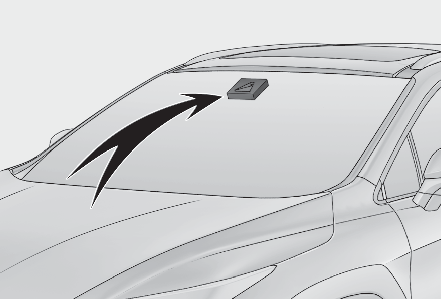
If the system judges that the vehicle is being driven over the speed limit, performing prohibited actions, etc. according to the recognized road signs, it notifies the driver through a visual notification and notification buzzer.WARNING:Before using the RSADo not rely solely upon the RSA system. RSA is a system which supports the driver by providing information, but it is not a replacement for a driver’s own vision and awareness. Drive safely by always paying careful attention to the traffic rules.INDICATION ON THE MULTI-INFORMATION DISPLAYWhen the front camera recognizes a sign, the sign will be displayed on the multi-information display.When the driving assist system information is selected, a maximum of 3 signs can be displayed. (Multi-information display)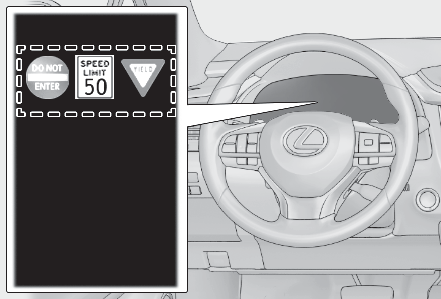
When a tab other than the driving assist system information is selected, the following types of road signs will be displayed (Multi-information display)Speed limit signDo Not Enter sign (when notification is necessary)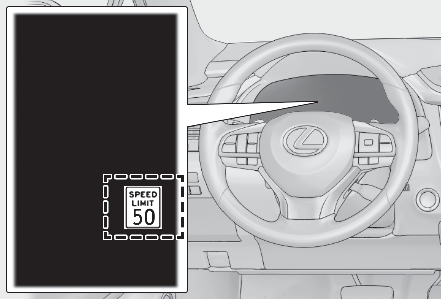
If signs other than speed limit signs are recognized, they will be displayed in an overlapping stack under the current speed limit sign.SUPPORTED TYPES OF ROAD SIGNSThe following types of road signs, including electronic signs and blinking signs, are recognized.A non-official or a recently introduced traffic sign may not be recognized.
 |
Speed limit |
 |
Do Not Enter |
 |
Stop |
 |
Yield |
NOTIFICATION FUNCTIONIn the following situations, the RSA system will notify the driver.When the vehicle speed exceeds the speed notification threshold of the speed limit sign displayed, the sign display will be emphasized and a buzzer will sound.When the RSA system recognizes a do not enter sign and determines that your vehicle has entered a no-entry area, the displayed sign will flash and a buzzer will sound.Depending on the situation, a notification function may not operate properly.Note:Setting procedurePress or of the meter control switches and select .Press or of the meter control switches and select , then press .Press or of the meter control switches and select “ RSA”, then press .Automatic turn-off of RSA sign displayIn the following situations, a displayed speed limit sign and/or do not enter sign will stop being displayed automatically:No sign has been recognized for a certain distance.The road changes due to a left or right turn, etc.In the following situations, stop and yield signs will stop being displayed automatically:The system determines that your vehicle has passed the sign.The road changes due to a left or right turn, etc.Conditions in which the function may not operate or detect correctlyIn the following situations, RSA does not operate normally and may not recognize signs, display the incorrect sign, etc. However, this does not indicate a malfunction.The front camera is misaligned due to a strong impact being applied to the sensor, etc.Dirt, snow, stickers, etc. are on the windshield near the front camera.In inclement weather such as heavy rain, fog, snow or sand storms.Light from an oncoming vehicle, the sun, etc. enters the front camera.The sign is dirty, faded, tilted or bent.The contrast of electronic sign is low.All or part of the sign is hidden by the leaves of a tree, a pole, etc.The sign is only visible to the front camera for a short amount of time.The driving scene (turning, lane change, etc.) is judged incorrectly.If a sign not appropriate for the currently traveled lane, but the sign exists directly after a freeway branches, or in an adjacent lane just before merging.Stickers are attached to the rear of the preceding vehicle.A sign resembling a system compatible sign is recognized.Side road speed signs may be detected and displayed (if positioned in sight of the front camera) while the vehicle is traveling on the main road.Roundabout exit road speed signs may be detected and displayed (if positioned in sight of the front camera) while traveling on a roundabout.The front of the vehicle is raised or lowered due to the carried load.The surrounding brightness is not sufficient or changes suddenly.When a sign intended for trucks, etc. is recognized.The speed information displayed on the meter and on the navigation system may be different due to the navigation system using map data.Speed limit sign displayIf the engine switch was last turned off while a speed limit sign was displayed on the multi-information display, the same sign displays again when the engine switch is turned to IGNITION ON mode.CustomizationSome functions can be customized. (Customizable features:Customizable features)
Download Manual