DRIVING ASSIST SYSTEMS
To keep driving safety and performance, the following systems operate automatically in response to various driving situations. Be aware, however, that these systems are supplementary and should not be relied upon too heavily when operating the vehicle.SUMMARY OF THE DRIVING ASSIST SYSTEMSABS (ANTI-LOCK BRAKE SYSTEM)Helps to prevent wheel lock when the brakes are applied suddenly, or if the brakes are applied while driving on a slippery road surfaceBRAKE ASSISTGenerates an increased level of braking force after the brake pedal is depressed when the system detects a panic stop situationVSC (VEHICLE STABILITY CONTROL)Helps the driver to control skidding when swerving suddenly or turning on slippery road surfacesENHANCED VSC (ENHANCED VEHICLE STABILITY CONTROL)Provides cooperative control of the ABS, TRAC, VSC and EPS.Helps to maintain directional stability when swerving on slippery road surfaces by controlling steering performance.TRAILER SWAY CONTROL (IF EQUIPPED)Helps the driver to control trailer sway by selectively applying brake pressure for individual wheels and reducing driving torque when trailer sway is detected.TRAC (TRACTION CONTROL)Helps to maintain drive power and prevent the drive wheels from spinning when starting the vehicle or accelerating on slippery roadsACTIVE CORNERING ASSIST (ACA)Helps to prevent the vehicle from drifting to the outer side by performing inner wheel brake control when attempting to accelerate while turningHILL-START ASSIST CONTROLHelps to reduce the backward movement of the vehicle when starting on an uphillEPS (ELECTRIC POWER STEERING)Employs an electric motor to reduce the amount of effort needed to turn the steering wheelDYNAMIC TORQUE CONTROL AWD SYSTEM (AWD MODELS)Automatically switches from front-wheel drive to all-wheel drive (AWD) according to the driving conditions, helping to ensure reliable handling and stability. Examples of conditions where the system will switch to AWD are when cornering, going uphill, starting off or accelerating, and when the road surface is slippery due to snow, rain, etc.ADAPTIVE VARIABLE SUSPENSION SYSTEM (IF EQUIPPED)Controls the damping force of the shock absorber of each wheel according to the road and driving conditions, helping achieve a comfortable ride, excellent driveability and a high level of stability.If Sport S+ mode is selected using the driving mode select switch, the damping force will become more suitable for sporty driving. (Driving mode select switch)VDIM (VEHICLE DYNAMICS INTEGRATED MANAGEMENT) (IF EQUIPPED)Provides integrated control of the ABS, brake assist, TRAC, VSC, hill-start assist control and EPS systemsHelps to maintain vehicle stability when swerving on slippery road surfaces by controlling the brakes, engine output and steering assist.THE SECONDARY COLLISION BRAKEWhen the SRS airbag sensor detects a collision and the system operates, the brakes and brake lights are automatically controlled to reduce the vehicle speed and help reduce the possibility of further damage due to a secondary collision.Note:When the TRAC/VSC/Trailer Sway Control systems are operatingThe slip indicator light will flash while the TRAC/VSC/Trailer Sway Control systems are operating.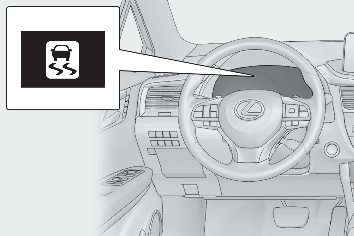
Disabling the TRAC systemIf the vehicle gets stuck in mud, dirt or snow, the TRAC system may reduce power from the engine to the wheels. Pressing the switch to turn the system off may make it easier for you to rock the vehicle in order to free it.To turn the TRAC system off, quickly press and release the switch.The “ Traction Control Turned Off” will be shown on the multi-information display.Press the switch again to turn the system back on.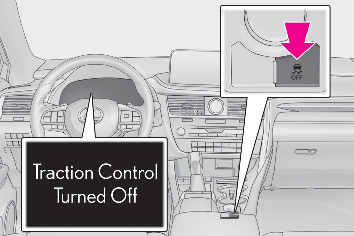
Turning off both TRAC, VSC and Trailer Sway Control systemsTo turn the TRAC, VSC and Trailer Sway Control systems off, press and hold the switch for more than 3 seconds while the vehicle is stopped.The VSC OFF indicator light will come on and the “ Traction Control Turned Off” will be shown on the multi-information display.*Press the switch again to turn the system back on.*On vehicles with PCS (Pre-Collision System), PCS will also be disabled (only Pre-Collision warning is available). The PCS warning light will come on and a message will be displayed on the multi-information display. (PCS (Pre-Collision System))When the message is displayed on the multi-information display showing that TRAC has been disabled even if the switch has not been pressedTRAC is temporary deactivated. If the information continues to show, contact your Lexus dealer.Operating conditions of hill-start assist controlWhen the following four conditions are met, the hill-start assist control will operate:The shift lever is in a position other than P or N (when starting off forward/backward on an upward incline)The vehicle is stoppedThe accelerator pedal is not depressedThe parking brake is not engagedAutomatic system cancelation of hill-start assist controlThe hill-start assist control will turn off in any of the following situations:The shift lever is shifted to P or NThe accelerator pedal is depressedThe parking brake is engaged2 seconds at maximum elapsed after the brake pedal is releasedSounds and vibrations caused by the ABS, brake assist, VSC, Trailer Sway Control, TRAC and hill-start assist control systemsA sound may be heard from the engine compartment when the brake pedal is depressed repeatedly, when the engine is started or just after the vehicle begins to move. This sound does not indicate that a malfunction has occurred in any of these systems.Any of the following conditions may occur when the above systems are operating. None of these indicates that a malfunction has occurred.Vibrations may be felt through the vehicle body and steering.A motor sound may be heard also after the vehicle comes to a stop.The brake pedal may pulsate slightly after the ABS is activated.The brake pedal may move down slightly after the ABS is activated.Active Cornering Assist operation sounds and vibrationsWhen the Active Cornering Assist is operated, operation sounds and vibrations may be generated from the brake system, but this is not a malfunction.EPS operation soundWhen the steering wheel is operated, a motor sound (whirring sound) may be heard. This does not indicate a malfunction.Reduced effectiveness of the EPS systemThe effectiveness of the EPS system is reduced to prevent the system from overheating when there is frequent steering input over an extended period of time. The steering wheel may feel heavy as a result. Should this occur, refrain from excessive steering input or stop the vehicle and turn the engine off. The EPS system should return to normal within 10 minutes.Automatic reactivation of TRAC, Trailer Sway Control and VSC systemsAfter turning the TRAC, Trailer Sway Control and VSC systems off, the systems will be automatically re-enabled in the following situations:When the engine switch is turned offIf only the TRAC system is turned off, the TRAC will turn on when vehicle speed increasesIf both the TRAC and VSC systems are turned off, automatic re-enabling will not occur when vehicle speed increases.Operating conditions of Active Cornering AssistThe system operates when the following occurs.TRAC/VSC can operateThe driver is attempting to accelerate while turningThe system detects that the vehicle is drifting to the outer sideThe brake pedal is releasedSecondary Collision Brake operating conditionsThe system operates when the SRS airbag sensor detects a collision while the vehicle is in motion.However, the system does not operate in any of the following situations.The vehicle speed is below 6 mph (10 km/h)Components are damagedSecondary Collision Brake automatic cancellationThe system is automatically canceled in any of the following situations.The vehicle speed drops below approximately 6 mph (10 km/h)A certain amount of time elapses during operationThe accelerator pedal is depressed a large amountWARNING:The ABS does not operate effectively whenThe limits of tire gripping performance have been exceeded (such as excessively worn tires on a snow covered road).The vehicle hydroplanes while driving at high speed on wet or slick roads.Stopping distance when the ABS is operating may exceed that of normal conditionsThe ABS is not designed to shorten the vehicle’s stopping distance. Always maintain a safe distance from the vehicle in front of you, especially in the following situations:When driving on dirt, gravel or snow-covered roadsWhen driving with tire chainsWhen driving over bumps in the roadWhen driving over roads with potholes or uneven surfacesTRAC/VSC may not operate effectively whenDirectional control and power may not be achievable while driving on slippery road surfaces, even if the TRAC/VSC system is operating. Drive the vehicle carefully in conditions where stability and power may be lost.Active Cornering Assist does not operate effectively whenDo not overly rely on Active Cornering Assist. Active Cornering Assist may not operate effectively when accelerating down slopes or driving on slippery road surfaces.When Active Cornering Assist frequently operates, Active Cornering Assist may temporarily stop operating to ensure proper operation of the brakes, TRAC and VSC.Hill-start assist control does not operate effectively whenDo not overly rely on hill-start assist control. Hill-start assist control may not operate effectively on steep inclines and roads covered with ice.Unlike the parking brake, hill-start assist control is not intended to hold the vehicle stationary for an extended period of time. Do not attempt to use hill-start assist control to hold the vehicle on an incline, as doing so may lead to an accident.When the TRAC/VSC/Trailer Sway Control is activatedThe slip indicator light flashes. Always drive carefully. Reckless driving may cause an accident. Exercise particular care when the indicator light flashes.When the TRAC/VSC/Trailer Sway Control systems are turned offBe especially careful and drive at a speed appropriate to the road conditions. As these are the systems to help ensure vehicle stability and driving force, do not turn the TRAC/VSC/Trailer Sway Control systems off unless necessary.Trailer Sway Control is part of the VSC system and will not operate if VSC is turned off or experiences a malfunction.Replacing tiresMake sure that all tires are of the specified size, brand, tread pattern and total load capacity. In addition, make sure that the tires are inflated to the recommended tire inflation pressure level.The ABS, TRAC, Trailer Sway Control and VSC systems will not function correctly if different tires are installed on the vehicle.Contact your Lexus dealer for further information when replacing tires or wheels.Handling of tires and the suspensionUsing tires with any kind of problem or modifying the suspension will affect the driving assist systems, and may cause a system to malfunction.Trailer Sway Control precautionThe Trailer Sway Control system is not able to reduce trailer sway in all situations. Depending on many factors such as the conditions of the vehicle, trailer, road surface and driving environment, the Trailer Sway Control system may not be effective. Refer to your trailer owner’s manual for information on how to tow your trailer properly.If trailer sway occursObserve the following precautions.Failing to do so may cause death or serious injury.Firmly grip the steering wheel. Steer straight ahead. Do not try to control trailer sway by turning the steering wheel.Begin releasing the accelerator pedal immediately but very gradually to reduce speed.Do not increase speed. Do not apply vehicle brakes.If you make no extreme correction with the steering or brakes, your vehicle and trailer should stabilize.Secondary Collision BrakeDo not rely solely upon the Secondary Collision Brake. This system is designed to help reduce the possibility of further damage due to a secondary collision, however, that effect changes according to various conditions. Overly relying on the system may result in death or serious injury.
Download Manual