REAR AUTOMATIC AIR CONDITIONING SYSTEM (RX350L)
The air outlets and fan speed are automatically adjusted according to the temperature setting.The rear air conditioning system can be operated using the Center Display and rear air conditioning system control panel.Press the “ MENU” button on the Remote Touch to display the main menu and move the cursor to to display the climate control shortcut buttons. Then, select to display the rear air conditioning control screen.REAR AIR CONDITIONING CONTROL OPERATIONCenter DisplayUsing the touchpad of the Remote Touch, select the button on the screen.This system can also be operated by the touch screen.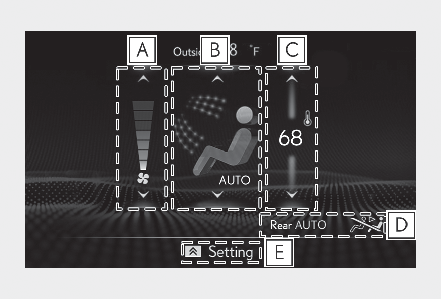
Adjust the rear seats fan speed settingSelect the rear seats air flow mode: Air flows to the upper body: Air flows to the upper body and feet: Air flows to the feetAdjust the rear seats temperature settingFunction on/off indicatorsWhen the function is on, the indicator illuminates on the control screen.Sub function menuWhen the sub function button on the Remote Touch is pressed, the following functions can be switched on and off.“ Rear off”: Turn the rear seats fan off“ Rear AUTO”: Set the rear seats automatic mode on/off (Using automatic mode): Disables operation of the rear air conditioning system using the Rear air conditioning system control panelREAR AIR CONDITIONING SYSTEM CONTROL PANEL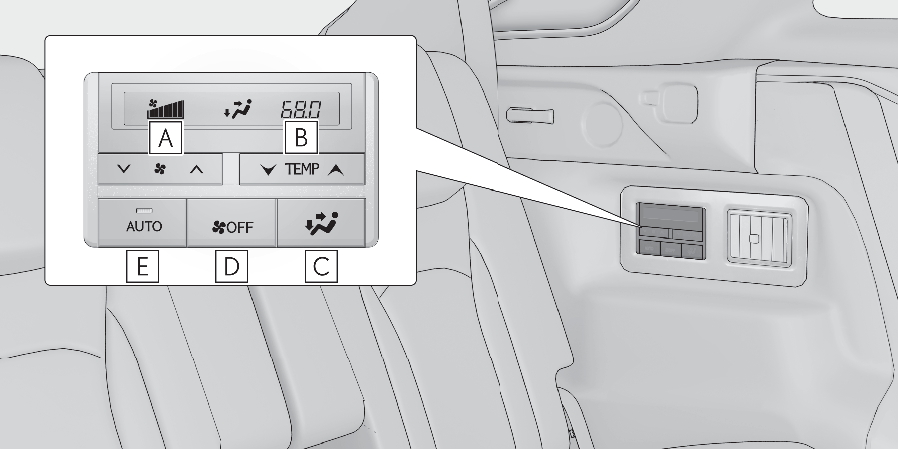
Adjust the rear seats fan speed settingPress to increase the fan speed and to decrease the fan speed.Press the OFF switch to turn the fan off.Adjust the rear seats temperature settingPress to increase the temperature and to decrease the temperature.Select the air flow modeOFF switchAUTO buttonWhen the function is on, the indicator illuminates on the control screen.USING AUTOMATIC MODECenter DisplaySelect “ Rear AUTO” on the sub function menu. (Center Display)To stop the operation, select “ Rear off” on the sub function menu. (Center Display)If the fan speed setting or air flow modes are operated, the automatic mode indicator goes off. However, automatic mode for functions other than that operated is maintained.Rear air conditioning system control panelPress “ AUTO” on the rear air conditioning system control panel.To stop the operation, select “ OFF” on the rear air conditioning system control panel.If the fan speed setting or air flow modes are operated, the automatic mode indicator goes off. However, automatic mode for functions other than that operated is maintained.Note:Using automatic modeFan speed is adjusted automatically according to the temperature setting and the ambient conditions.Therefore, the fan may stop for a while until warm or cool air is ready to flow immediately after “ Rear AUTO” is selected or “ AUTO” is touched.Cool air may blow around the upper body even when the heater is on due to sunlight.ADJUSTING THE TEMPERATURE SETTING OF THE REAR SEATSThe temperature setting of the rear seats can be adjusted using the following methods:When the “ 3-ZONE” indicator is off: Adjust the driver’s seat temperature.Adjust the temperature setting of each rear seat using the Center Display or rear air conditioning system control panel.Adjust the temperature setting of rear seats using the Center Display (rear air conditioning control screen) or rear air conditioning system control panel.AIR OUTLETSLocation of air outletsThe air outlets and air volume changes according to the selected air flow mode.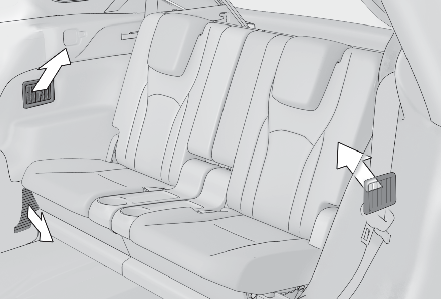
ADJUSTING THE POSITION OF AND OPENING AND CLOSING THE AIR OUTLETSAdjusting the position of and opening and closing the air outlets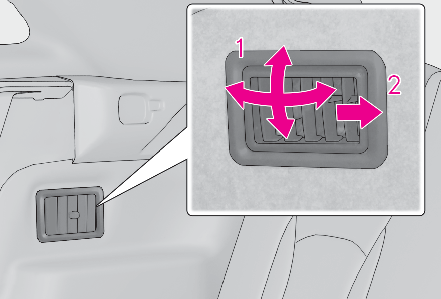
Direct air flow to the left or right, up or downTurn the knob fully to the back of the vehicle to close the ventNOTICE:To prevent battery dischargeDo not leave the air conditioning system on longer than necessary when the engine is off.
Download Manual