HEAD-UP DISPLAY*
*If equippedThe head-up display is linked to the meters and navigation system (if equipped) and projects a variety of information in front of the driver, such as the current vehicle speed and route guidance to a set destination.SYSTEM COMPONENTS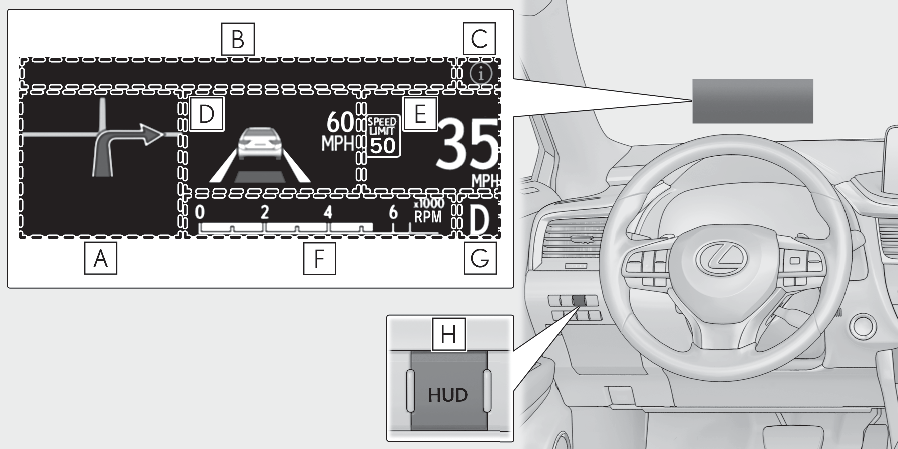
Illustrations used in this text are intended as examples, and may differ from the image that is actually displayed by the head-up display.Navigation system-linked display area (if equipped) (Navigation system-linked display area (if equipped))Message display area (Message display area)Displays the following items:Warning/Message (if equipped)Audio system operation statusOutside temperatureDisplays the following item, which are linked to the navigation system:Street name/ icon (Information icon/Master warning icon)Driving assist system status display area (if equipped)Displays the operational status of the following systems:Dynamic radar cruise control with full-speed range (Dynamic radar cruise control with full-speed range)LTA (Lane Tracing Assist) (LTA (Lane Tracing Assist))Intuitive parking assist (Intuitive parking assist*)Parking Support Brake function (for static objects) (Parking Support Brake function (static objects)*)Displayed content is the same as that displayed on the multi-information display. For details, refer to the explanations of each system.Vehicle speed display areaDisplays the following items:Vehicle speedSpeed limit (vehicles with a navigation system) (U.S.A. only)Road sign icons recognized by the RSA (RSA (Road Sign Assist)*)Eco Driving Indicator/Tachometer (Eco Driving Indicator/Tachometer)Shift position display (Automatic transmission)HUD (Head-up display) switch (Enabling/Disabling the head-up display)Note:Head-up displayThe head-up display may seem dark or hard to see when viewed through sunglasses, especially polarized sunglasses. Adjust the brightness of the head-up display or remove your sunglasses.WARNING:Before using the head-up displayCheck that the position and brightness of the head-up display image does not interfere with safe driving. Incorrect adjustment of the image’s position or brightness may obstruct the driver’s view and lead to an accident, resulting in death or serious injury.Do not continuously look at the head-up display while driving as you may fail to see pedestrians, objects on the road, etc. ahead of the vehicle.NOTICE:To prevent damage to componentsDo not place any drinks near the head-up display projector. If the projector gets wet, electrical malfunctions may result.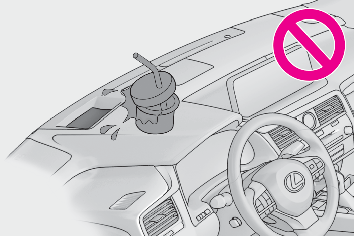
Do not place anything on or put stickers onto the head-up display projector. Doing so could interrupt head-up display indications.Do not touch the inside of the head-up display projector or thrust sharp edges or the like into the projector. Doing so could cause mechanical malfunctions.USING THE HEAD-UP DISPLAYEnabling/Disabling the head-up displayPress the HUD (Head-up display) switch.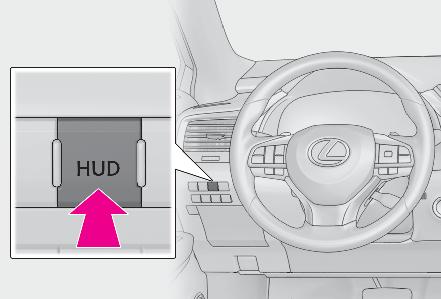
Changing settings of the head-up displaySelect on the multi-information display (Customizable features) to change the following settings:Display brightness/positionSelect to adjust the brightness and position of the head-up display.Display contentSelect to enable/disable the following items:Route guidance to destination (if equipped)Driving assist system status (if equipped)Compass (if equipped)Audio system operation statusEco Driving Indicator/TachometerSelect to display Eco Driving Indicator/tachometer/no content.Display angleSelect to adjust the angle of the head-up display.Note:Enabling/disabling of the head-up displayIf the head-up display is disabled, it will remain disabled when the engine switch is turned off then back to IGNITION ON mode.Display brightnessThe brightness of the head-up display can be adjusted on of the multi-information display. Also, it is automatically adjusted according to the ambient brightness.Automatic adjustment of the head-up display position (if equipped)A desired head-up display position can be entered to memory and recalled automatically by the driving position memory system. (Driving position memory*)When the battery is disconnectedThe customize settings of the head-up display will be reset.WARNING:Caution for changing settings of the head-up displayAs the engine needs to be running while changing the settings of the head-up display, ensure that the vehicle is parked in a place with adequate ventilation. In a closed area such as a garage, exhaust gases including harmful carbon monoxide (CO) may collect and enter the vehicle. This may lead to death or a serious health hazard.NOTICE:When changing the settings of the head-up displayTo prevent battery discharge, ensure that the engine is running while the changing the settings of the head-up display.INFORMATION ICON/MASTER WARNING ICONDisplays the following multi-information display linked icons:: Master warning iconDisplayed when a warning message is displayed on the multi-information display. (If a warning message is displayed): Information iconDisplayed when a suggestion/advice pop-up display is displayed on the multi-information display. (Suggestion function)MESSAGE DISPLAY AREADisplays the following items in the appropriate situation:Warning/Message (if equipped)Displays the following system warning/messages:PCS (Pre-Collision System) (PCS (Pre-Collision System))Parking Support Brake function (for static objects) (Parking Support Brake function (static objects)*)Dynamic radar cruise control with full-speed range (Dynamic radar cruise control with full-speed range)Brake Override System (Restraining the engine output (Brake Override System))Drive-Start Control (Restraining sudden start (Drive-Start Control))Details of content displayed on the head-up display may differ from that displayed on the multi-information display. For details, refer to the explanation of each system.Audio system operation statusDisplayed when the audio system is operated.Outside temperatureDisplayed in the following situations:When the engine switch is turned to IGNITION ON modeWhen the low outside temperature indicator is flashingDisplayed content is the same as that displayed on the multi-information display. For details, refer to the explanation of the outside temperature display on the multi-information display. (Outside temperature display)Displays the following items which are linked to the navigation system:Street nameThe name of the street that the vehicle is currently driving on is displayed on the bottom of the display area.When the navigation system is performing route guidance, the name of the next street will be displayed on the top of the display area.Note:Street name display (vehicles with a navigation system)Only street names which are included in the map data will be displayed.NAVIGATION SYSTEM-LINKED DISPLAY AREA (IF EQUIPPED)Displays the following items which are linked to the navigation system:Route guidance to destinationDisplayed when the navigation system is performing route guidance. When approaching an intersection, an arrow will be displayed to indicate the suggested direction of travel.CompassDisplays the direction of travel.ECO DRIVING INDICATOR/TACHOMETEREco Driving Indicator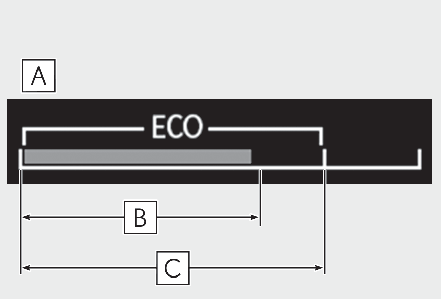
Eco Driving Indicator Zone DisplayEco driving ratio based on accelerationZone of Eco drivingDisplayed content is the same as that displayed on the multi-information display (Eco Driving Indicator). For details, refer to Eco Driving Indicator.TachometerDisplays the engine speed in revolutions per minute.
Download Manual