PARKING BRAKE
The parking brake can be set or released automatically or manually.In automatic mode, the parking brake can be set or released automatically according to the shift lever operation. Also, even in automatic mode, the parking brake can be set or released manually.OPERATING INSTRUCTIONSusing the manual modeThe parking brake can be set and released manually.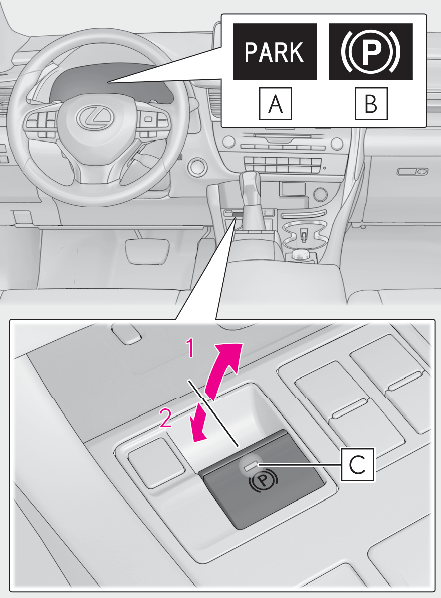
U.S.A.CanadaParking brake lightPull the parking brake switch to set the parking brakeThe parking brake indicator light and parking brake light will turn on.Pull and hold the parking brake switch if an emergency occurs and it is necessary to operate the parking brake while driving.Push the parking brake switch to release the parking brakeOperate the switch while depressing the brake pedal or slowly depressing the accelerator pedal.Make sure that the parking brake indicator light and parking brake light turn off.If the parking brake indicator light and parking brake light flashes, operate the switch again. (Parking brake indicator)TURNS AUTOMATIC MODE ONWhile the vehicle is stopped, pull and hold the parking brake switch until “ Automatic Mode On” will be displayed on the multi-information display.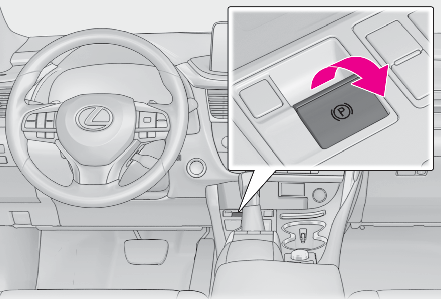
When the automatic mode is turned on, the parking brake operates as follows.When the shift lever is moved out of P, the parking brake will be released, and the parking brake indicator light and parking brake light turn off.When the shift lever is moved into P, the parking brake will be set, and the parking brake indicator light and parking brake light turn on.Operate the shift lever with the brake pedal depressed.TURNS AUTOMATIC MODE OFFWhile the vehicle is stopped, press and hold the parking brake switch until “ Automatic Mode Off” will be displayed on the multi-information display.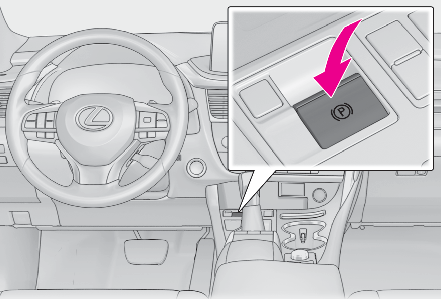
Note:Parking brake operationWhen the engine switch is not in IGNITION ON mode, the parking brake cannot be released using the parking brake switch.When the engine switch is not in IGNITION ON mode, automatic mode (automatic brake setting and releasing) is not available.Parking brake automatic release functionThe parking brake is automatically released when slowly depress the accelerator pedal.The parking brake will be released automatically under the following conditions:The driver’s door is closed.The driver’s seatbelt is fastened.Shift the shift lever is in a forward or reverse position.The malfunction indicator lamp or brake system warning light is not illuminated.If the automatic release function does not operate, manually release the parking brake.If “ Parking Brake Overheated Parking Brake Unavailable” is displayed on the multi-information displayIf the parking brake is operated repeatedly over a short period of time, the system may restrict operation to prevent overheating. If this happens, refrain from operating the parking brake. Normal operation will return after about 1 minute.If “ EPB Activation Stopped Incompletely” or “ Parking Brake Unavailable” is displayed on the multi-information displayOperate the parking brake switch. If the message does not disappear after operating the switch several times, the system may be malfunctioning. Have the vehicle inspected by your Lexus dealer immediately.Parking brake operation soundWhen the parking brake operates, a motor sound (whirring sound) may be heard. This does not indicate a malfunction.Parking brake indicator light and parking brake lightDepending on the engine switch mode, the parking brake indicator light and parking brake light will turn on and stay on as described below:IGNITION ON mode: Comes on until the parking brake is released.Not in IGNITION ON mode: Stays on for approximately 15 seconds.When the engine switch is turned off with the parking brake set, the parking brake indicator light and parking brake light will stay on for about 15 seconds. This does not indicate a malfunction.Changing the modeWhen changing the automatic mode on/off, the message will be shown on the multi-information display and the buzzer sounds.Parking the vehicleDriving the vehicleParking brake engaged warning buzzerA buzzer will sound if the vehicle is driven with the parking brake engaged. “ Release Parking Brake” is displayed on the multi-information display.Warning messages and buzzersWarning messages and buzzers are used to indicate a system malfunction or to inform the driver of the need for caution. If a warning message is shown on the multi-information display, read the message and follow the instructions.If the brake system warning light comes onIf a warning light turns on or a warning buzzer soundsUsage in winter timeUtility vehicle precautionsWARNING:When parking the vehicleDo not leave a child in the vehicle alone. The parking brake may be released unintentionally and there is the danger of the vehicle moving that may lead to an accident resulting in death or serious injury.Parking brake switchDo not set any objects near the parking brake switch. Objects may interfere with the switch and may lead the parking brake to unexpectedly operate.NOTICE:When parking the vehicleBefore you leave the vehicle, shift the shift lever to P, set the parking brake and make sure that the vehicle does not move.When the system malfunctionsStop the vehicle in a safe place and check the warning messages.When the parking brake cannot be released due to a malfunctionDriving the vehicle with the parking brake set will lead to brake components overheating, which may affect braking performance and increase brake wear.Have the vehicle inspected by your Lexus dealer immediately if this occurs.
Download Manual