CENTER DISPLAY
CENTER DISPLAY OVERVIEWMenu screenPress the “ MENU” button on the Remote Touch to display the menu screen.This system can also be operated by the touch screen.For details, refer to “ NAVIGATION AND MULTIMEDIA SYSTEM OWNER’S MANUAL”.The displays shown in the illustrations are used for example only and may differ from the actual vehicle.Vehicles with a 12.3-inch display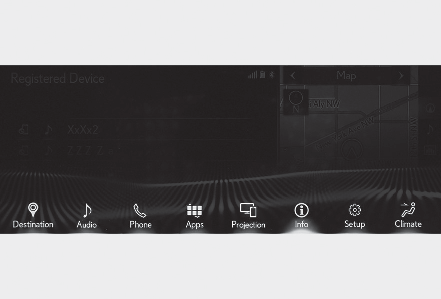
Vehicles with a 8-inch display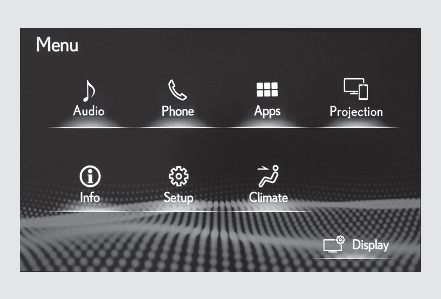
| Switch | Function |
|---|---|
 |
Select to display the “ Destination” screen.*1 |
 |
Select to display the audio control screen.*1 |
 |
Select to display the hands-free control screen.*1 |
 |
Select to display the “ Apps” screen.*1, 2 |
 /  /  |
When an Apple CarPlay/Android Auto connection is established and this button displays “ Apple CarPlay”/“ Android Auto”, select to display the home screen of Apple CarPlay/Android Auto.*1, 2 |
 |
Select to display the information screen.*1 (Fuel consumption information) |
 |
Select to display the setup screen.*1 |
 |
Select to display the air conditioning control screen. (Front automatic air conditioning system) |
 |
Select to adjust the contrast and brightness of the screens, turn the screen off, etc.*1, 2 |
*1Refer to “ NAVIGATION AND MULTIMEDIA SYSTEM OWNER’S MANUAL”.*2This function is not made available in some models or areas.Split-screen display (vehicles with a 12.3-inch display)Different information can be displayed on the left and right sides of the screen. For example, air conditioning system screen can be displayed and operated while the fuel consumption information screen is being displayed. The large screen on the left of the display is called the main display, and the small screen to the right is called the side display.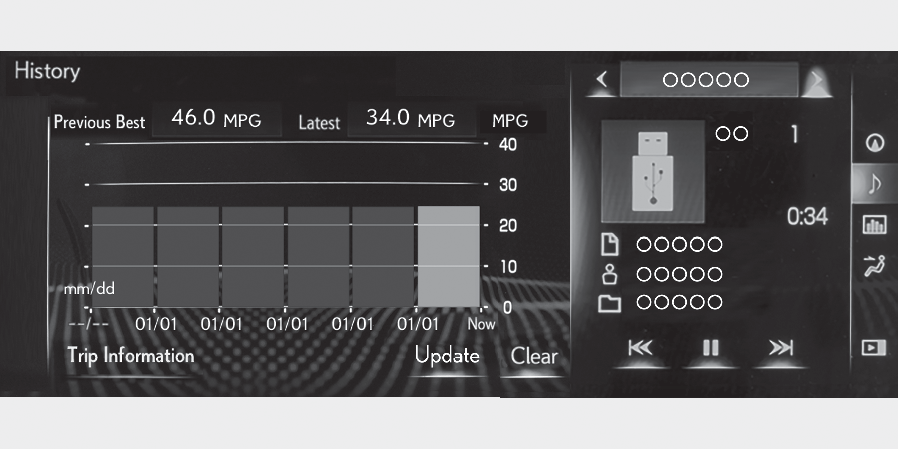
Main display (vehicles with a 12.3-inch display)For details about the functions and operation of the main display, refer to the respective section and “ NAVIGATION AND MULTIMEDIA SYSTEM OWNER’S MANUAL”.Side display (vehicles with a 12.3-inch display)The following functions can be displayed and operated on the side display.Select or to display the desired screen.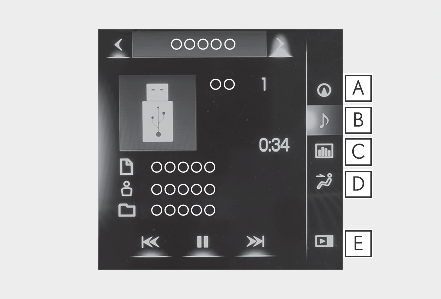
Navigation system*Audio*Vehicle information (Using the side display (vehicles with a 12.3-inch display) )Air conditioning system (Front automatic air conditioning system)Show/hide the side display**Refer to “ NAVIGATION AND MULTIMEDIA SYSTEM OWNER’S MANUAL”.Note:Screen display during low temperaturesWhen the ambient temperature is extremely low, screen response may be delayed even if the Remote Touch is operated.
Download Manual