PKSB (PARKING SUPPORT BRAKE)*
*If equippedThe Parking Support Brake system consists of the following functions that operate when driving at a low speed or backing up, such as when parking. When the system determines that the possibility of a collision with a detected object is high, a warning operates to urge the driver to take evasive action. If the system determines that the possibility of a collision with a detected object is extremely high, the brakes are automatically applied to help avoid the collision or help reduce the impact of the collision.PKSB (PARKING SUPPORT BRAKE) SYSTEMParking Support Brake function (static objects) (if equipped)Ultrasonic sensors are used to detect static objects, such as a wall, in the detection area when driving at a low speed or backing up. (Parking Support Brake function (static objects)*)Parking Support Brake function (rear-crossing vehicles) (if equipped)Rear radar sensors are used to detect approaching vehicles in the detection area behind the vehicle when backing up. (Parking Support Brake function (rear-crossing vehicles)*)WARNING:Cautions regarding the use of the systemDo not overly rely on the system, as doing so may lead to an accident.The driver is solely responsible for safe driving. Always drive carefully, taking care to observe your surroundings. The Parking Support Brake system is designed to provide support to lessen the severity of collisions. However, it may not operate in some situations.The Parking Support Brake system is not designed to stop the vehicle completely. Additionally, even if the system has stopped the vehicle, it is necessary to depress the brake pedal immediately as brake control will be canceled after approximately 2 seconds.It is extremely dangerous to check the system operations by intentionally driving the vehicle into the direction of a wall, etc. Never attempt such actions.When to disable the Parking Support BrakeIn the following situations, disable the Parking Support Brake as the system may operate even though there is no possibility of a collision.When inspecting the vehicle using a chassis roller, chassis dynamo or free rollerWhen loading the vehicle onto a boat, truck or other transport vesselIf the suspension has been modified or tires of a size other than specified are installedIf the front of the vehicle is raised or lowered due to the carried loadWhen equipment that may obstruct a sensor is installed, such as a towing eyelet, bumper protector (an additional trim strip, etc.), bicycle carrier, or snow plowWhen using automatic car washing devicesIf the vehicle cannot be driven in a stable manner, such as when the vehicle has been in an accident or is malfunctioningWhen the vehicle is driven in a sporty manner or off-roadWhen the tires are not properly inflatedWhen the tires are very wornWhen a tire chains, compact spare tire or an emergency tire puncture repair kit is usedNOTICE:If “ Parking Support Brake Unavailable” is displayed on the multi-information display and the PKSB OFF indicator is flashingIf this message is displayed immediately after the engine switch is changed to IGNITION ON mode, operate the vehicle carefully, paying attention to your surroundings. It may be necessary to drive the vehicle for a certain amount of time before the system returns to normal. (If the system is not return to normal after driving for a while, clean the sensors and their surrounding area on the bumpers.)ENABLING/DISABLING THE PARKING SUPPORT BRAKEThe Parking Support Brake can be enabled/disabled on the multi-information display. All of the Parking Support Brake functions (static objects and rear-crossing vehicles) are enabled/disabled simultaneously.Use the meter control switches to enable/disable the parking support brake. (Changing the meter display)Press or to select .Press or to select and then press .When the Parking Support Brake is disabled, the PKSB OFF indicator (Warning lights and indicators displayed on the instrument cluster) illuminates on the multi-information display.To re-enable the system when it was disabled, select on the multi-information display, select and turn it on. If the system is disabled, it will remain off even if the engine switch is turned to IGNITION ON mode after the engine switch has been turned off.DISPLAYS AND BUZZERS FOR ENGINE OUTPUT RESTRICTION CONTROL AND BRAKE CONTROLIf the engine output restriction control or brake control operates, a buzzer will sound and a message will be displayed on the Center Display and multi-information display, to alert the driver. On vehicles with a head-up display, the head-up display (if equipped) will display the same message as the multi-information display.Depending on the situation, engine output restriction control will operate to either limit acceleration or restrict output as much as possible.Engine output restriction control is operating (acceleration restriction)Acceleration greater than a certain amount is restricted by the system.Center Display (Panoramic view monitor) (If equipped): No warning displayedMulti-information display: “ Object Detected Acceleration Reduced”PKSB OFF indicator: Not illuminatedBuzzer: Does not soundEngine output restriction control is operating (output restricted as much as possible)The system has determined that stronger-than-normal brake operation is necessary.Center Display (Panoramic view monitor) (If equipped): “ BRAKE!”Multi-information display: “ BRAKE!”PKSB OFF indicator: Not illuminatedBuzzer: Short beepBrake control is operatingThe system determined that emergency braking is necessary.Center Display (Panoramic view monitor) (If equipped): “ BRAKE!”Multi-information display: “ BRAKE!”PKSB OFF indicator: Not illuminatedBuzzer: Short beepVehicle stopped by system operationThe vehicle has been stopped by brake control operation.Center Display (Panoramic view monitor) (If equipped): “ Press Brake Pedal”Multi-information display: “ Switch to Brake” (If the accelerator pedal is not depressed, “ Press Brake Pedal” will be displayed.)PKSB OFF indicator: IlluminatedBuzzer: Short beepSYSTEM OVERVIEWIf the Parking Support Brake determines that a collision with a detected object is possible, the engine output will be restricted to restrain any increase in the vehicle speed. (Engine output restriction control: See figure 2.)Additionally, if the accelerator pedal continues to be depressed, the brakes will be applied automatically to reduce the vehicle speed. (Brake control: See figure 3.)Figure 1 When the PKSB (Parking Support Brake) is disabled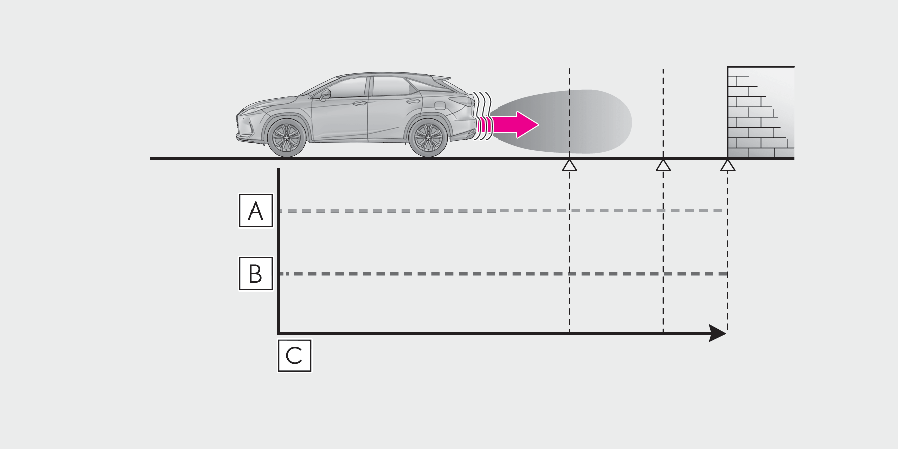
Engine outputBraking forceTimeFigure 2 When engine output restriction control operates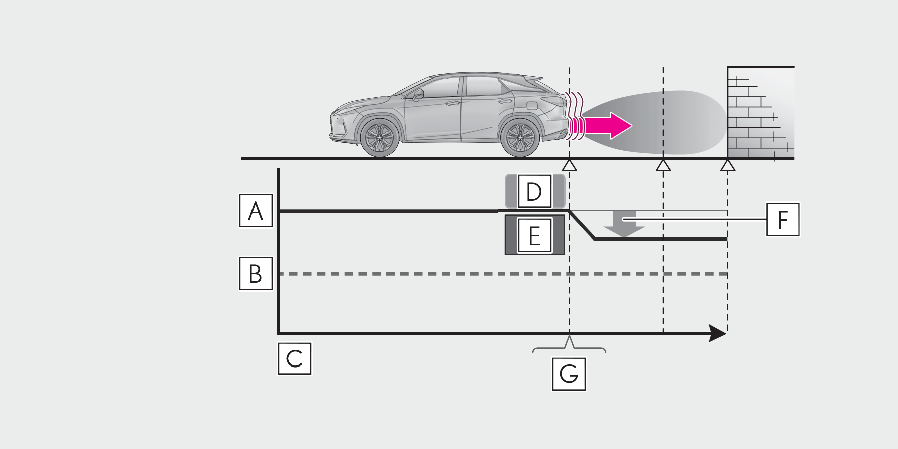
Engine outputBraking forceTimeEngine output restriction control begins operatingSystem determines that possibility of collision with detected object is highEngine output reducedExample: Multi-information display: “ BRAKE!”Figure 3 When brake control operates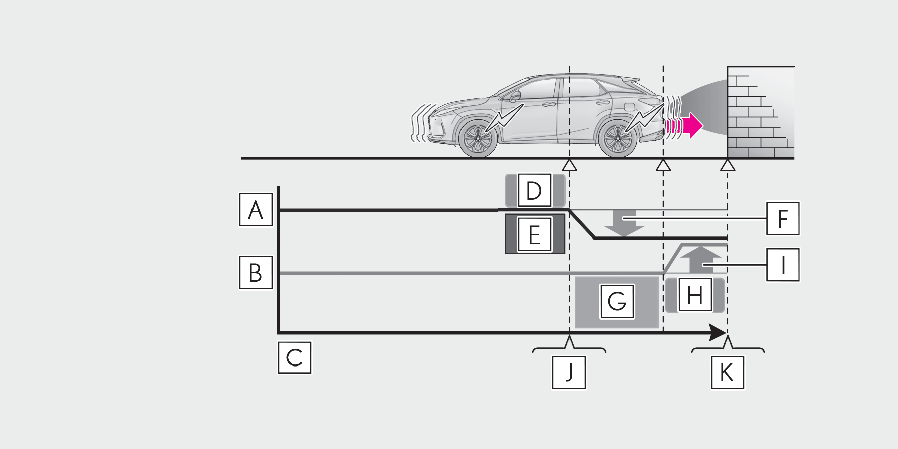
Engine outputBraking forceTimeEngine output restriction control begins operatingSystem determines that possibility of collision with detected object is highEngine output reducedSystem determines that possibility of collision with detected object is extremely highBrake control begins operatingBrake control strength increasedExample: Multi-information display: “ BRAKE!”Example: Multi-information display: “ Switch to Brake”Note:If the Parking Support Brake has operatedIf the vehicle is stopped due to operation of the Parking Support Brake, the Parking Support Brake will be disabled and the PKSB OFF indicator will illuminate. If the Parking Support Brake operates unnecessarily, brake control can be canceled by depressing the brake pedal or waiting for approximately 2 seconds for it to automatically be canceled. Then, the vehicle can be operated by depressing the accelerator pedal.Re-enabling the Parking Support BrakeTo re-enable the Parking Support Brake when it has been disabled due to system operation perform any of the following operations.At this time, the PKSB OFF indicator will turn off. (Indicators)Turn the PKSB (Parking Support Brake) on (Enabling/Disabling the Parking Support Brake)The shift lever is in P.Drive with no operation targets in the traveling direction of the vehicleChange the traveling direction of the vehicleIf “ Parking Support Brake Unavailable” is displayed on the multi-information display and the PKSB OFF indicator is flashingIf this message is displayed only when the shift lever is in any position other than R, a sensor on the front or rear bumper may be dirty. Clean the sensors and their surrounding area on the bumpers.If “ Parking Assist Unavailable” and “ Parking Assist Unavailable Clean Parking Assist Sensor” are displayed on the multi-information display and the PKSB OFF indicator is flashingA sensor may be covered with ice, snow, dirt, etc. Remove the ice, snow, dirt, etc., from the sensor to return the system to normal.If this message is shown even after removing dirt from the sensor, or shown when the sensor was not dirty to begin with, have the vehicle inspected by your Lexus dealer.A sensor may be frozen. Once the ice melts, the system will return to normal.Water may be continuously flowing over the sensor surface, such as in a heavy rain. When the system determines that it is normal, the system will return to normal.If a battery terminal has been disconnected and reconnectedThe system needs to be initialized. To initialize the system, drive the vehicle straight ahead for 5 seconds or more at a speed of approximately 22 mph (35 km/h) or more. Additionally, for vehicles with the Parking Support Brake function, turn the steering wheel fully to the left and right with the vehicle stopped.
Download Manual