RCTA (REAR CROSS TRAFFIC ALERT) FUNCTION*
*If equippedThe RCTA function uses the BSM rear side radar sensors installed behind the rear bumper. This function is intended to assist the driver in checking areas that are not easily visible when backing up.WARNING:Cautions regarding the use of the functionThere is a limit to the degree of recognition accuracy and control performance that this system can provide, do not overly rely on this system. The driver is always responsible for paying attention to the vehicle’s surroundings and driving safely. (Cautions regarding the use of the system)To ensure the system can operate properlyBSM (Blind Spot Monitor)*SYSTEM COMPONENTS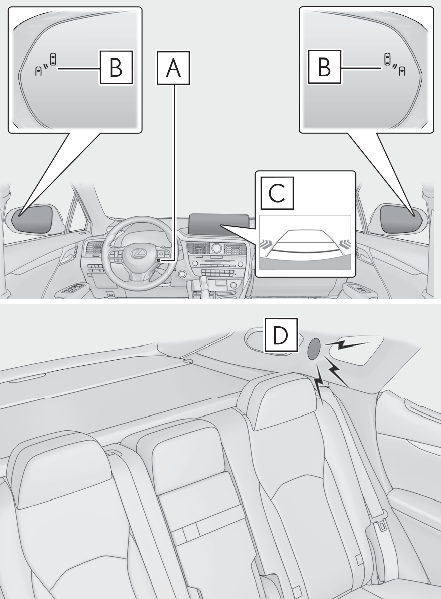
Meter control switchesTurning the RCTA function on/off.When the RCTA function is disabled, the RCTA OFF indicator illuminates.Outside rear view mirror indicatorsWhen a vehicle approaching from the right or left at the rear of the vehicle is detected, both outside rear view mirror indicators will flash.Center DisplayIf a vehicle approaching from the right or left at the rear of the vehicle is detected, the RCTA icon (RCTA icon display) for the detected side will be displayed on the Center Display. This illustration shows an example of a vehicle approaching from both sides of the vehicle.RCTA buzzerIf a vehicle approaching from the right or left at the rear of the vehicle is detected, a buzzer will sound.TURNING THE RCTA FUNCTION ON/OFFUse the meter control switches to enable/disable the RCTA function. (Changing the meter display)Vehicles without the Intuitive parking assistPress or to select .Press or to select “ RCTA” and then press .When the RCTA function is disabled, the RCTA OFF indicator (Warning lights and indicators displayed on the instrument cluster) illuminates on the multi-information display. (Each time the engine switch is turned off then changed to IGNITION ON mode, the RCTA function will be enabled automatically.)Vehicles with the Intuitive parking assistPress or to select .Press or to select “ PKSA” and then press .Press or to select “ RCTA” and then press .When the RCTA function is disabled, the RCTA OFF indicator (Warning lights and indicators displayed on the instrument cluster) illuminates on the multi-information display. (Each time the engine switch is turned off then changed to IGNITION ON mode, the RCTA function will be enabled automatically.)NOTICE:Before using the RCTA functionDo not place objects near the sensors.Note:Outside rear view mirror indicator visibilityIn strong sunlight, the outside rear view mirror indicator may be difficult to see.Hearing the RCTA buzzerThe RCTA buzzer may be difficult to hear over loud noises, such as if the audio system volume is high.When “ Rear Cross Traffic Alert Unavailable” is shown on the multi-information displayWater, ice, snow, mud, etc., may be attached to the rear bumper around the sensors. (BSM (Blind Spot Monitor)*) Removing the water, ice, snow, mud, etc., from the attached to the rear bumper around the sensors to return the function to normal.Additionally, the function may not operate normally when driving in extremely hot or cold environments.Rear side radar sensorsBSM (Blind Spot Monitor)*RCTA FUNCTIONOPERATION OF THE RCTA FUNCTIONThe RCTA function uses rear side radar sensors to detect vehicles approaching from the right or left at the rear of the vehicle and alerts the driver of the presence of such vehicles by flashing the outside rear view mirror indicators and sounding a buzzer.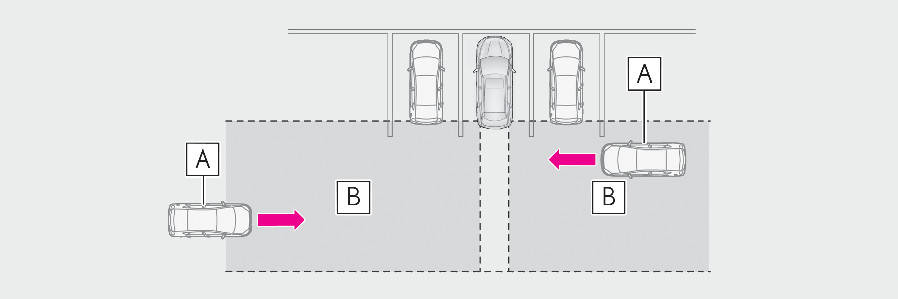
Approaching vehiclesDetection areas of approaching vehiclesRCTA ICON DISPLAYWhen a vehicle approaching from the right or left at the rear of the vehicle is detected, the following will be displayed on the Center Display.Example (Lexus parking assist monitor) (if equipped): Vehicles are approaching from both sides of the vehicle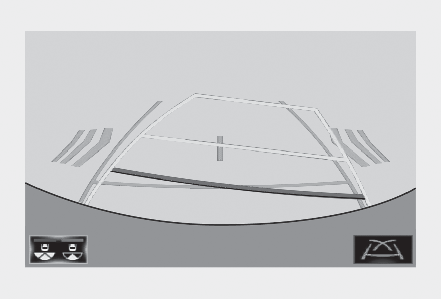
Example (Panoramic view monitor) (if equipped): Vehicles are approaching from both sides of the vehicle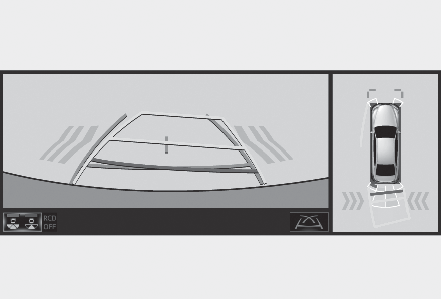
RCTA FUNCTION DETECTION AREASThe areas that vehicles can be detected in are outlined below.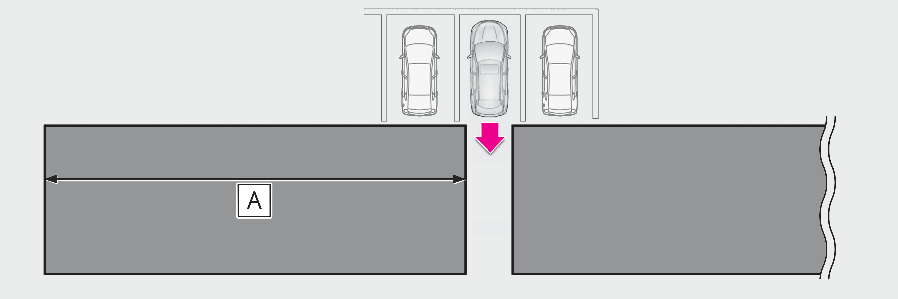
The buzzer can alert the driver of faster vehicles approaching from farther away.Example:
| Approaching vehicle speed | Approximate alert distance |
|---|---|
| 18 mph (28 km/h) (fast) | 65 ft. (20 m) |
| 5 mph (8 km/h) (slow) | 18 ft. (5.5 m) |
Note:The RCTA function is operational whenThe RCTA function operates when all of the following conditions are met:The engine switch is in IGNITION ON mode.The RCTA function is on.The shift lever is in R.The vehicle speed is approximately 5 mph (8 km/h) or less.The approaching vehicle speed is between approximately 5 mph (8 km/h) and 18 mph (28 km/h).Setting the buzzer volumeThe buzzer volume can be adjusted on the multi-information display. (Setting the buzzer volume)Use the meter control switches to change settings. (Changing the meter display)Conditions under which the system will not detect a vehicleThe RCTA function is not designed to detect the following types of vehicles and/or objects:Vehicles approaching from directly behindVehicles backing up in a parking space next to your vehicleVehicles that the sensors cannot detect due to obstructions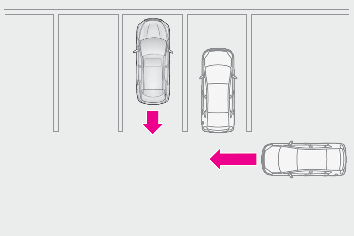
Guardrails, walls, signs, parked vehicles and similar stationary objects*Small motorcycles, bicycles, pedestrians, etc.*Vehicles moving away from your vehicleVehicles approaching from the parking spaces next to your vehicle*The distance between the sensor and approaching vehicle gets too close*Depending on the conditions, detection of a vehicle and/or object may occur.Situations in which the system may not operate properlyThe RCTA function may not detect vehicles correctly in the following situations:When the sensor is misaligned due to a strong impact to the sensor or itssurrounding areaWhen mud, snow, ice, a sticker, etc., is covering the sensor or surrounding area on the position above the rear bumperWhen driving on a road surface that is wet with standing water during bad weather, such as heavy rain, snow, or fogWhen multiple vehicles are approaching with only a small gap between each vehicleWhen a vehicle is approaching at high speedWhen equipment that may obstruct a sensor is installed, such as a towing eyelet, bumper protector (an additional trim strip, etc.), bicycle carrier, or snow plowWhen backing up on a slope with a sharp change in grade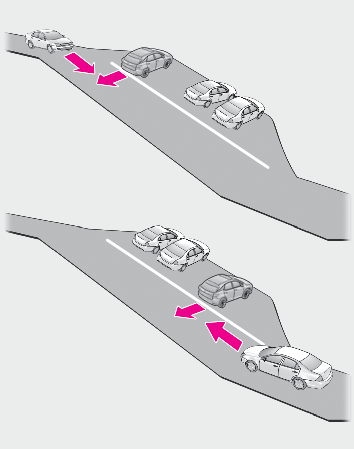
When backing out of a sharp angleparking spot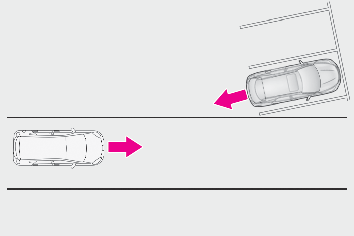
When towing a trailerWhen there is a significant difference in height between your vehicle and the vehicle that enters the detection areaWhen a sensor or the area around a sensor is extremely hot or coldIf the suspension has been modified or tires of a size other than specified are installedIf the front of the vehicle is raised or lowered due to the carried loadWhen turning while backing up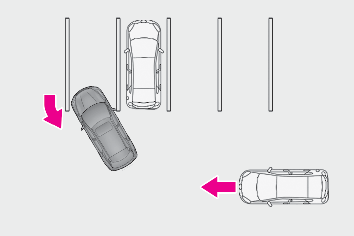
When a vehicle turns into the detection area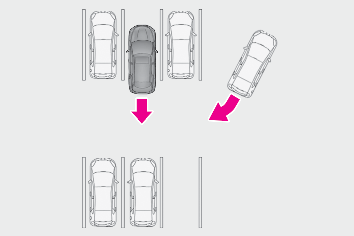
Situations in which the system may operate even if there is no possibility of a collisionInstances of the RCTA function unnecessary detecting a vehicle and/or object may increase in the following situations:When the parking space faces a street and vehicles are being driven on the street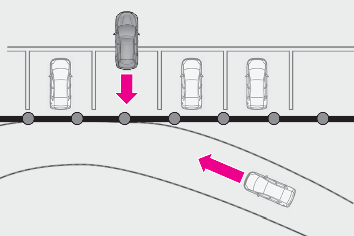
When the distance between your vehicle and metal objects, such as a guardrail, wall, sigh, or parked vehicle, which may reflect electrical waves toward the rear of the vehicle, is short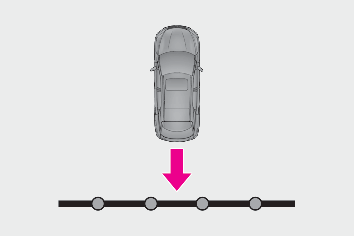
When equipment that may obstruct a sensor is installed, such as a towing eyelet, bumper protector (an additional trim strip, etc.), bicycle carrier, or snow plowWhen a vehicle passes by the side of your vehicle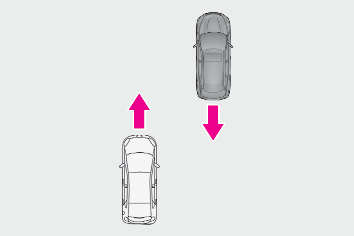
When a detected vehicle turns while approaching the vehicle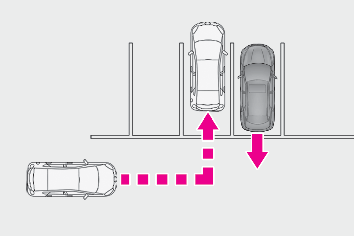
When there are spinning objects near your vehicle such as the fan of an air conditioning unitWhen water is splashed or sprayed toward the rear bumper, such as from a sprinklerMoving objects (flags, exhaust fumes, large rain droplets or snowflakes, rain water on the road surface, etc.)When the distance between your vehicle and a guardrail, wall, etc., that enters the detection area is shortGratings and guttersWhen a sensor or the area around a sensor is extremely hot or coldIf the suspension has been modified or tires of a size other than specified are installedIf the front of the vehicle is raised or lowered due to the carried load
Download Manual