AUTOMATIC TRANSMISSION
Select the shift position depending on your purpose and situation.SHIFT POSITION PURPOSE AND FUNCTIONS
| Shift position | Objective or function |
|---|---|
| P | Parking the vehicle/starting the engine |
| R | Reversing |
| N | Condition in which the power is not transmission |
| D | Normal driving*1 |
| M | M mode driving*2 (Selecting gears in the M position) |
*1Shifting to the D position allows the system to select a gear suitable for the driving conditions. Setting the shift lever to the D position is recommended for normal driving.*2Selecting gears using M mode fixes the gear step, controls engine braking force, and prevents unnecessary upshifting.Note:To protect the automatic transmissionIf the automatic transmission fluid temperature is high, “ Transmission Fluid Temp High See Owner’s Manual” will be displayed on the multi-information display and the vehicle will go into transmission protection mode automatically. Have the vehicle inspected by your Lexus dealer.When driving with dynamic radar cruise control with full-speed range activatedEven when performing the following actions with the intent of enabling engine braking, engine braking will not occur because dynamic radar cruise control with full-speed range will not be canceled.While driving in D position, downshifting to 7, 6, 5 or 4. (Dynamic radar cruise control with full-speed range)When switching the driving mode to sport mode while driving in the D position (Driving mode select switch)Restraining sudden start (Drive-Start Control)Restraining sudden start (Drive-Start Control)AI-SHIFTThe AI-SHIFT automatically selects the suitable gear according to driver performance and driving conditions.The AI-SHIFT automatically operates when the shift lever is in D. (Shifting the shift lever to the M position cancels the function.)G AI-SHIFT automatically selects a suitable gear for sporty driving according to driver’s input and driving conditions. G AI-SHIFT operates automatically when the shift lever is in D and sport mode is selected for the driving mode. (Selecting normal mode with the driving mode select switch or shifting the shift lever to the M position cancels this function.)WARNING:When driving on slippery road surfacesBe careful of downshifting and sudden acceleration, as this could result in the vehicle skidding to the side or spinning.SHIFTING THE SHIFT LEVER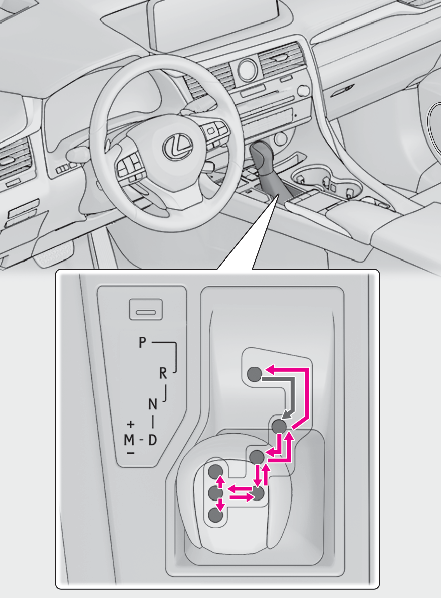
While the engine switch is in IGNITION ON mode, move the shift lever with the brake pedal depressed.When shifting the shift lever between P and D, make sure that the vehicle is completely stopped.Note:Shift lock systemThe shift lock system is a system to prevent accidental operation of the shift lever in starting.The shift lever can be shifted from P only when the engine switch is in IGNITION ON mode and the brake pedal is being depressed.If the shift lever cannot be shifted from PFirst, check whether the brake pedal is being depressed.If the shift lever cannot be shifted with your foot on the brake pedal, there may be a problem with the shift lock system. Have the vehicle inspected by your Lexus dealer immediately.The following steps may be used as an emergency measure to ensure that the shift lever can be shifted.Releasing the shift lock:Turn the engine switch to IGNITION ON mode and check that the parking brake is set. (Changing engine switch modes, Parking brake)Turn the engine switch to off.Depress the brake pedal.Pry the cover up with a flathead screwdriver or equivalent tool.To prevent damage to the cover, cover the tip of the screwdriver with a rag.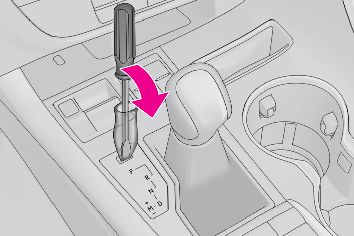
Press the shift lock override button.The shift lever can be shifted while the button is pressed.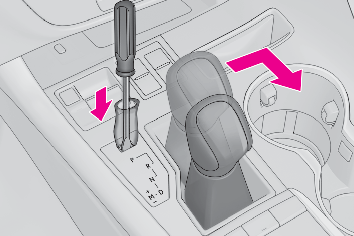
WARNING:To prevent an accident when releasing the shift lockBefore pressing the shift lock override button, make sure to set the parking brake and depress the brake pedal.If the accelerator pedal is accidentally depressed instead of the brake pedal when the shift lock override button is pressed and the shift lever is shifted out of P, the vehicle may suddenly start, possibly leading to an accident resulting in death or serious injury.SELECTING THE DRIVING MODEDriving mode select switchSELECTING SHIFT RANGES IN THE D POSITIONTo drive using temporary shift range selection, operate the “ -” or “ +” paddle shift switch.When the “ -” paddle shift switch is operated, the shift range will be downshifted to a range that enables engine braking force that is suitable to driving conditions. When the “ +” paddle shift switch is operated, the shift range will be one gear higher than the gear in use during normal D position driving.Changing the shift range allows restriction of the highest gear, preventing unnecessary upshifting and enabling the level of engine braking force to be selected.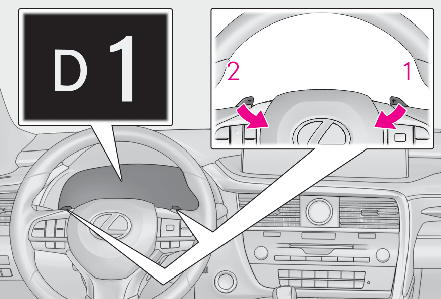
UpshiftingDownshiftingThe selected shift range, from D1 to D8, will be displayed on the meters.SHIFT RANGES AND THEIR FUNCTIONS
| Meter display | Function |
|---|---|
| D2 - D8 | A gear in the range between 1 and the selected gear is automatically chosen depending on vehicle speed and driving conditions |
| D1 | Setting the gear at 1 |
A lower shift range will provide greater engine braking forces than a higher shift range.Note:Automatic deactivation of shift range selection in the D positionShift range selection in the D position will be deactivated in the following situations:When the vehicle comes to a stopIf the accelerator pedal is depressed for more than a certain period of timeWhen the shift lever is shifted to a position other than DThe “ +” paddle shift switch is held down for a period of timeDownshifting restriction warning buzzerTo help ensure safety and driving performance, downshifting operation may sometimes be restricted. In some circumstances, downshifting may not be possible even when the shift lever or paddle shift switch is operated. (A buzzer will sound twice.)SELECTING GEARS IN THE M POSITIONTo enter M mode, shift the shift lever to M. Gears can then be selected by operating the shift lever or paddle shift switches, allowing you to drive in the gear of your choosing.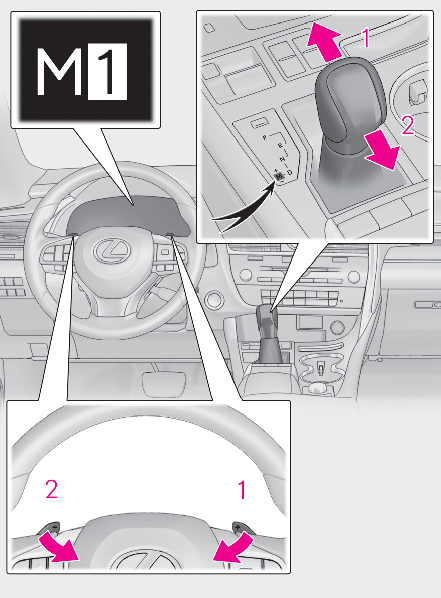
UpshiftingDownshiftingThe gear changes once every time the shift lever or paddle shift switch is operated.The selected gear, from M1 to M8, will be fixed and displayed on the meters.When in the M position, the gear will not change unless the shift lever or paddle shift switches are operated.However, even when in the M position, the gears will be automatically changed in the following situation:When vehicle speed drops (downshift only).When the automatic transmission fluid or engine coolant temperature is low.When automatic transmission fluid temperature is high (upshift only).When the needle of the tachometer is in the red zone (the range which exceeds the allowable revs of the engine).In the following situations, the gear will not shift even if the shift lever or paddle shift switches are operated.The vehicle speed is low (upshift only).Note:Downshifting restriction warning buzzerTo help ensure safety and driving performance, downshifting operation may sometimes be restricted. In some circumstances, downshifting may not be possible even when the paddle shift switch is operated. (A buzzer will sound twice.)
Download Manual