REMOTE TOUCH
The Remote Touch can be used to operate the Center Display.For details on the Remote touch, refer to “ NAVIGATION AND MULTIMEDIA SYSTEM OWNER’S MANUAL”.REMOTE TOUCH OPERATIONSwitches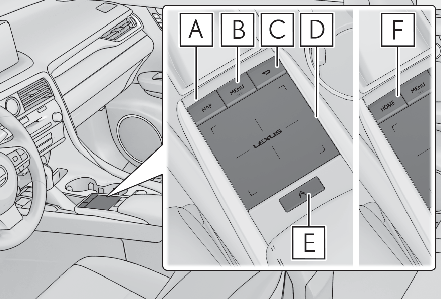
Vehicles with a 12.3-inch display:“ MAP” buttonVehicles with navigation function:Press this button to display the vehicle’s current position.Vehicles without navigation function:Press this button to display the compass mode screen.“ MENU” buttonPress this button to display the menu screen.Back buttonPress this button to display the previous screen.TouchpadSlide your finger on the touchpad and move the pointer to select a function, letter and screen button.Press the touchpad to enter the selected function, letter or screen button. Certain finger movements on the touchpad can perform functions, such as changing map scalings and scrolling list screens.Sub function buttonWhen is displayed on the screen, a function screen assigned to the screen can be displayed.Vehicles with a 8-inch display:“ HOME” buttonPress this button to display the home screen.Using the touchpad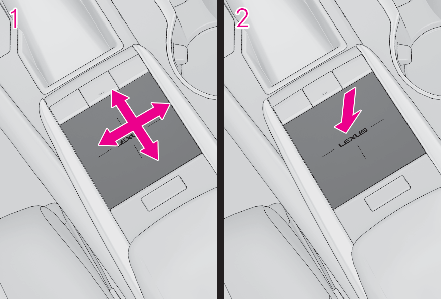
Select: Touch the touchpad to select the desired button on the screen.Enter: Buttons on the screen can be selected by either depressing or double tapping the touchpad. Once a button has been selected, the screen will change.Touch operationOperations are performed by touching the touchpad with your finger.TraceTrace the pad surface while maintaining contact with the touchpad. Moving the cursor and the pointer.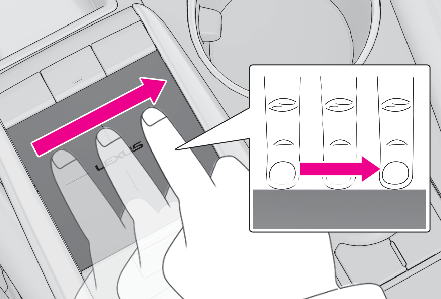
Double tapTap the touchpad twice, quickly. Select the button on the screen.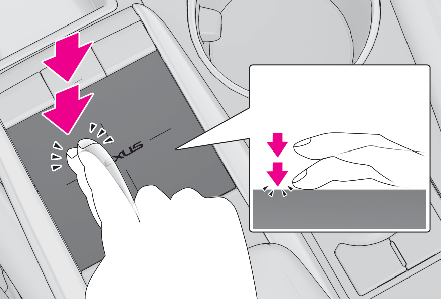
FlickQuick and short movement along the touchpad with you finger. Move the list screen.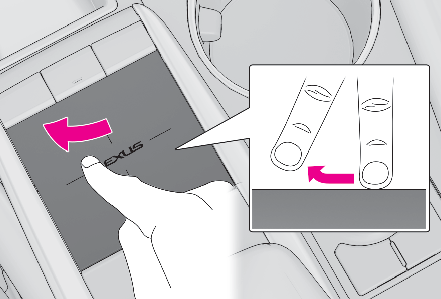
Pinch in/Pinch outSlide fingers toward each other or apart on the touchpad. Change the scale of the map.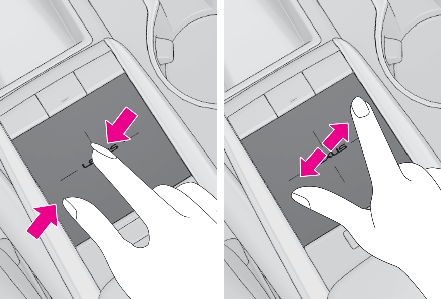
NOTICE:To prevent damage to the Remote TouchObserve the following precautions. Failure to do so may cause damage to the Remote Touch.Do not allow food, liquid, stickers or lit cigarettes to contact the Remote Touch.Do not subject the Remote Touch to excessive pressure or strong impact.Do not push the touchpad with a strong force or use a sharp pointed object to operate the pad.
Download Manual