DYNAMIC RADAR CRUISE CONTROL WITH FULL-SPEED RANGE
In vehicle-to-vehicle distance control mode, the vehicle automatically accelerates, decelerates and stops to match the speed changes of the preceding vehicle even if the accelerator pedal is not depressed. In constant speed control mode, the vehicle runs at a fixed speed.Use the dynamic radar cruise control with full-speed range on freeways and highways.Vehicle-to-vehicle distance control mode (Driving in vehicle-to-vehicle distance control mode)Constant speed control mode (Selecting constant speed control mode)SYSTEM COMPONENTS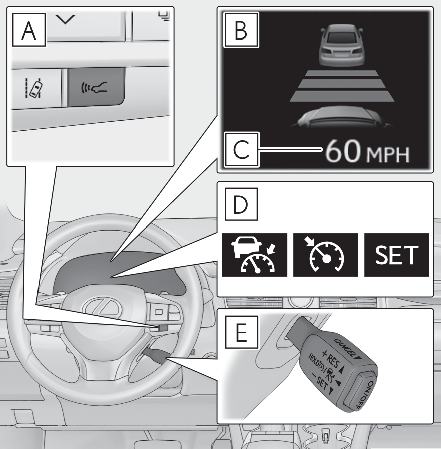
Vehicle-to-vehicle distance switchMulti-information displaySet speedIndicatorsCruise control switchWARNING:Before using dynamic radar cruise control with full-speed rangeDriving safely is the sole responsibility of the driver. Do not rely solely on the system, and drive safely by always paying careful attention to your surroundings.The dynamic radar cruise control with full-speed range provides driving assistance to reduce the driver’s burden. However, there are limitations to the assistance provided.Read the following conditions carefully. Do not overly rely on this system and always drive carefully.When the sensor may not be correctly detecting the vehicle ahead: When the sensor may not be correctly detecting the vehicle aheadConditions under which the vehicle-to-vehicle distance control mode may not function correctly: Conditions under which the vehicle-to-vehicle distance control mode may not function correctlySet the speed appropriately depending on the speed limit, traffic flow, road conditions, weather conditions, etc. The driver is responsible for checking the set speed.Even when the system is functioning normally, the condition of the preceding vehicle as detected by the system may differ from the condition observed by the driver. Therefore, the driver must always remain alert, assess the danger of each situation and drive safely. Relying solely on this system or assuming the system ensures safety while driving can lead to an accident, resulting in death or serious injury.Switch the dynamic radar cruise control with full-speed range setting to off, using the “ ON/OFF” button when not in use.Cautions regarding the driving assist systemsObserve the following precautions, as there are limitations to the assistance provided by the system. Failure to do so may cause an accident resulting in death or serious injury.Assisting the driver to measure following distanceThe dynamic radar cruise control with full-speed range is only intended to help the driver in determining the following distance between the driver’s own vehicle and a designated vehicle traveling ahead. It is not a mechanism that allows careless or inattentive driving, and it is not a system that can assist the driver in low-visibility conditions. It is still necessary for driver to pay close attention to the vehicle’s surroundings.Assisting the driver to judge proper following distanceThe dynamic radar cruise control with full-speed range determines whether the following distance between the driver’s own vehicle and a designated vehicle traveling ahead is within a set range. It is not capable of making any other type of judgement. Therefore, it is absolutely necessary for the driver to remain vigilant and to determine whether or not there is a possibility of danger in any given situation.Assisting the driver to operate the vehicleThe dynamic radar cruise control with full-speed range does not include functions which will prevent or avoid collisions with vehicles ahead of your vehicle. Therefore, if there is ever any possibility of danger, the driver must take immediate and direct control of the vehicle and act appropriately in order to ensure the safety of all involved.Situations unsuitable for dynamic radar cruise control with full-speed rangeDo not use dynamic radar cruise control with full-speed range in any of the following situations. Doing so may result in inappropriate speed control and could cause an accident resulting in death or serious injury.Roads where there are pedestrians, cyclists, etc.In heavy trafficOn roads with sharp bendsOn winding roadsOn slippery roads, such as those covered with rain, ice or snowOn steep downhills, or where there are sudden changes between sharp up and down gradients Vehicle speed may exceed the set speed when driving down a steep hill.At entrances to freeways and highwaysWhen weather conditions are bad enough that they may prevent the sensors from detecting correctly (fog, snow, sandstorm, heavy rain, etc.)When there is rain, snow, etc. on the front surface of the radar or front cameraIn traffic conditions that require frequent repeated acceleration and decelerationWhen your vehicle is towing a trailer or during emergency towingWhen an approach warning buzzer is heard oftenDRIVING IN VEHICLE-TO-VEHICLE DISTANCE CONTROL MODEThis mode employs a radar to detect the presence of vehicles up to approximately 328 ft. (100 m) ahead, determines the current vehicle-to-vehicle following distance, and operates to maintain a suitable following distance from the vehicle ahead. The desired vehicle-to-vehicle distance can also be set by operating the vehicle-to-vehicle distance switch.When driving on downhill slopes, the vehicle-to-vehicle distance may become shorter.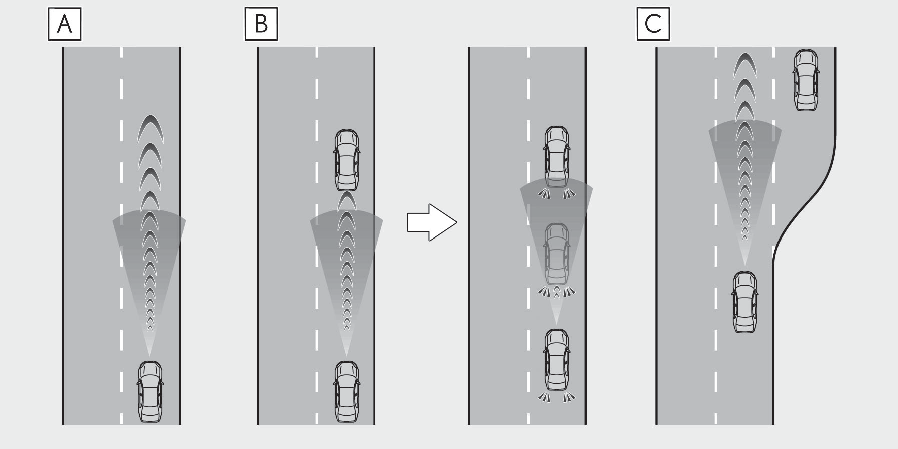
Example of constant speed cruisingWhen there are no vehicles aheadThe vehicle travels at the speed set by the driver.Example of deceleration cruising and follow-up cruisingWhen a preceding vehicle driving slower than the set speed appearsWhen a vehicle is detected running ahead of you, the system automatically decelerates your vehicle. When a greater reduction in vehicle speed is necessary, the system applies the brakes (the stop lights will come on at this time). The system will respond to changes in the speed of the vehicle ahead in order to maintain the vehicle-to-vehicle distance set by the driver. Approach warning warns you when the system cannot decelerate sufficiently to prevent your vehicle from closing in on the vehicle ahead.When the vehicle ahead of you stops, your vehicle will also stop (vehicle is stopped by system control). After the vehicle ahead starts off, pushing the cruise control lever up or depressing the accelerator pedal (start-off operation) will resume follow-up cruising. If the start-off operation is not performed, system control continues to keep your vehicle stopped.When the turn signal lever is operated and your vehicle moves to an overtaking lane while driving at 50 mph (80 km/h) or more, the vehicle will accelerate to help to overtake a passing vehicle.The system’s identification of what is an overtaking lane may be determined solely based on the location of the steering wheel in the vehicle (left side driver position versus right side driver position.) If the vehicle is driven to a region where the overtaking lane is on a different side from where the vehicle is normally driven, the vehicle may accelerate when the turn signal lever is operated in the opposite direction to the overtaking lane (e.g., if the driver normally operates the vehicle in a region where the overtaking lane is to the right but then drives to a region where the overtaking lane is to the left, the vehicle may accelerate when the right turn signal is activated).Example of accelerationWhen there are no longer any preceding vehicles driving slower than the set speedThe system accelerates until the set speed is reached. The system then returns to constant speed cruising.SETTING THE VEHICLE SPEED (VEHICLE-TO-VEHICLE DISTANCE CONTROL MODE)Press the “ ON/OFF” button to activate the cruise control.Dynamic radar cruise control indicator will come on and a message will be displayed on the multi-information display. Press the button again to deactivate the cruise control.If the “ ON/OFF” button is pressed and held for 1.5 seconds or more, the system turns on in constant speed control mode. (Selecting constant speed control mode)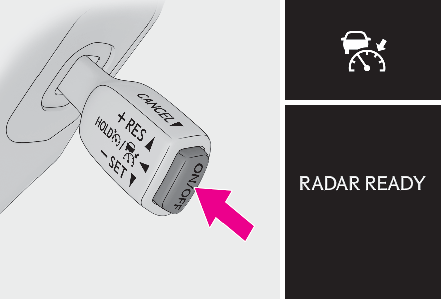
Accelerate or decelerate, with accelerator pedal operation, to the desired vehicle speed (at or above approximately 20 mph [30 km/h]) and push the lever down to set the speed.Cruise control “ SET” indicator will come on.The vehicle speed at the moment the lever is released becomes the set speed.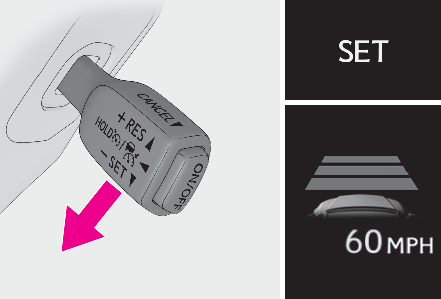
ADJUSTING THE SET SPEEDTo change the set speed, operate the lever until the desired set speed is displayed.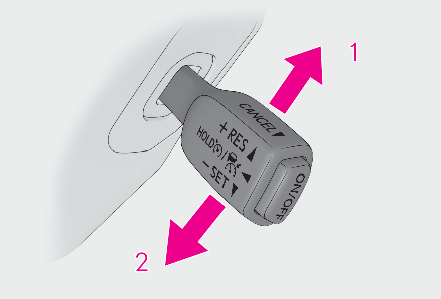
Increases the speed (Except when the vehicle has been stopped by system control in vehicle-to-vehicle distance control mode)Decreases the speedFine adjustment: Momentarily move the lever in the desired direction.Large adjustment: Hold the lever up or down to change the speed, and release when the desired speed is reached.In the vehicle-to-vehicle distance control mode, the set speed will be increased or decreased as follows:For the U.S. mainland, HawaiiFine adjustment: By 1 mph (1.6 km/h)*1 or 1 km/h (0.6 mph)*2 each time the lever is operated Large adjustment: Increases or decreases in 1 mph (1.6 km/h)*1 or 1 km/h (0.6 mph)*2 increments for as long as the lever is heldFor Canada, Guam, Puerto Rico and SaipanFine adjustment: By 1 mph (1.6 km/h)*1 or 1 km/h (0.6 mph)*2 each time the lever is operated Large adjustment: Increases or decreases in 5 mph (8 km/h)*1 or 5 km/h (3.1 mph)*2 increments for as long as the lever is heldIn the constant speed control mode (Selecting constant speed control mode), the set speed will be increased or decreased as follows:Fine adjustment: By 1 mph (1.6 km/h)*1 or 1 km/h (0.6 mph)*2 each time the lever is operatedLarge adjustment: The speed will continue to change while the switch is held.*1When the set speed is shown in “ MPH”*2When the set speed is shown in “ km/h”CHANGING THE VEHICLE-TO-VEHICLE DISTANCE (VEHICLE-TO-VEHICLE DISTANCE CONTROL MODE)Pressing the switch changes the vehicle-to-vehicle distance as follows: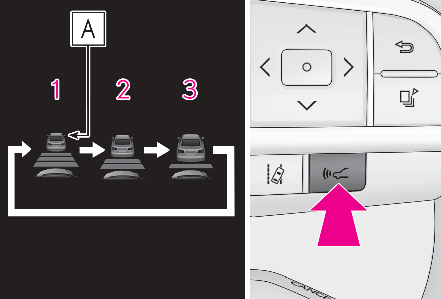
LongMediumShortIf a vehicle is running ahead of you, the preceding vehicle mark will also be displayed.VEHICLE-TO-VEHICLE DISTANCE SETTINGS (VEHICLE-TO-VEHICLE DISTANCE CONTROL MODE)Select a distance from the table below. Note that the distances shown correspond to a vehicle speed of 50 mph (80 km/h). Vehicle-to-vehicle distance increases/decreases in accordance with vehicle speed. When the vehicle is stopped by system control, the vehicle stops at a certain vehicle-to-vehicle distance depending on the situation.
| Distance options | Vehicle-to-vehicle distance |
|---|---|
| Long | Approximately 160 ft. (50 m) |
| Medium | Approximately 130 ft. (40 m) |
| Short | Approximately 100 ft. (30 m) |
RESUMING FOLLOW-UP CRUISING WHEN THE VEHICLE HAS BEEN STOPPED BY SYSTEM CONTROL (VEHICLE-TO-VEHICLE DISTANCE CONTROL MODE)After the vehicle ahead of you starts off, push the lever up.Your vehicle will also resume follow-up cruising if the accelerator pedal is depressed after the vehicle ahead of you starts off.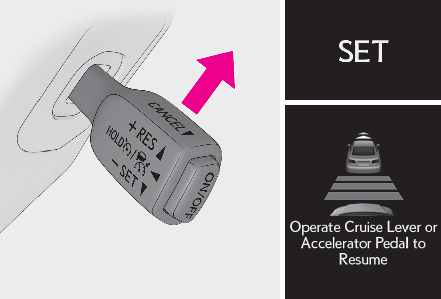
CANCELING AND RESUMING THE SPEED CONTROL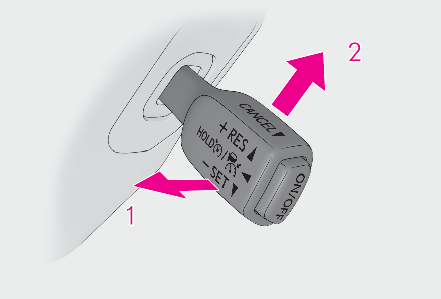
Pulling the lever toward you cancels the speed control.The speed control is also canceled when the brake pedal is depressed. (When the vehicle has been stopped by system control, depressing the brake pedal does not cancel the setting.)Pushing the lever up resumes the cruise control and returns vehicle speed to the set speed.APPROACH WARNING (VEHICLE-TO-VEHICLE DISTANCE CONTROL MODE)When your vehicle is too close to a vehicle ahead, and sufficient automatic deceleration via the cruise control is not possible, the display will flash and the buzzer will sound to alert the driver. An example of this would be if another driver cuts in front of you while you are following a vehicle. Depress the brake pedal to ensure an appropriate vehicle-to-vehicle distance.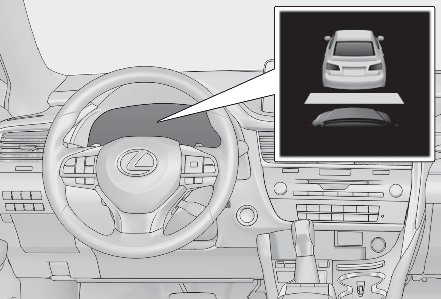
Warnings may not occur whenIn the following instances, warnings may not occur even when the vehicle-to-vehicle distance is small.When the speed of the preceding vehicle matches or exceeds your vehicle speedWhen the preceding vehicle is traveling at an extremely slow speedImmediately after the cruise control speed was setWhen depressing the accelerator pedalSELECTING CONSTANT SPEED CONTROL MODEWhen constant speed control mode is selected, your vehicle will maintain a set speed without controlling the vehicle-to-vehicle distance. Select this mode only when vehicle-to-vehicle distance control mode does not function correctly due to a dirty radar, etc.With the cruise control off, press and hold the “ ON/OFF” button for 1.5 seconds or more.Immediately after the “ ON/OFF” button is pressed, the dynamic radar cruise control indicator will come on. Afterwards, it switches to the cruise control indicator.Switching to constant speed control mode is only possible when operating the lever with the cruise control off.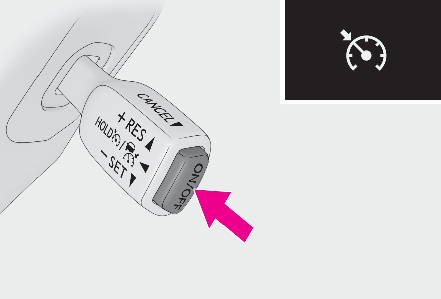
Accelerate or decelerate, with accelerator pedal operation, to the desired vehicle speed (at or above approximately 20 mph [30 km/h]) and push the lever down to set the speed.Cruise control “ SET” indicator will come on.The vehicle speed at the moment the lever is released becomes the set speed.Adjusting the speed setting: Adjusting the set speedCanceling and resuming the speed setting: Canceling and resuming the speed control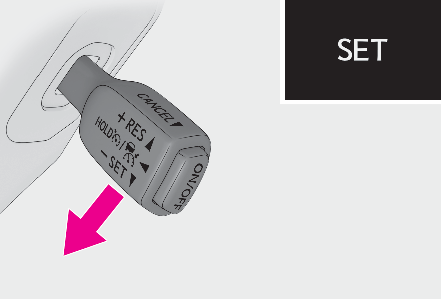
Note:Dynamic radar cruise control with full-speed range can be set whenThe shift lever is in D.The desired set speed can be set when the vehicle speed is approximately 20 mph (30 km/h) or more. (However, when the vehicle speed is set while driving at below approximately 20 mph [30 km/h], the set speed will be set to approximately 20 mph [30 km/h].)Accelerating after setting the vehicle speedThe vehicle can accelerate by operating the accelerator pedal. After accelerating, the set speed resumes. However, during vehicle-to-vehicle distance control mode, the vehicle speed may decrease below the set speed in order to maintain the distance to the preceding vehicle.When the vehicle stops while follow-up cruisingPushing the lever up while the vehicle ahead stops will resume follow-up cruising if the vehicle ahead starts off within approximately 3 seconds after the lever is pushed up.If the vehicle ahead starts off within 3 seconds after your vehicle stops, follow-up cruising will be resumed.Automatic cancelation of vehicle-to-vehicle distance control modeVehicle-to-vehicle distance control mode is automatically canceled in the following situations.VSC is activated.TRAC is activated for a period of time.When the VSC or TRAC system is turned off.The sensor cannot detect correctly because it is covered in some way.When the brake control or output restriction control of a driving support system operates.(For example: Pre-Collision System, Drive-Start Control)The parking brake is operated.The vehicle is stopped by system control on a steep incline.The following are detected when the vehicle has been stopped by system control:The driver is not wearing a seat belt.The driver’s door is opened.The vehicle has been stopped for about 3 minutes.If vehicle-to-vehicle distance control mode is automatically canceled for any reasons other than the above, there may be a malfunction in the system. Contact your Lexus dealer.Automatic cancelation of constant speed control modeConstant speed control mode is automatically canceled in the following situations:Actual vehicle speed is more than approximately 10 mph (16 km/h) below the set vehicle speed.Actual vehicle speed falls below approximately 20 mph (30 km/h).VSC is activated.TRAC is activated for a period of time.When the VSC or TRAC system is turned off.When the brake control or output restriction control of a driving support system operates.(For example: Pre-Collision System, Drive-Start Control)If constant speed control mode is automatically canceled for any reasons other than the above, there may be a malfunction in the system. Contact your Lexus dealer.Brake operationA brake operation sound may be heard and the brake pedal response may change, but these are not malfunctions.Warning messages and buzzers for dynamic radar cruise control with full-speed rangeWarning messages and buzzers are used to indicate a system malfunction or to inform the driver of the need for caution while driving. If a warning message is shown on the multi-information display, read the message and follow the instructions.(If a warning message is displayed on the multi-information display,If a warning message is displayed)When the sensor may not be correctly detecting the vehicle aheadIn the case of the following and depending on the conditions, operate the brake pedal when deceleration of the system is insufficient or operate the accelerator pedal when acceleration is required. As the sensor may not be able to correctly detect these types of vehicles, the approach warning (Approach warning (vehicle-to-vehicle distance control mode)) may not be activated.Vehicles that cut in suddenlyVehicles traveling at low speedsVehicles that are not moving in the same laneVehicles with small rear ends (trailers with no load on board, etc.)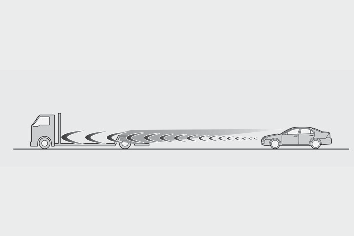
Motorcycles traveling in the same laneWhen water or snow thrown up by the surrounding vehicles hinders the detecting of the sensorWhen your vehicle is pointing upwards (caused by a heavy load in the luggage compartment, etc.)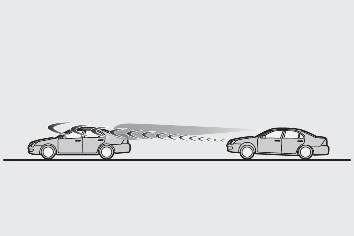
Preceding vehicle has an extremely high ground clearance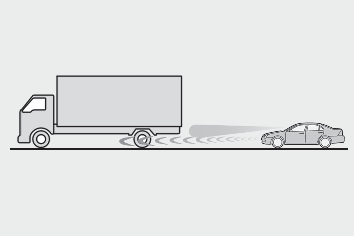
Conditions under which the vehicle-to-vehicle distance control mode may not function correctlyIn the case of the following conditions, operate the brake pedal (or accelerator pedal, depending on the situation) as necessary. As the sensor may not be able to correctly detect vehicles ahead, the system may not operate properly.When the road curves or when the lanes are narrow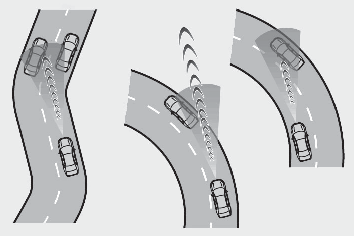
When steering wheel operation or your position in the lane is unstable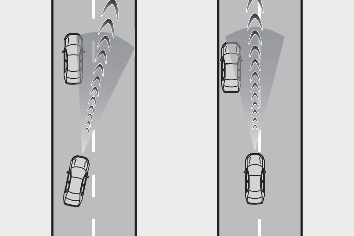
When the vehicle ahead of you decelerates suddenlyWhen driving on a road surrounded by a structure, such as in a tunnel or on a bridgeWhile the vehicle speed is decreasing to the set speed after the vehicle accelerates by depressing the accelerator pedal
Download Manual