Rear Traffic Alert
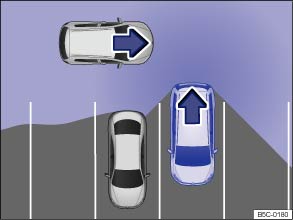
Fig. 128 Rear Traffic Alert: Monitored area around the vehicle that is backing out of a parking space.
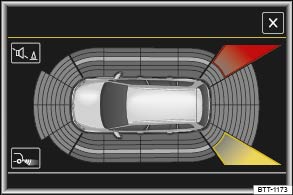
Fig. 129 Rear Traffic Alert display (may vary depending on vehicle equipment).
Switching the Rear Traffic Alert on and off
- You can turn Rear Traffic Alert on or off in the Vehicle settings menu in the Infotainment system .
- OR: In the Assist systems menu in the instrument cluster display .
- OR: Press the driver assistance systems button on the multi-function steering wheel to open the Assist systems menu .
Function
The Rear Traffic Alert system uses the radar sensors in the rear bumper to monitor the traffic crossing behind your vehicle when you are backing out of a parking space or maneuvering, for example, in traffic situations with poor visibility .
Key to :
- Stop backing up! The red area indicates that the system has detected traffic behind the vehicle.
- The yellow area indicates that the system has possibly detected traffic behind the vehicle.
A warning sounds if the system detects approaching traffic behind your vehicle when backing up (red area).
- Vehicles without Park Distance Control (PDC): There is a warning tone and a text message in the instrument cluster display.
- Vehicles with Park Distance Control (PDC): There is a continuous warning tone from the PDC. If PDC is switched off, a warning for the driver may not be possible, and therefore the Rear Traffic Alert is also deactivated.
If there is a system malfunction in the scanned area, a yellow indicator light appears.
Automatic braking
If Rear Traffic Alert detects an approaching vehicle and the driver does not press the brake pedal, the system can intervene with automatic braking.
Rear Traffic Alert assists the driver with harsh automatic braking that could help prevent or reduce damage that can result from a collision. Automatic braking occurs while backing up at speeds between 1–7 mph (1–12 km/h). Once the system detects that your vehicle is not moving, it keeps the vehicle from moving for up to 2 seconds.
After automatic braking, about 10 seconds must pass before the system can brake automatically again.
The driver can interrupt the automatic braking and take control of the vehicle by pressing firmly on the accelerator or brake pedal.
Automatic deactivation of Rear Traffic Alert
The radar sensors for the Rear Traffic Alert turn off automatically if the system detects an obstruction over a radar sensor. This could occur if the radar sensor area is covered by ice or snow, for example.
A text message appears in the instrument cluster display when the system turns off automatically.
 WARNING
The Rear Traffic Alert technology cannot overcome the laws of physics and limits of the system. Careless or unintentional use of the Rear Traffic Alert may result in accidents and serious injuries.
- The Rear Traffic Alert is not a substitute for careful and attentive driving.
- Never use the system when visibility is limited or in complex traffic situations, for example, on heavily traveled roads or when there are multiple lanes.
- Always watch for people, especially small children, bicycles, animals, and objects, because the Rear Traffic Alert may not always be able to detect them. Rear Traffic Alert cannot detect people, animals, and things that are moving slowly or not at all.
- The Rear Traffic Alert does not always brake the vehicle to a complete stop.
- The harsh automatic braking will be uncomfortable for many people, and if you or your passengers have special conditions or sensitivities, particularly in the neck, you may want to switch off Rear Traffic Alert.
 NOTE
NOTE
- The radar sensors in the rear bumper can be damaged or become misaligned in low-speed impacts and parking maneuvers. The system can switch itself off or may be impaired as a result.
- Always keep the rear bumper clean and free of snow and ice so that the radar sensors can work properly. Do not cover the radar sensor area.
- The rear bumper may only be painted with vehicle paint that is approved by Volkswagen. Other paints may make the Rear Traffic Alert system work improperly or cause it to malfunction.

A Declaration of Compliance with the United States FCC and Industry Canada regulations is on .
Download Manual