Interior lighting
Instrument panel and switch lighting
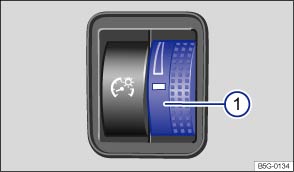
Fig. 82 To the left of the steering wheel: Thumbwheel to adjust instrument panel lighting ①.
Instrument cluster and switch brightness
You can adjust the brightness of the instrument cluster and switch lighting by turning the thumbwheel .
On appropriately equipped vehicles, you can also adjust other interior lights in the Vehicle settings menu in the Infotainment system .
The brightness of the instrument panel lighting changes in response to a change in lighting around the vehicle, for example, when driving through a tunnel.

The instrument cluster lighting is on when the lights are turned off and the ignition is on. As the lighting around the vehicle fades, the instrument cluster lighting will also fade and eventually turn off. This is to remind the driver to turn on the low beams.
Interior and reading lights
- Rear interior lights on.
- Press the button to turn the door contact feature on and off. When the feature is switched on, the interior lights come on automatically when the vehicle is unlocked or a door is opened. The lights go out about 20 seconds after you close the doors; they also go out when you lock the vehicle or switch on the ignition.
- Reading lights on or off.
Glove and luggage compartment lights
The glove and luggage compartments may have lights that come on automatically when they are opened and go off when they are closed.
Ambient (background) lighting
Depending on vehicle equipment, your vehicle may have ambient lighting in the doors and footwells, which comes on when the ignition and the headlights are switched on.
On appropriately equipped vehicles, you can adjust the brightness of the ambient lighting in the Vehicle settings menu in the Infotainment system .
The interior and reading lights go out when you lock the vehicle or a few minutes after you remove the vehicle key from the ignition. This helps to prevent unnecessary drain on the vehicle battery.
Download Manual