Lane Keeping system (Lane Assist)
 Introduction to the subject
In this chapter you will find information on the following subjects:
Your vehicle may be equipped with a Lane Assist system, which can warn you if your vehicle unintentionally leaves the current drive lane.
With the help of a camera , Lane Assist can recognize certain lane markings for the lane in which the vehicle is moving. Should the vehicle leave this area unintentionally, for example, when leaving the lane without activating a turn signal, the system will warn you with a steering correction. The driver can override the steering correction at any time.
Vehicles without Blind Spot Monitor: Lane Assist will not warn you of a lane change if you activate the turn signal, because the system will assume that the lane change is intended.
System limits
Only use Lane Assist on highways and well-maintained roads.
Lane Assist may deactivate temporarily under certain circumstances:
- When the speed of your vehicle is less than about 40 mph (65 km/h).
- If the system cannot recognize lane markings correctly, for example, in construction zones, on bad roads, when visibility is bad, or when the camera area is covered.
- When ESC is switched off or when ESC Sport is switched on .
 WARNING
Always remember that Lane Assist has limits – using Lane Assist when it is not possible to drive safely can be dangerous and can lead to an accident and serious personal injury.
- Always adjust your speed and the distance you keep between you and the vehicles ahead of you to the road, traffic, weather, and visibility conditions.
- Always keep both hands on the steering wheel so that you are prepared to steer at any time. The driver is always responsible for controlling the vehicle.
- Always pay attention to the messages in the instrument cluster display and act accordingly.
- Always pay close attention to what is happening around your vehicle.
WARNING
Not deactivating Lane Assist in the situations mentioned above can cause collisions, other accidents and serious personal injury.

Certain settings are automatically saved by the driver personalization feature .
Driving with Lane Assist
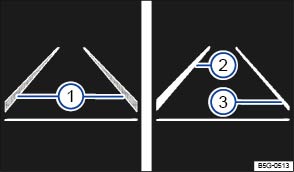
Fig. 116 In the instrument cluster display: Lane Assist display (displayed in color on an instrument cluster with color display).
Read and follow the introductory information and safety information first
Switching Lane Assist on and off
- You can turn Lane Assist on or off in the Vehicle settings menu in the Infotainment system .
- OR: In the Assist systems menu in the instrument cluster display .
- OR: Press the driver assistance systems button on the multi-function steering wheel to open the Assist systems menu .
The indicator light in the instrument cluster shows the status of the system.
If the yellow indicator light comes on, Lane Assist is switched on but is not active.
Lane Assist works at speeds above about 40 mph (65 km/h) when lane markings can be identified . The green indicator light comes on.
Displays
Lane Assist display in the instrument cluster :
 Lane marking detected (shown in gray). No regulation is necessary.
 Lane marking detected (shown in white). System is actively regulating.
 No lane marking detected. System is not regulating.
Switching Lane Assist off temporarily
Lane Assist should be switched off in the following situations:
- When driving with a sporty or dynamic driving style.
- When weather conditions and/or visibility are poor.
- When the vehicle is off road, for example, in construction zones or on race tracks.
- Before reaching the top of a hill.
Reminder to resume steering
If the system does not detect steering activity by the driver, a warning chime and a message in the instrument cluster display remind you to resume steering the vehicle.
If the driver does not respond to the reminder, the system may deactivate temporarily.
Steering wheel vibration
Certain situations will cause the steering wheel to vibrate and demand active steering intervention by the driver:
- If the corrective steering intervention is not sufficient to keep the vehicle in its lane.
- If the system no longer detects a lane during a strong corrective steering intervention.
WARNING
Failure to heed warning lights or other warnings can result in a collision and serious personal injury.
- Never ignore warning lights or text WARNINGS.
- Always stop the vehicle as soon as it is safe to do so.
 NOTE
NOTE
Failure to heed warning lights or text WARNINGS can result in vehicle damage.
If there is a malfunction, Lane Assist is automatically deactivated.
Tips and troubleshooting
Read and follow the introductory information and safety information first
If there is no camera image, an error message, or the system switches itself off
- Clean the windshield .
- Check for visible damage on the windshield in the camera's field of view.
If the system is not responding as expected
- Regularly clean the camera and keep it free from snow and ice.
- Do not cover the camera's field of view.
- Check the windshield for damage in the camera's field of view.
- Do not attach objects to the steering wheel.
WARNING
If the camera's field of view is covered or dirty, Lane Assist may not work properly.
- Always make sure that the camera area is free of dirt or snow and not covered.
NOTE
In order to help keep Lane Assist working properly:
- Always keep the windshield in front of the camera free of ice, dirt, snow, and other things that could reduce its field of view.
- Regularly check the windshield and especially the area around the camera for damage.
- Never attach or mount any accessories or other items to the steering wheel.
If Lane Assist does not work properly and as described here or if there is a system fault, have the system checked by an authorized Volkswagen dealer or authorized Volkswagen Service Facility.
Download Manual