Adaptive Cruise Control (ACC)
 Introduction to the subject
In this chapter you will find information on the following subjects:
Your vehicle may be equipped with the Adaptive Cruise Control system (ACC), which helps maintain an individually stored constant speed and a previously set speed-dependent distance interval between your vehicle and those in front of you.
In certain situations, your vehicle may be braked to a standstill by an automatic braking maneuver .
ACC speed range
ACC works when the vehicle speed is between about 20 mph (30 km/h) and 95 mph (150 km/h).
Driving with ACC
You can override control by ACC at any time. If you press the brake pedal, ACC will be deactivated. If you accelerate, control will be interrupted while you are accelerating and then resumed.
Driver intervention warning
Adaptive Cruise Control has system-related limits. As a driver, you must control the speed and the distance to other vehicles under some circumstances. If the deceleration of the ACC automatic braking system is not sufficient to bring the vehicle to a full stop in time, a message in the instrument cluster display and a red warning light come on. Depress the brake pedal!
Radar sensor
The ACC system works together with the Forward Collision Warning (Front Assist) system, if equipped . Both systems use the same radar sensor at the front of the vehicle to monitor the traffic situation .
 WARNING
Always remember that the Adaptive Cruise Control has limits – Using Adaptive Cruise Control when it is not possible to drive safely at a constant speed can be dangerous and can lead to an accident and serious personal injury.
- Adaptive Cruise Control will not slow the vehicle down or maintain the set distance when you drive towards an obstacle or something on or near the road that is not moving, such as vehicles stopped in a traffic jam, a stalled or disabled vehicle.
- Always adjust your speed and the distance you keep between you and the vehicles ahead of you to the road, traffic, weather, and visibility conditions.
- Never use Adaptive Cruise Control on steep, winding, or slippery roads (such gravel roads, wet roads, or snowy or icy roads) or on roads with standing water.
- Never use Adaptive Cruise Control when driving off-road or on unpaved roads.
- Always remember that the Adaptive Cruise Control cannot detect a vehicle that is driving towards you in your traffic lane and that it cannot detect narrow vehicles such as motorcycles and bicycles.
- Never follow a vehicle so closely that you cannot stop your vehicle safely. The Adaptive Cruise Control cannot slow or brake the vehicle safely when you follow another vehicle too closely. Always remember that the Adaptive Cruise Control has a braking power that is only about 30% of the vehicle's maximum braking ability, under certain circumstances the automatic braking function cannot bring the vehicle to a stop in time.
- Always turn off Adaptive Cruise Control when entering turn lanes, exit lanes and construction zones or in similar situations because the vehicle will automatically accelerate to the stored speed when the road ahead is clear.
- To help prevent unintended operation of Adaptive Cruise Control, switch the system off when it is not being used.
- It is dangerous to use the Resume feature when the previously set speed is too high for the existing road, traffic, or weather conditions.
- When traveling downhill, the Adaptive Cruise Control may not be able to maintain a constant speed. The vehicle will speed up because of its own weight. Downshift and/or use the foot brake to slow the vehicle.
- Never allow the closing speed between you and other vehicles to be so high that the Adaptive Cruise Control may not be able to slow your vehicle safely. If closing speed is too high, you must apply the brakes yourself to reduce the risk of a rear-end crash.
- If a driver intervention warning or Front Assist warning appears in the instrument cluster display, immediately take over the control of the brake and gas pedals and slow down the vehicle or bring it to stop when necessary and according to the traffic situation.
- Always be prepared to take over the control of the brake and the gas pedal in every situation.
 NOTE
NOTE
If you suspect that ACC doesn't work properly or the sensors are damaged, switch off ACC immediately.
- See an authorized Volkswagen dealer or Volkswagen Service Facility for assistance and have the ACC system checked.

The maximum speed for ACC is restricted to 95 mph (150 km/h).
If the ACC is active, you may hear noise during the automatic braking procedure. This is normal; the noises are caused by the braking system.
Certain settings are automatically saved by the driver personalization feature .
A Declaration of Compliance with the United States FCC and Industry Canada regulations is on .
Special driving situations
Read and follow the introductory information and safety information first
Adaptive Cruise Control has physical and system-related limits. The driver may therefore feel that, in certain circumstances, some Adaptive Cruise Control reactions are unwanted or occur with a delay. You should therefore always be prepared to take full control of the vehicle whenever necessary.
Stop and go traffic (Golf and Golf GTI models with automatic or DSG transmission only)
If a moving vehicle ahead of your vehicle brakes to a standstill, the ACC will also brake your vehicle to a standstill. The vehicle is then held stationary by the brakes for no more than a few seconds. You must press the brake pedal or the vehicle will start moving forward again!
To drive off after a stationary phase, press the accelerator pedal. To resume ACC, press the button on the multi-function steering wheel and the Adaptive Cruise Control (ACC) will resume speed regulation as long as the vehicle in front is moving again.
Stop and go traffic (Golf R models with DSG transmission only)
ACC will brake your vehicle to a standstill if a moving vehicle ahead of your vehicle brakes to a standstill. The vehicle is then held stationary by the brakes. ACC stays active and will resume speed regulation as soon as you press the accelerator pedal and accelerate.
ACC will not automatically resume in the following situations:
- The safety belt is unbuckled.
- The vehicle standstill lasts longer than about 3 minutes.
- The driver door is opened.
- The ignition is switched off.
WARNING
If ACC brings your vehicle to a complete stop before the system prompts you to brake and the stationary vehicle ahead starts moving, your vehicle will also start moving automatically. In some cases the radar sensor may be unable to detect obstacles in the vehicle's path. This can result in serious injury and accidents.
- Always check the road ahead before the vehicle pulls away. If necessary, cancel the pulling away procedure by depressing the brake pedal.
Limits of ACC
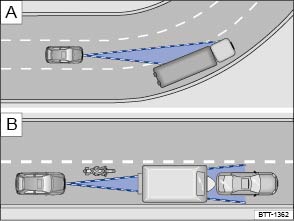
Fig. 111 Driving in a curve. Motorcycle traveling ahead outside of the sensor range.
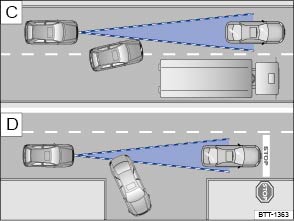
Fig. 112 Vehicle changing lanes. A turning and a stationary vehicle ahead.
Read and follow the introductory information and safety information first
When to switch off ACC
Switch off ACC under the following conditions due to system limitations :
- When driving around curves, turn lanes, highway ramps, or construction zones; to prevent unwanted acceleration of the vehicle.
- When driving through tunnels.
- On roads with more than one lane, if other vehicles are driving more slowly in the fast lane. Vehicles in other lanes will normally not be detected and will, in this case, be passed from the slow lane.
- When driving in multi-level garages or parking structures.
- When there are metal objects, for example, tracks or metal plates in the road.
- When driving on roads with gravel or loose pavement.
- Under bad weather conditions or bad visibility, for example, in heavy rain, snowfall, or fog.
Things that can prevent the radar sensor from working properly
If the radar sensor function is impaired by heavy rain, spray, snow or mud, Adaptive Cruise Control switches off temporarily. A driver information message appears in the instrument cluster display. Clean the radar sensors as required.
The Adaptive Cruise Control will automatically be available again as soon as the radar sensor is working properly. The message in the instrument cluster display switches off, and the Adaptive Cruise Control can be reactivated.
Strong reflected radar signals, for example, in multilevel parking structures, can prevent the radar sensor from working properly.
Objects that cannot be detected
The ACC radar sensor can only detect vehicles that are moving in the same direction as your vehicle.
Objects that cannot be detected by the radar sensor include:
- People.
- Animals.
- Stationary vehicles, such as a broken-down vehicle or a vehicle that is stopped at the end of a traffic jam.
- Vehicles crossing in front of your vehicle.
- Oncoming traffic in your lane.
- Other stationary objects.
If a vehicle detected by Adaptive Cruise Control turns or changes lanes and there is a stationary vehicle in front of that vehicle, the system will not react to the stationary vehicle . If required, brake the vehicle yourself.
Driving around curves and traffic circles
When driving into a curve and driving out of a long curve, the radar sensor may react to a vehicle in the next lane . In such situations, the vehicle might decelerate unnecessarily or not react to the vehicle in front. In this case, you must either override the ACC by depressing the accelerator, interrupt the braking procedure by depressing the brake pedal, or press the
button on the multi-function steering wheel .
Narrow vehicles and vehicles offset to one side
Narrow vehicles and vehicles traveling slightly to the left or right of your vehicle can only be detected by the radar sensor when they are within sensor range . This applies especially to narrow vehicles such as motorcycles. If required, brake the vehicle yourself.
Narrow vehicles, such as motorcycles traveling ahead of you, are often detected late or not at all under some circumstances.
Other vehicles changing lanes
Vehicles that change into your lane a short distance ahead of you can only be detected by the radar sensor once they are within sensor range . The result is a delayed reaction by the Adaptive Cruise Control. If required, brake the vehicle yourself.
Vehicles with oversize loads or special equipment
Under certain circumstances, ACC will not correctly recognize vehicles carrying oversize loads or loads that exceed the vehicle dimensions, like flatbed trailer trucks.
Switch off ACC when driving behind or while passing such vehicles. If required, brake the vehicle yourself.
WARNING
Not deactivating Adaptive Cruise Control (ACC) in the situations mentioned above can cause collisions, other accidents, and serious personal injury.
Switching ACC on and off
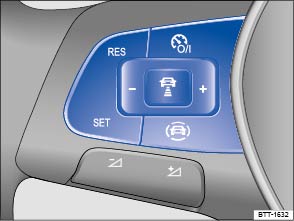
Fig. 113 Left-hand side of the multi-function steering wheel: Buttons for operating the Adaptive Cruise Control (ACC).
Read and follow the introductory information and safety information first
Switching ACC on
- Press the
button.
ACC is switched on The gray indicator light or
comes on, ACC does not regulate.
Setting the current speed
- Press the
button when the vehicle is moving.
ACC saves the current speed and maintains the preset distance interval to the vehicle in front. If the current speed is outside the defined speed range, ACC will set the minimum speed (when driving more slowly than the minimum speed) or maximum speed (when driving faster than the maximum speed).
Depending on the driving situation, the following indicator lights come on when ACC is switched on:
- ACC is active.
- No vehicle has been detected ahead.
- Vehicle detected ahead.
Temporarily deactivating ACC
- Briefly press the
- OR: Depress the brake pedal.
Depending on whether a vehicle is detected ahead, either the or
indicator light stays on in the instrument cluster display, and the speed and distance interval remain stored.
When ASR is switched off, ACC is automatically deactivated.
Resuming ACC
- Press the
button.
ACC uses the most recently set speed and most recently set distance interval to the vehicle in front. The instrument cluster display shows the set speed, and the green indicator light comes on.
Switching ACC off
- Press and hold the
ACC is switched off and the stored speed is deleted.
Adjusting settings for ACC
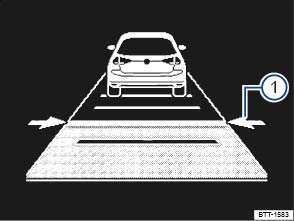
Fig. 114 In the instrument cluster display: ACC active, vehicle detected ahead, time interval is being set ① (displayed in color on an instrument cluster with color display).
Read and follow the introductory information and safety information first
Setting the distance interval
You can set the speed-dependent distance from the vehicle ahead to one of 5 levels ranging from very close to very far.
- Press the
button and then the
or
button on the multi-function steering wheel.
- OR: Press the
The ACC display appears when the button is pressed. The ACC display shows the current distance interval ①.
If ACC is switched off, the set distance interval and the vehicle are not shown in the instrument cluster display.
In wet road conditions, you should always set a larger distance than when driving in dry road conditions.
Adjusting the set speed
You can set a speed within the defined speed range as follows by briefly pressing the buttons on the multi-function steering wheel:
- + 1 mph (1 km/h)
- - 1 mph (1 km/h)
To adjust the stored speed continuously, press and hold the or
button.
Adjusting the driving mode or drive program
- Vehicles with Driving Mode Selection: Set the driving mode .
- Vehicles without Driving Mode Selection: Set the drive program in the Infotainment system .
WARNING
Following other vehicles too closely increases the risk of collisions and serious personal injury or even death.
- Always obey applicable traffic laws when setting the distance to the vehicles ahead in traffic.
- Setting short distances to the traffic ahead reduces the time and distance available to bring your vehicle to a safe stop and makes it even more necessary to pay close attention or traffic.
- Always use good judgment and select a safe following distance for the traffic, road and weather conditions.
- Never use Adaptive Cruise Control on narrow or winding roads or under poor road conditions (snow, ice, streets covered with standing water or gravel, for example) or when visibility is poor, especially when it is foggy.
- Always select a greater following distance to the vehicle ahead on wet roads than on dry roads.
Tips and troubleshooting
Read and follow the introductory information and safety information first
 ACC not available
The yellow indicator light comes on.
- The radar sensor is dirty. Clean the radar sensor .
- Radar sensor visibility is impaired by weather conditions such as snow, or residue from abrasive cleaning agents or coatings. Clean the radar sensor .
- Radar sensor visibility is impaired by aftermarket components, stickers, or accessories.
- The radar sensor has been damaged or misaligned in low speed impacts or parking maneuvers at the front of the vehicle. Have the sensor checked for damage .
- ACC malfunction. Switch the engine off and on again.
- Paint work or structural modifications have been made at the front of the vehicle.
- The original Volkswagen emblem is not being used.
- If the problem persists, see an authorized Volkswagen dealer or authorized Volkswagen Service Facility.
If the system is not responding as expected
- The radar sensor is dirty. Clean the radar sensor .
- ACC is functioning in a situation in which it should be deactivated due to system limitations .
- The brakes are overheated from braking maneuvers or driving down steeper slopes. A driver information message appears in the instrument cluster display. Allow the brakes to cool down and activate ACC again.
- If the problem persists, see an authorized Volkswagen dealer or authorized Volkswagen Service Facility.
If ACC will not switch on
- Manual transmission: A forward gear (other than first gear) is selected.
- Automatic or DSG transmission: The selector lever is in position D/S or Tiptronic position.
- The brake lights on the vehicle are working.
- ESC is not regulating.
- The brake pedal is not depressed.
If there are unusual noises during automatic braking
- This is normal and is not a malfunction.
Download Manual