Instrument cluster
 Introduction to the subject
In this chapter you will find information on the following subjects:
The vehicle is equipped either with an analog instrument cluster or a digital instrument cluster (Volkswagen Digital Cockpit) .
Emergency starting and starting the engine with a very weak vehicle battery or after the vehicle battery has been replaced may change or delete system settings (including time, date, driver personalization, and programming). Check the settings and correct as necessary once the vehicle battery has built up a sufficient charge.
 WARNING
Driving on today's roads demands the full attention of the driver at all times. Driver distraction causes accidents, collisions and serious personal injury!
- Never use the buttons in the instrument cluster while driving.
- Adjust the settings in the instrument cluster or the Infotainment system only when the vehicle is standing still.
Instrument overview (Golf, Golf GTI)
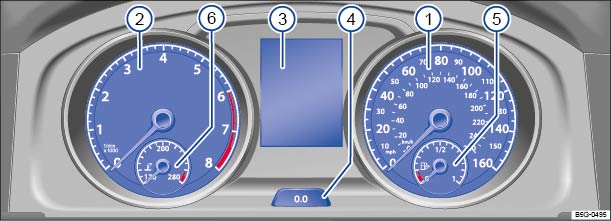
Fig. 10 Instrument cluster in the instrument panel (Golf).
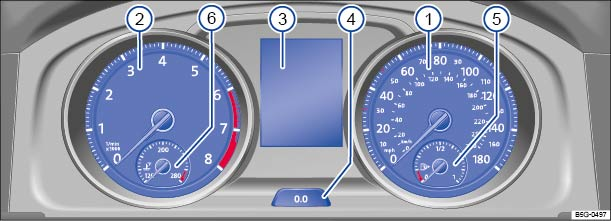
Fig. 11 Instrument cluster in the instrument panel (Golf GTI).
Read and follow the introductory information and safety information first
Instrument explanations or :
 Speedometer.
 Tachometer (thousands of revolutions per minute when the engine is running) .
 Displays .
Reset, set, and display button , , .
 Fuel gauge , .
 Engine coolant temperature gauge
 , .
Volkswagen Digital Cockpit (Golf R)

Fig. 12 Digital instrument cluster (Volkswagen Digital Cockpit) in the instrument panel.
Read and follow the introductory information and safety information first
The Volkswagen Digital Cockpit is a digital instrument cluster with a high-resolution TFT color display. In addition to standard gauges such as the tachometer and speedometer, you can choose from various information profiles to view more data.
Instrument explanations :
- Tachometer (thousands of revolutions per minute when the engine is running) .
- Information profile displays. The information shown depends on the selected information profile. The example above shows the Gear & speed profile.
- Displays .
-
Reset, set, and display button , , .
- Speedometer
- Fuel gauge , .

Engine coolant temperature gauge
Information profiles
You can choose between several information profiles in the Views menu in the Volkswagen Information System . The Volkswagen Digital Cockpit shows additional information in the center of the tachometer and the speedometer depending on the information profile you have selected. The following information profiles are available:
- Gear & speed: The selector lever position is displayed in the tachometer. The digital speed display is in the center of the speedometer.
- Economy & range: Current fuel economy is shown graphically and average fuel economy is shown digitally in the tachometer. The remaining range before refueling is necessary is shown digitally in the speedometer.
- Economy: Current fuel economy is shown graphically and average fuel economy is shown digitally in the tachometer. In the speedometer, the symbol
is shown if the current driving style is fuel-efficient, and a graphic display helps the driver drive more efficiently.
- Navigation: If route guidance is active: the remaining distance to the set destination and an estimated time of arrival are shown in the tachometer, and arrows to aid navigation are shown in the speedometer. If route guidance is inactive: the current altitude is shown in the tachometer, and a compass is shown in the speedometer.
- Driver assist systems: Graphic displays relating to various driver assistance systems are shown , or the travel time is shown digitally in the tachometer. The speedometer shows arrow navigation or a compass.
The information displayed may vary, depending on vehicle equipment.
- Press the
button on the multi-function steering wheel to open the Views menu.
Navigation map in the Volkswagen Digital Cockpit
On appropriately equipped vehicles, you can select the Navigation menu item in the Volkswagen Information System to select a detailed map. Press the or the
arrow button on the multi-function steering wheel to zoom in or out on the map.
The map has two possible sizes. If you select the larger version, the Volkswagen Digital Cockpit dials will be smaller. To select the map size:
- Press the
button on the multi-function steering wheel to switch between map sizes.
The navigation map is shown on only one display at a time; it may be displayed in the Volkswagen Digital Cockpit or the Infotainment system.
WARNING
If the Volkswagen Digital Cockpit stops working properly or will not come on, you will not be able to see important information such as vehicle speed, engine performance, warning lights, and text warnings. Failure to see this information may result in the vehicle breaking down in traffic or result in a collision and serious personal injury.
- Always make sure that the Volkswagen Digital Cockpit is working properly before driving.
- If you believe it is safe to do so, immediately take the vehicle to an authorized Volkswagen dealer or authorized Volkswagen Service Facility.
Tachometer
Read and follow the introductory information and safety information first
Tachometer
The beginning of the red zone at the end of the scale indicates maximum permissible engine rpm (revolutions per minute) for all gears after the break-in period. Before the needle reaches the red zone, select the next higher gear or selector lever position D/S, or ease your foot off the accelerator .
 NOTE
NOTE
- To help prevent engine damage, always avoid high engine speeds, full throttle acceleration, and heavy engine loads when the engine is cold.
- To help prevent engine damage, the tachometer needle should only enter the red zone (warning zone) briefly, for example, when accelerating rapidly.

Upshifting early into the next higher gear saves fuel and reduces engine noise.
Displays
Read and follow the introductory information and safety information first
Depending on vehicle equipment, different information may be shown in the instrument cluster display.
- Open doors, engine hood, or trunk lid
- Warning and information texts
- Odometer displays
- Time
- Radio and navigation information ⇒BookletInfotainment System,
- Telephone information ⇒BookletInfotainment System,
- Outside temperature
- Compass display
- Selector lever position
- Gear recommendation
- Driving data and menus for different settings
- Service reminder display
- Speed warning
- Start-stop system status information
- Fuel-efficient driving display
- Engine identification code
- Driver personalization: User selection
Open doors, hood, or trunk lid
The instrument cluster display indicates if any doors, the engine hood, or trunk lid are open once the vehicle has been unlocked, and while the vehicle is moving. There may also be an audible warning chime. Different models and equipment versions may have different displays.
Driver personalization
For vehicles equipped with driver personalization, the instrument cluster display indicates which user profile is currently active for about 10 seconds after the ignition is switched on. During this time, you can switch from one user profile to another with the arrow up and down buttons or
on the multi-function steering wheel.
For vehicles equipped with the Volkswagen Digital Cockpit, the user profile affects which information profile is shown , and also affects other vehicle settings .
You can adjust more settings for driver personalization in the Vehicle settings menu in the Infotainment system .
Odometer displays
The odometer at the bottom of the instrument cluster display indicates the total distance driven by the vehicle.
The trip odometer (trip) shows the distance driven since the last time the trip odometer was reset. The last digit indicates 1/10 mile (or 100 meters, depending on the units selected).
Press the button in the instrument cluster briefly or to reset the trip odometer to 0.
Outside temperature display
At outside temperatures below about +39 °F (+4 °C), a snowflake symbol appears in the display. The symbol stays on until the outside temperature rises above +43 °F (+6 °C) .
When the vehicle is not moving or when you are driving at very low speeds, the temperature displayed may be slightly higher than the actual outside temperature.
The measurement range is from -49 °F (-45 °C) to +169 °F (+76 ℃).
Compass display
On vehicles equipped with a compass display, the current compass direction is indicated in the instrument cluster display when the ignition (or the navigation system, if equipped) is switched on.
On vehicles equipped with a navigation system and the Volkswagen Digital Cockpit, you can view the compass display in the Navigation or Driver assist systems information profiles.
Selector lever position (automatic or DSG® transmission)
The selector lever position is shown both on the side of the selector lever and in the instrument cluster. The respective gear may be shown in the instrument cluster display in Tiptronic® mode .
Gear recommendation
When the vehicle is moving, a fuel economy gear recommendation may appear in the instrument cluster display .
Speed warning
A display in the instrument cluster indicates when the set maximum speed has been exceeded .
The speed warning can also be set and changed in the Vehicle settings menu in the Infotainment system when the ignition is switched on .
Start-stop status display (if equipped)
The current status of the Start-stop system is shown in the instrument cluster display .
Fuel-efficient driving display
In vehicles equipped with the fuel-efficient driving display, the instrument cluster display shows the symbol when the vehicle is being driven in a fuel-efficient manner .
Engine identification code
Press and hold the button in the instrument cluster or for about 15 seconds to display the vehicle's engine identification code. You must do this when the doors are closed, the ignition is on, but the engine is not running.
WARNING
Failure to heed warning lights or other warnings can result in a collision and serious personal injury.
- Never ignore warning lights or text WARNINGS.
- Always stop the vehicle as soon as it is safe to do so.
- Park the vehicle at a safe distance from moving traffic and where no part of the hot catalytic converter and exhaust system can come into contact with flammable materials under the vehicle, such as dry grass, brush, spilled fuel, etc.
- A broken-down vehicle presents a high accident risk for itself and others. Switch on emergency flashers and set up a warning triangle to warn oncoming traffic.
WARNING
Roads and bridges may be dangerously icy even if the outside air temperature is above freezing.
- If you use the outside temperature display to tell you about frost conditions, remember that roads can even ice over at temperatures above +39 °F (+4 °C). Always remember: even if the snowflake symbol is not displayed, there could still be black ice on the road.
- Never rely exclusively on the outside temperature display.
NOTE
Failure to heed warning lights or text WARNINGS can result in vehicle damage.

The instrument cluster displays and their arrangement may vary depending on the vehicle model and engine. For displays without warning and information messages, malfunctions are only signaled with indicator lights.
Depending on vehicle equipment, some settings and displays may also appear in the Infotainment system.
Instrument cluster menus
Read and follow the introductory information and safety information first
The following list shows how the Volkswagen Information System menus in the instrument cluster display are structured. The size and layout of the Volkswagen Information System menu depends on vehicle equipment.
Certain menus may only be displayed while the vehicle is completely stopped.
- Driving data
- Assist systems (if equipped)
- Lane Assist on/off
- Blind Spot on/off
- Rear Traffic on/off
- Front Assist on/off
- ACC (display only)
- Navigation (if equipped) ⇒BookletInfotainment System,
- Compass (vehicles without navigation)
- Audio ⇒BookletInfotainment System,
- Telephone ⇒BookletInfotainment System,
- Vehicle status
- Lap timer (if equipped)
Driving data (Multi-Function Display)
Read and follow the introductory information and safety information first
When the ignition is on, the Driving data menu provides a variety of travel and fuel consumption data. Navigate through the data as described on .
Switching between the displays
Use the arrow up and down buttons ( and
) on the right side of the steering wheel .
Trip memories
The display has 3 automatic memories:
- Since start
- Extend. period
- Since refuel
The currently selected memory is shown in the display.
The trip memories are in addition to the trip odometer, which is displayed in the bottom part of the instrument cluster and controlled using the button , , or , depending on equipment.
Press the button on the multi-function steering wheel to toggle between the 3 memories when the ignition is on.
The driving data for the trip memories can also be viewed in the Infotainment system by pressing the button followed by the Vehicle and
function keys .
OR: When the vehicle is not moving, press the Infotainment button until the Driving Data is displayed .
Since start trip memory
The memory accumulates and stores information about distance driven and fuel used from the time the ignition was switched on until the time it was switched off.
If the ignition stays off for 2 hours or more, stored information is automatically deleted. If the trip is continued within 2 hours after the ignition was switched off, the memory continues to accumulate and store information after the ignition is switched on again.
Extend. period trip memory
Depending on the instrument cluster version, the memory displays and stores the accumulated driving and fuel consumption data of any number of single trips up to a total driving time of either 19 hours and 59 minutes or 99 hours and 59 minutes, and up to a total distance of either 1,999 km or 9,999 km. If one of the maximum values1) is exceeded, then the memory is automatically cleared and starts again from 0.
Since refuel trip memory
The memory accumulates and stores information about distance driven and fuel used from the time the vehicle is refueled. The memory is deleted automatically during refueling.
Manually erasing a trip memory
- Select either the Since start or the Extended period memory to be erased. The Since refuel memory cannot be manually erased.
- Press and hold the
You can also reset the Since start or the Extended period driving data in the Vehicle settings menu in the Infotainment system .
Enabling and disabling displays
You can set which driving data displays should appear in the instrument cluster in the Vehicle settings menu in the Infotainment system . The units in which data is displayed can also be changed. Options may vary, depending on vehicle equipment.
Average (or  ) economy display
Average fuel consumption in miles per gallon (l/100 km) on trips per trip memories 1, 2, and 3 (toggle). For the Since start trip memory, the value is displayed once the vehicle has been driven about 330 feet (100 m). Until then, dashes appear instead of a number. The value displayed is updated every second.
Range display
Estimated distance in miles (km) that the vehicle can go with the fuel left in the tank the way you are currently driving. Takes account of the current fuel consumption, among other things.
Average (or ) speed display
Average speed on trips per trip memories 1, 2, and 3 (toggle). For the Since start trip memory, the value is displayed once the vehicle has been driven about 300 feet (100 m). The value displayed is updated every 5 seconds.
Energy consumers display
Displays any convenience equipment in the vehicle that is currently affecting fuel consumption in gallons per hour (or liters per hour).
Speed warning
When the speed warning is switched on and the set speed is exceeded, an acoustic warning sounds and a visual message may also appear in the instrument cluster display.
- Select the Speed warning or Warning at display in the instrument cluster.
- Press the
- If necessary, set the desired speed within about 5 seconds with the
or
buttons on the multi-function steering wheel. Then press the
- To deactivate, press the
Certain settings are automatically saved by the driver personalization feature .
1) May differ depending on the instrument cluster version.
Warning and information texts
Read and follow the introductory information and safety information first
The status of various vehicle functions and components is monitored when the ignition is switched on and while driving. Malfunctions are indicated by red and yellow warning symbols with text messages in the instrument cluster display . In some cases, they may also be signaled acoustically. The display can vary depending on the instrument cluster model.
Additionally, current malfunctions can be manually displayed in the Vehicle status or Vehicle menu.
Priority 1 warning message (red)1)
A symbol flashes or lights up – sometimes with acoustic warnings. Stop! .
Check the malfunction and take corrective action. Contact an authorized Volkswagen dealer or an authorized Volkswagen Service Facility for assistance if necessary.
Menus cannot be accessed when a priority 1 warning message is displayed. The warning message will turn off automatically after a few seconds. You can confirm and turn off some warning messages by pressing the button on the multi-function steering wheel.
Priority 2 warning message (yellow)
A symbol flashes or lights up continuously – sometimes with acoustic warnings.
Malfunctions or low operating fluid levels may cause vehicle damage and vehicle breakdown .
Check the malfunction as soon as possible. Contact an authorized Volkswagen dealer or an authorized Volkswagen Service Facility for assistance if necessary.
Information texts
Information texts provide information about various vehicle situations.
WARNING
Failure to heed warning lights and instrument cluster text messages can cause the vehicle to break down in traffic and result in a collision and serious personal injury.
- Never ignore warning lights or text WARNINGS.
- Always stop the vehicle as soon as it is safe to do so.
- Whenever stalled or stopped for repair, move the vehicle a safe distance off the road, stop the engine, turn on the emergency flashers, and use other warning devices to warn approaching traffic.
- Never park the vehicle in areas where the hot catalytic converter and exhaust system can come into contact with dry grass, brush, spilled fuel, oil, or other material that can catch fire.
- A broken-down vehicle presents a high accident risk for itself and others. Switch on emergency flashers and set up a warning triangle to warn oncoming traffic.
NOTE
Failure to heed warning lights or text WARNINGS can result in vehicle damage.
If there are multiple warning messages, the symbols are displayed for several seconds in order of importance. The symbols are displayed until the cause has been corrected.
If warning messages are displayed when the ignition is switched on, it may not be possible to adjust some settings as described, or the information display may appear differently. If this happens, take the vehicle to an authorized Volkswagen dealer or an authorized Volkswagen Service Facility for assistance.
1) Displayed in color on an instrument cluster with color display.
Setting the clock
Read and follow the introductory information and safety information first
You can set the time in the Vehicle settings menu in the Infotainment system when the ignition is switched on .
- If a vehicle status message or the vehicle icon is displayed, push the
- To set the time, press and hold the
button in the instrument cluster or until the word Time appears in the display. If the ignition is switched off, the doors must be closed.
- Release the button. The time is shown in the instrument cluster display and the hour setting is highlighted.
- Press the
- Once you have set the hour, release the button and wait a few seconds until the minutes display is highlighted.
- Press the
- Release the button to finish setting the clock.
Lap timer
Read and follow the introductory information and safety information first
Your vehicle may be equipped with a lap timer that you can access via the main menu in the instrument cluster .
With the lap timer, you can time your own laps manually, store lap times, and compare the times to one another.
The following menus can be displayed:
- Lap timer
- Lap 1 (or current lap number)
- Statistics
Switching between the menus
- Press the
Menu displays and functions
Lap timer menu:
- Start
- The timing of a lap starts.
- Since start
- Timing starts when the vehicle begins driving. If the vehicle is already in motion, timing will begin after the vehicle has come to a temporary stop.
- Statistics
- Statistics display of the laps driven.
A new first lap can only be started if the statistics are reset in the Statistics menu.
Lap menu:
- New lap
- Timing of the current lap is interrupted and a new lap begins. The time of the completed lap is carried over to the statistics.
- Split time
- A split time displays for about 5 seconds. Active timing continues in parallel.
- Stop
- Active timing is interrupted. This will not end the lap.
- Resume
- After pressing Stop, paused timing resumes for the current lap.
- Stop lap
- After pressing Stop, timing of the active lap ends and the lap is deleted. It is not entered into the statistics.
- End
- After pressing Stop, active timing stops. The lap is automatically entered into the statistics.
Statistics menu:
- Back
- Go back to the previous menu.
- Reset
- All stored statistics data is reset.
In the Statistics menu, the lap times most recently recorded are shown. If the maximum number of 99 laps or the maximum time of 99 hours, 59 minutes and 59 seconds has been recorded, timing can only start again after the statistics are reset.
WARNING
Driving on today's roads demands the full attention of the driver at all times. Driver distraction causes accidents, collisions and serious personal injury!
- Never set the lap timer when the vehicle is moving.
WARNING
Rapid acceleration can cause skidding and loss of traction, especially on slippery roads, resulting in a loss of vehicle control, collisions, and serious personal injury.
- Only use the lap timer or fast acceleration if speed limits, visibility, weather, road, and traffic conditions permit and other drivers will not be endangered by your driving and the vehicle's acceleration.
NOTE
To help prevent engine damage, always avoid high engine speeds, full throttle acceleration, and heavy engine loads when the engine is cold.
Indicator lights and fuel gauge
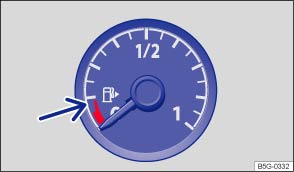
Fig. 13 In the instrument cluster: Fuel gauge.
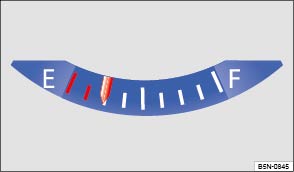
Fig. 14 Volkswagen Digital Cockpit: Fuel gauge.
Read and follow the introductory information and safety information first
When the ignition is switched on, several warning and indicator lights come on briefly for a function check. They go out after a few seconds.
 Fuel tank almost empty
The yellow indicator light comes on. The vehicle is running on reserve (red area indicated in or ) , .
- Refuel as soon as possible .
 Fuel filler cap not properly closed
The yellow indicator light comes on. The fuel filler cap is not properly closed.
- Stop the vehicle in a safe place and switch off the engine and the ignition.
- Open the fuel filler flap and take the fuel filler cap off the filler neck. Then put the fuel filler cap back on the filler neck and screw it on clockwise until you clearly hear a clicking sound.
- Close the fuel filler flap.
After switching on the ignition, the indicator light may stay on or the text message may still appear in the instrument cluster display, even if the fuel filler cap is now properly closed. This is normal and no reason to take your vehicle in for service.
If, however, the malfunction indicator light also comes on, drive to your nearest authorized Volkswagen dealer or authorized Volkswagen Service Facility and have the fuel system and the engine checked.
WARNING
Failure to heed warning lights and instrument cluster text messages can cause the vehicle to break down in traffic and result in a collision and serious personal injury.
- Never ignore warning lights or text WARNINGS.
- Always stop the vehicle as soon as it is safe to do so.
WARNING
Driving with a fuel tank that is almost empty can lead to stalling in traffic, a collision, and serious personal injuries.
- When the fuel tank is almost empty, fuel supply to the engine can be interrupted, especially when driving over bumps, across slopes, and up and down hills.
- Steering and braking assistance as well as ESC and related systems will not work if the engine sputters or stalls due to lack of fuel.
- Always refuel when the tank is 1/4 full to reduce the risk of running out of fuel and stalling in traffic.
NOTE
- Failure to heed warning lights or text WARNINGS can result in vehicle damage.
- Never drive until the fuel tank is completely empty. The irregular fuel supply can cause the engine to misfire. This allows unburned fuel to get into the exhaust system and damage the catalytic converter.
The small arrow next to the gas pump symbol in the fuel gauge shows the side of the vehicle with the fuel filler flap.
Warning light and engine coolant temperature gauge
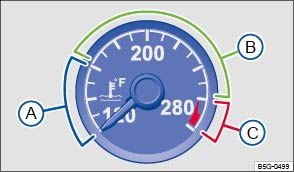
Fig. 15 Engine coolant temperature gauge in the instrument cluster.
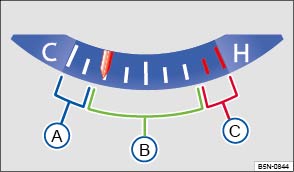
Fig. 16 Engine coolant temperature gauge in the Volkswagen Digital Cockpit.
Read and follow the introductory information and safety information first
Key to and :
 Cold range. Do not drive at high engine speeds or with heavy engine loads until the engine warms up.
 Normal temperature range.
 Warning zone. The display may also move into the warning area when the engine is working hard, especially at high ambient temperatures.
If the needle in the engine coolant temperature gauge is in the cold range Ⓐ, the engine has not reached operating temperature. High engine speeds and heavy engine loads should be avoided.
Under normal driving conditions, the needle should be in the middle of the gauge. The temperature may go higher when the engine is working hard, especially in hot weather.
When the ignition is switched on, several warning and indicator lights come on briefly for a function check. They go out after a few seconds.
The following paragraphs explain what to do if the engine coolant temperature warning light does not go out a few seconds after the engine is started or starts flashing while driving.
Flashes when the temperature needle is in area Ⓒ
The engine coolant temperature is too high.
Stop! Pull off the road and stop as soon as you can do so safely.
- Stop the engine and let it cool down until the temperature needle is in the normal range again.
- Check the engine coolant level and add engine coolant if needed .
- If the engine coolant level is correct or the problem continues after adding coolant and driving a short distance, do not drive any farther. Contact the nearest authorized Volkswagen dealer or authorized Volkswagen Service Facility.
- If the coolant level is correct, the overheating may be caused by a radiator fan fault. Check the fuses and replace as necessary .
Flashes when the temperature needle is in area Ⓑ
The engine coolant level is too low or there is a coolant system malfunction.
- Check the engine coolant level after the engine has cooled down and add engine coolant if low .
- If the engine coolant level is correct but the warning light does not go out OR if the needle goes into the red warning zone Ⓒ, do not drive any farther! Contact an authorized Volkswagen dealer or authorized Volkswagen Service Facility for assistance.
WARNING
Failure to heed warning lights and instrument cluster text messages can cause the vehicle to break down in traffic and result in a collision and serious personal injury.
- Never ignore warning lights or text WARNINGS.
- Always stop the vehicle as soon as it is safe to do so.
NOTE
Failure to heed warning lights or text WARNINGS can result in vehicle damage.
Service reminder display
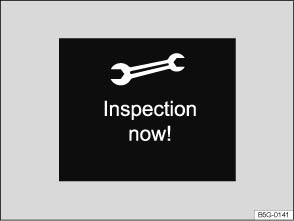
Fig. 17 In the instrument cluster display: Example of the service reminder when a service is due.
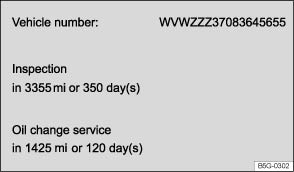
Fig. 18 In the Infotainment system display: Example of the service reminder.
Read and follow the introductory information and safety information first
The maintenance service reminder is shown in the instrument cluster display and in the Infotainment system . Versions and displays can vary depending on the instrument cluster or the Infotainment system version equipped with the vehicle.
For information on maintenance intervals, please see the ⇒BookletWarranty and Maintenance,.
For vehicles with time- or distance driven-dependent service, only fixed service intervals are displayed.
Service reminder
If service is due in the near future, a service reminder is displayed when the ignition is switched on.
The number of miles (km) and amount of time shown correspond to the maximum number of miles (km) or maximum time that can still be driven before the next service.
Service event
For a scheduled oil service or a scheduled inspection there is an audible chime when the ignition is switched on. The wrench symbol also appears for several seconds in the instrument cluster display along with one of the following messages :
| Oil service now! | |
| Inspection now! | |
| Oil service and inspection now! |
Viewing service message
You can view service information in the Vehicle settings menu in the Infotainment system .
The current service message can also be accessed in the instrument cluster display when the ignition is switched on and the vehicle is stopped:
- Press and hold the
- Release the button. The current service message appears in the display for a few seconds.
Resetting the service reminder display
If the service was not performed by an authorized Volkswagen dealer or an authorized Volkswagen Service Facility, the service reminder can be reset as follows:
- Switch off the ignition.
- Press and hold the
- Switch on the ignition.
- Release the
- One after the other, the following messages appear in the display:
| Reset oil change service? | |
| Reset inspection interval? |
- When you see the message for the interval you want to reset (either oil change or inspection), confirm the request by pressing the
Do not reset the service reminder between service intervals; otherwise, incorrect information will be displayed.
Download Manual