High beams
Switching high beams on and off
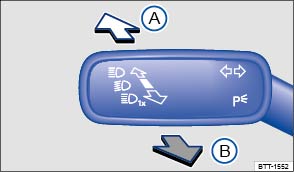
Fig. 81 To the left of the steering wheel: Turn signal and high beam lever.
- Switch on the ignition.
- Switch on the headlights.
- Move the turn signal and high beam lever from the center position to the following position :
 High beams switched on.
 Operate the headlight flasher or switch off the high beams. The headlight flasher turns on the high beams as long as the lever is pulled and manually held in the pulled position.
When the high beams or headlight flasher is switched on, the blue indicator light in the instrument cluster lights up.
High-beam control (Light Assist)
Your vehicle may be equipped with the Light Assist automatic high beam control system .
 WARNING
Improper use of high beams can distract and blind others, causing accidents and serious injuries.
High-beam control (Light Assist)
Your vehicle may be equipped with the Light Assist automatic high beam control system.
Light Assist high beam control
Light Assist switches the high beam headlights on at speeds above about 37 mph (60 km/h), depending on the surroundings and traffic conditions, and off again at speeds below about 18 mph (30 km/h), within the limits of the system . The system is controlled by a camera mounted in the rearview mirror base.
Light Assist generally detects well-lit areas such as towns and switches the high beam headlights off when driving through these areas.
Switching Light Assist on
- Switch the ignition on and turn the light switch to the
position .
- Push the turn signal lever forward (out of the home position) .
When Light Assist is switched on, the indicator light appears in the instrument cluster display. When the high beams are switched on, the blue indicator light
in the instrument cluster lights up.
Switching Light Assist off
- When the high beam headlights are on, pull the turn signal lever back to the home position.
- OR: Turn the light switch to a position other than
- OR: When the high beam headlights are not on, push the turn signal lever forward to switch the high beam headlights on manually. Light Assist switches off.
- OR: Switch the ignition off.
Adjusting Light Assist sensitivity
Light Assist has two sensitivity levels.
- Increase sensitivity: Push the turn signal forward from the home position and hold for about 15 seconds. The
indicator light in the instrument cluster display flashes 3 times to confirm the increased sensitivity level.
- Reset sensitivity to the factory setting: Push the turn signal lever forward from the home position a second time and hold for about 15 seconds. The
Light Assist system limits
The following conditions can prevent Light Assist from switching the high beam headlights off in time or from switching them off at all:
- Poorly lit roads with highly reflective signs.
- If there are others on the road with insufficient lighting, such as pedestrians or bicycles.
- In tight curves, when traffic is partially hidden, on steep hills, or in valleys.
- On roads with a center barrier where the driver can clearly see oncoming traffic above the barrier, for example, a truck driver.
- In fog, snow, or heavy rain.
- When there is dust or sand in the air.
- If the windshield is damaged in the area of the camera.
- If the camera's visual field is fogged over, dirty, or covered by a sticker, snow, or ice.
- If the camera is not working properly or the power is interrupted.
WARNING
Never let the increased convenience provided by Light Assist tempt you into taking extra risks. The system is not a substitute for careful and attentive driving.
- Always be prepared to control the headlights yourself and to adapt them to road, traffic, weather, and visibility conditions.
- Light Assist may not detect all traffic situations correctly and function may be restricted in certain situations.
- If the camera's area of view is dirty, covered, or damaged, Light Assist may not work properly. Changes to the vehicle lighting system, such as by adding additional headlights, can also change the way the systems work.
 NOTE
NOTE
To help the Light Assist system function properly, note the following:
- Always keep the windshield in front of the camera clean and free of snow and ice; do not cover the camera's field of view.
- Check the windshield for damage in the area of the camera.

The illuminated display on an electronic device, for example, an external navigation device, may prevent the Light Assist system from functioning properly.
Download Manual