Driver side overview
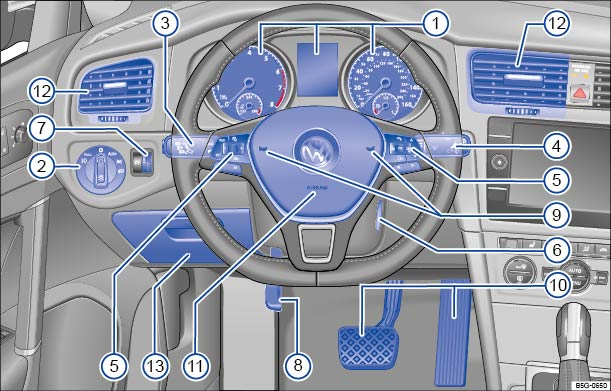
Fig. 5 Driver side overview.
Key to :

Instrument cluster or Volkswagen Digital Cockpit, equipment varies:
- Instruments
- Display
- Warning and indicator lights

Headlight switch :
- Off position
- Automatic headlights
(if equipped)
- Parking lights
(if equipped)
- Low beams
- Fog lights
(if equipped)

Lever for :
- Turning high beams on or off
–
- Headlight flasher
x
- Turn signals

Windshield wiper and washer lever :
- Windshield wiper
–
- Intermittent operation for the front windshield wipers
- Interval settings for the wipers or sensitivity for the rain sensor
(if equipped)
- Windshield wiper
- One-tap wiping
- Windshield wiper
- Automatic wipe/wash for windshield
- Rear window wiper
- Rear window automatic wipe/wash

Multi-function steering wheel controls :
- Volume setting for radio, navigation system notifications (if applicable), or telephone calls
–
- Voice control activation
- Audio, navigation
–
- Control buttons for the Volkswagen Information System
–
–
,
,
- Cruise control or Adaptive Cruise Control buttons
,
,
,
,
– -,
,
- Button for driver assistance systems
- Button for switching information profiles (Volkswagen Digital Cockpit) or for switching between the current and the previously selected menu
 Ignition switch (vehicles without Keyless Access) or location for the emergency start feature for the Keyless Access system
 Dimmer control for the instrument and switch illumination
 Lever for the adjustable steering wheel
 Horn
Horn
 Pedals
 Driver front airbag
 Air vents
 –
–
 Storage compartment
Download Manual