Keyless Access with push-button start
 Introduction to the subject
In this chapter you will find information on the following subjects:
Your vehicle may be equipped with Keyless Access with push-button start, a keyless starting and locking system that unlocks and locks the vehicle without active use of a remote control vehicle key. All you have to do is touch a sensor surface on one of the front outside door handles or press the Volkswagen emblem on the trunk lid when a valid remote control vehicle key is within range.

A Declaration of Compliance with the United States FCC and Industry Canada regulations is on .
Unlocking or locking the vehicle with Keyless Access
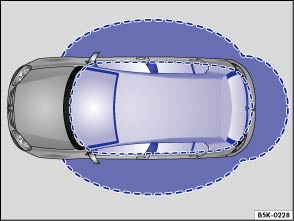
Fig. 53 Ranges of the Keyless Access system. Outside the vehicle: Unlocking range. Inside the vehicle: Starting range.
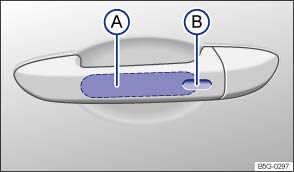
Fig. 54 Keyless Access system: Unlocking and locking sensors on the outside door handle.
Read and follow the introductory information and safety information first
Key to :
 Unlocking sensor
 Locking sensor
Unlocking the vehicle
- Grasp the door handle of the driver or front passenger door so that you touch the unlocking sensor surface .
- Open the door.
All turn signals flash twice to confirm that the vehicle has been unlocked.
If the vehicle is unlocked, it will lock again after a short time if you do not open one of the doors or the trunk lid.
Locking the vehicle
Always switch off the engine and ignition and take the vehicle key with you.
- Close the driver door.
- Touch the lock sensor surface in the door handle on the driver or front passenger door one time. The vehicle is locked. The door being locked must be closed.
All turn signals flash once to confirm that the vehicle has been locked.
Unlocking and locking the trunk lid
If the vehicle is locked and a valid remote control vehicle key is within range of the trunk lid, it unlocks automatically when opened.
If the vehicle is completely unlocked, the trunk lid will not lock automatically when it is closed.
Temporarily deactivating Keyless Access
To help prevent the vehicle from being unlocked and started by an unauthorized person, Keyless Access can be temporarily deactivated.
- Lock the vehicle with the
button on the remote control vehicle key.
- Within 5 seconds, touch the lock sensor surface on the door handle on the driver or front passenger door .
- Keyless Access is now temporarily deactivated.
- To check that Keyless Access is deactivated, wait at least 10 seconds and then pull the door handle. The door should not open.
The vehicle can only be unlocked with the remote control vehicle key. Keyless Access is automatically reactivated after the vehicle has been unlocked.
Convenience features
Your vehicle may be equipped with the convenience closing feature.
To use the convenience closing feature to close all power windows and the power sunroof, hold your finger on the lock sensor surface on the outside of the door handle for a few seconds until the windows and the power sunroof close.
Remove your finger from the lock sensor surface to stop the function.
Pinch protection is active during convenience closing of the windows and the power sunroof.
To help make sure that the vehicle stays locked after you press the locking sensor on the door handle, the unlocking function on that door handle switches off for about 2 seconds after locking the vehicle.
A driver information message may appear in the instrument cluster display if there is a Keyless Access system malfunction. See an authorized Volkswagen dealer or an authorized Volkswagen Service Facility for assistance.
A driver information message appears in the instrument cluster display if there is no remote control vehicle key inside the vehicle or if the system does not recognize the remote control vehicle key. The key may not be recognized, for example, if it is covered by something that interferes with the signal (such as a briefcase), or if the remote control vehicle key battery is weak. Electronic devices such as mobile phones can also interfere with the signal.
If the automatic or DSG transmission is not in Park (P) position, the electronic steering column will not lock and the vehicle will not lock via sensors in the front door handles or the remote control vehicle key.
Depending on the vehicle settings, the entire vehicle will unlock when you touch the unlocking sensor surface twice in a row, even if a single door was already unlocked.
Tips and troubleshooting
Read and follow the introductory information and safety information first
If Keyless Access does not work
Dirt or road salt on the door handles can affect the way the door handle sensors work.
- Clean the door handle sensors .
If all turn signals flash four times
To help prevent you from locking yourself out, the vehicle will not lock immediately in the following situation:
- When you press the lock button on the remote control vehicle key when a passenger door or the trunk lid is still open.
- AND you leave the remote control vehicle key you just used inside the vehicle when you close all doors and the trunk lid.
The vehicle does not fully lock. All turn signals flash four times. Take the remote control vehicle key out of the vehicle and lock the vehicle again.
Automatic deactivation of sensors
If the vehicle has not been unlocked or locked for a longer period of time, the sensors in the door handles are automatically switched off.
If a sensor on the door handle of a locked vehicle is touched too often, for instance by a bush or hedge that rubs against the vehicle, that sensor may be switched off for a short time.
To reactivate the sensors:
- Unlock the vehicle using the
button on the remote control vehicle key.
 NOTE
NOTE
The door handle sensor surfaces can be activated by a strong stream of water or steam if a valid vehicle key is within range of the vehicle.
- If at least one power window is opened and the sensor is continuously activated, the convenience closing feature will automatically close the windows.
Download Manual